

I have seen projects go sideways not because of bad work, but because of a bad start. Missing context, unclear goals, and unspoken expectations create the kind of mess that takes weeks to untangle.
A well-built client onboarding questionnaire changes all of that. It gives you everything you need before you write a single line of copy, design a single page, or send a single deliverable.
In this guide, I will walk you through what to ask, why it matters, and how to build a new client questionnaire that your clients actually complete.
What Is a Client Onboarding Questionnaire?
Think of it as the foundation of your entire working relationship. Every answer you collect shapes how you approach the project, how you communicate, and how you measure success. Done right, it replaces five emails, two calls, and a week of confusion.
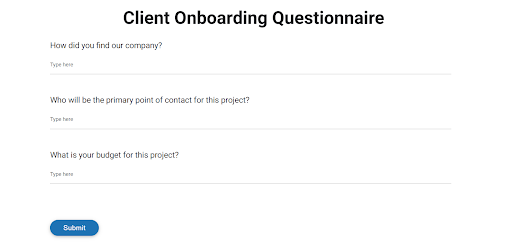
Here is why it matters in practice:
- Reduces back-and-forth: You collect what you need upfront instead of chasing information across email threads
- Prevents scope creep: Documented goals and requirements create a clear reference point when the project expands
- Sets expectations early: Timelines, deliverables, and communication preferences are agreed upon before work starts
- Surfaces risks before they become problems: Budget constraints, approval bottlenecks, and past agency frustrations come out before they derail your project
- Creates a professional first impression: A structured intake process signals that you run a tight, organized operation
What to Include in Your Client Onboarding Questionnaire
Before you start adding questions, you need a structure. Most agencies and freelancers either ask too many questions and scare clients off, or ask too few and start work without enough context. The goal is to stay under 15 questions while covering all the essential categories.
I organize every new client questionnaire around these six areas:
- Business Background: Understand who the client is, what they do, and what their competitive landscape looks like. This is context-setting, not interrogation.
- Goals and Objectives: Understand what success looks like for this specific engagement. Vague answers like “to grow” are a red flag. Push for measurable outcomes.
- Current Processes and Workflows: Know what tools, platforms, and processes they already have in place. You are not building from scratch in a vacuum.
- Project Specifics: Budget, timeline, deliverables, and point of contact. These details prevent the most common early-project conflicts.
- Brand and Communication Style: How do they speak to their audience? What does their brand stand for? Who approves work, and how fast?
- Past Experiences: What has worked before? What has not? What frustrated them about their last agency or vendor? This question alone can save a relationship.
20+ Client Onboarding Questions to Ask
Here are the questions I recommend across different categories. I have written them so you can use them directly or adapt them to your specific service. Here you go:
- Client Details and Business Background
- Marketing and Audience Questions
- Project-Specific Questions
- Communication and Workflow Preferences
- Business Fit and Relationship Questions
Client Details and Business Background
These questions help you understand the business before you open any project file.
- What does your business do, and who is your ideal customer?
This gets you context faster than reading their website. Look for specificity. If they struggle to answer, that tells you something important. - Who are your top three competitors, and how do you differentiate from them?
Useful for positioning, messaging, and understanding the market they operate in. - What is your company’s primary mission or goal for the next 12 months?
This helps you connect your work to something bigger than the current project. - Do you have brand guidelines? If yes, please share them.
Logos, fonts, colors, tone of voice. Get this before you design or write anything. - Are there any legal, regulatory, or compliance requirements we need to know about? Critical for industries like healthcare, finance, and legal services. Skipping this creates expensive rework.
- What is your website URL and what platforms or tools do you currently use?
This tells you the tech stack and helps you understand the complexity of integrations.
Marketing and Audience Questions
Use these when you are onboarding clients for content, SEO, paid ads, social media, or any growth-related work.
- Who is your target audience? Describe them in terms of demographics, behavior, and pain points.
Encourage specificity. “Adults 25 to 45” is not enough. “E-commerce founders who have hit $500K in revenue and are scaling their team” is the level of detail that makes audience research usable. - What marketing channels have you used in the past, and which performed best?
This prevents you from recommending something they have already tried and abandoned. - What is your primary marketing objective for this engagement?
Lead generation, brand awareness, customer retention, or sales conversion. Make them pick one. - How do your products or services solve your customers’ problems?
This is the core of any messaging work and is often where clients give you their best copy material. - What does a conversion look like for your business?
Get very specific. “A sale” is not enough. Is it a demo booking, a free trial signup, a phone call?
Pro tip: If you are running surveys or feedback forms as part of your marketing work, check out these website survey questions that help you collect ongoing customer insights beyond the initial onboarding.
Project-Specific Questions
These are the questions that prevent the most common project conflicts.
- What is your budget range for this project?
Not asking this is the single biggest mistake agencies and freelancers make. You cannot plan or scope without it. A web design agency that skips this question often discovers the client expected a $5K website when the scope requires $15K. This is a conversation that is far harder to have after work has started.
- What is your expected timeline or deadline?
Hard deadline or flexible? Is this tied to a product launch, seasonal event, or funding round? - What does success look like for this project? List three specific metrics.
If they cannot name metrics, help them. Traffic, leads, conversion rate, revenue, time-on-site. These become your KPIs. For example, a content marketing agency that locks in “50 qualified leads per month from organic” in the questionnaire has a clear benchmark to report against and a clear defense if the client’s expectations shift later. - Who is the primary point of contact, and who has final approval authority?
The RACI question. Find out who gives feedback, who approves, and whether those are the same person. Misaligned approval chains cause the most revision cycles. - Have you undertaken a similar project before? What was the outcome?
This gives you context on their experience level and any unspoken expectations they carry from past engagements.
Communication and Workflow Preferences
These questions set the operational tone of the relationship.
- What is your preferred method of communication (email, Slack, calls)?
Do not assume. Some clients want daily Slack updates. Others want a weekly email summary. Match their preference from day one. - How frequently would you like to receive progress updates?
Weekly, biweekly, or milestone-based. Get this in writing and refer back to it when communication expectations drift. - What is your typical response time for feedback and approvals?
If they say “within a week,” your timeline needs to account for that. If they expect you to turn things around in 24 hours, make sure that is realistic.
Business Fit and Relationship Questions
These are the relationship-building questions that also help you qualify the fit.
- How did you hear about us?
Simple attribution question that also helps you understand what messaging brought them in. - What made you choose us over other options?
Their answer tells you what they value most. It is also useful for your own marketing and positioning. - What concerns or hesitations do you have going into this engagement?
This is one of the most underused questions on this list. Most clients have a past experience that shapes how they work. Asking about it early helps prevent issues later.One social media agency I know learned that a new client had been burned by an agency that disappeared after onboarding, so they scheduled weekly check-ins during the first month and built trust from the start.
- What is the one thing that would make this engagement a clear success for you?
This is your north star question. If everything else falls apart, this is what you come back to.
Industry-Specific Add-On Questions
General questions get you started. These industry-specific additions get you to the next level.
Web Design and Development Clients
- What CMS or platform do you currently use or prefer (WordPress, Webflow, Shopify)?
- Do you need e-commerce functionality, member portals, or custom integrations?
- Can you share examples of websites you admire and explain what you like about them?
- Who will manage the website after launch, and what is their technical skill level?
SEO and Content Marketing Clients
- What keywords or topics are you currently targeting?
- Do you have existing content we can audit or repurpose?
- What is your current organic traffic baseline?
- Who on your team will be the subject matter expert for content creation?
Social Media and Paid Ads Clients
- Which platforms are most important to your business right now?
- Do you have existing ad accounts and creative assets we can access?
- What is your monthly ad spend budget?
- How do you currently track campaign performance?
Coaching and Consulting Clients
- What specific outcome are you hoping to achieve through this engagement?
- What have you already tried that has not worked?
- What does your current decision-making process look like?
- Who else in your organization will be involved in implementing recommendations?
FREE. All Features. FOREVER!
Try our Forever FREE account with all premium features!
How To Start Your Client Onboarding Right
Creating and managing a client onboarding questionnaire manually with PDFs, spreadsheets, or basic forms can quickly become time-consuming. Information gets scattered, follow-ups fall through the cracks, and every new client seems to require a different process.
ProProfs Survey Maker helps you create, distribute, and manage new client questionnaires from one place:
1. AI-powered questionnaire creation: Generate a complete first draft in seconds by describing your service, audience, and onboarding goals.
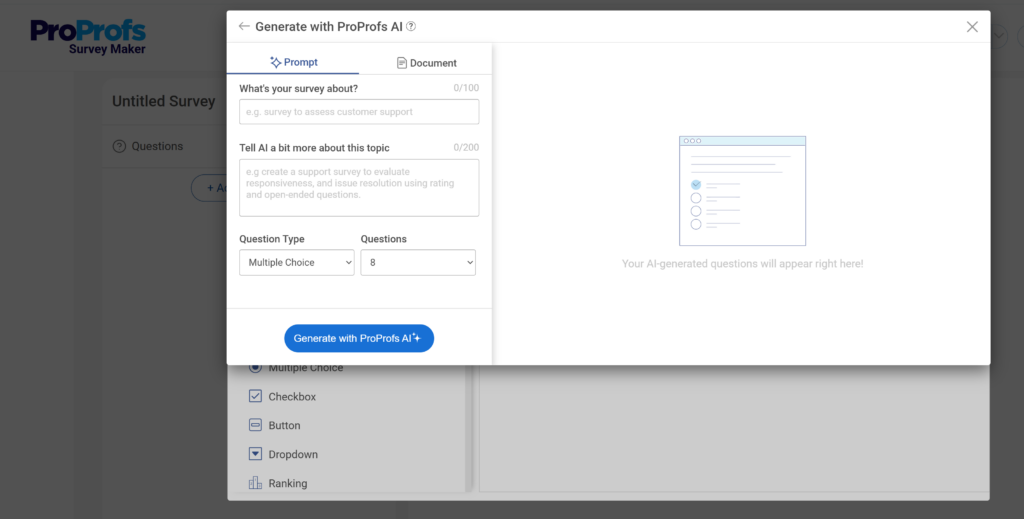
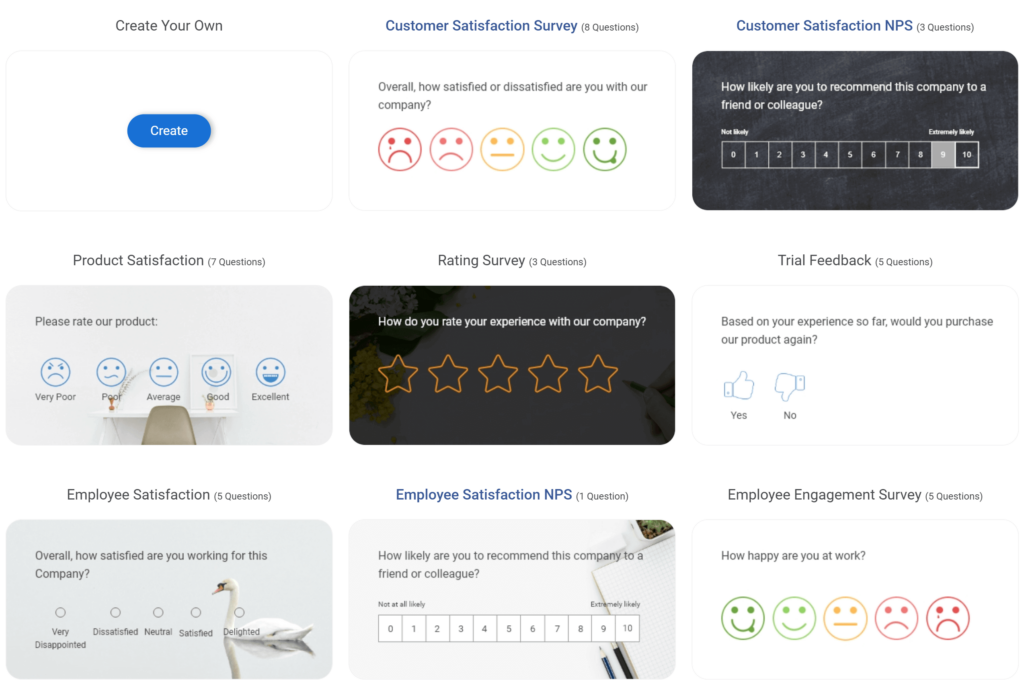
2. Ready-to-use templates: Start with proven new client onboarding questionnaire templates instead of building everything from scratch.
3. Conditional logic: Display only relevant questions based on previous responses, creating a shorter and more personalized experience using conditional logic.
4. White-label branding: Customize new client onboarding questionnaires with your logo, colors, and branding for a professional client experience.
5. CRM integrations: Automatically sync responses with HubSpot, Salesforce, and other business tools to keep client records updated.
6. Mobile-friendly design: Let clients complete prospective client questionnaires seamlessly from any device.
7. Analytics and reporting: Track completion rates, identify drop-off points, and continuously improve your onboarding process.
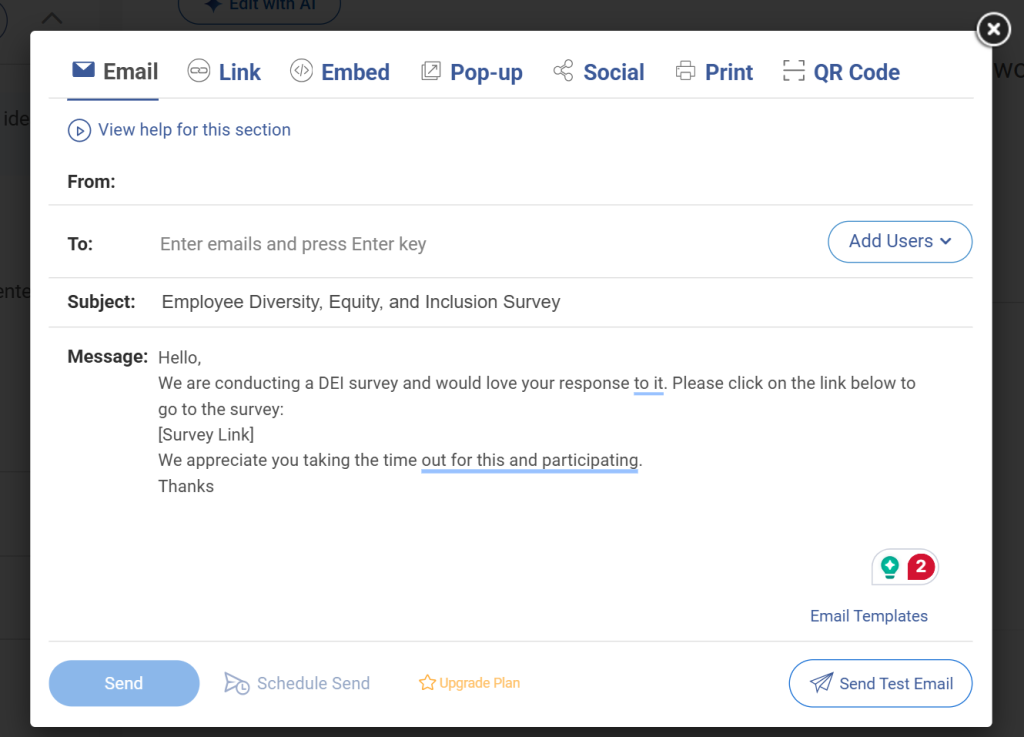
8. Flexible sharing options: Distribute prospective client questionnaires through email, direct links, website embeds, QR codes, or targeted audience groups with just a few clicks.
Strategies To Build a Questionnaire That Clients Actually Complete
Designing the questions is half the job. The other half is making sure clients complete the form. Here is what I have learned works.
1. Keep It Under 15 Questions
Every question you add reduces completion rate. Be ruthless. A simple filter: if you cannot complete the sentence “The answer to this question will change how I approach [specific task] in week one,” cut the question. If the answer would not change anything about how you approach the first week of work, it does not belong in the form.
2. Pre-Fill What You Already Know
If you collected information during the sales call, do not ask the client to repeat it. Pre-filling shows you were paying attention and reduces friction. The 80/20 rule works well here: pre-fill 80 percent from your sales notes and let the client fill the remaining 20 percent.
3. Use Multi-Step Formatting
One question at a time is less daunting than a wall of fields. Tools with progressive disclosure, where each question appears after the previous one is answered, consistently outperform long-form questionnaires.
4. Send It Within 48 Hours of Signing
The window right after the contract is signed is when clients are most engaged and motivated. If you wait more than 48 hours, momentum drops. Automate this step so it triggers immediately after signature.
5. Add a Short Video Introduction
A 30-second Loom video at the top of the form explaining why this information matters and how you will use it increases completion rates. It makes the form feel personal rather than administrative.
6. Have a Ghosting Plan
If a client does not complete the questionnaire within three business days, do not just send a reminder email. Offer a 15-minute call to go through the questions together. Some clients find forms easier to complete with a human guiding them through it.
7. Use Conditional Logic
Not every question applies to every client. If a client selects “no” to having existing content, skip the content audit questions. Tools with branching logic keep the form short and relevant for each respondent.
Where the Questionnaire Fits in Your Onboarding Process
A questionnaire does not exist in isolation. It is one step in a larger process. Here is where it fits in a standard agency or freelancer workflow:
Step 1: Sales call and proposal
Gather high-level context. Do not ask detailed questions here.
Step 2: Contract signing and deposit
The trigger point. Send the questionnaire within 48 hours.
Step 3: Client questionnaire
Collect detailed information on goals, requirements, preferences, and constraints.
Step 4: Internal review
Your team reviews the responses before the kickoff meeting. Flag gaps and prepare follow-up questions.
Step 5: Kickoff meeting
Use the questionnaire responses to build the agenda. Reference specific answers to show clients you read everything. This builds immediate trust.
Step 6: 30-day check-in
Revisit the questionnaire at the 30-day mark. Early assumptions often need correcting once work is underway. A brief follow-up survey at this point prevents small misalignments from becoming large ones.
How to Use Questionnaire Responses Internally
Collecting the responses is just the beginning. The real value comes from how you use them.
1. Build Client Profiles
Transfer key information into your CRM immediately. Connect your survey tool to HubSpot, Salesforce, or whatever CRM you use so that client profiles are created automatically. You should not be copying and pasting answers into spreadsheets.
2. Brief Your Team
Assign a team member to review responses before the kickoff meeting and flag anything that needs clarification or signals a risk. Common red flags include vague success metrics, tight timelines with no budget flexibility, and negative experiences with previous agencies.
3. Set KPIs from the Answers
The project-specific questions should feed directly into your project management tool. If they said their success metric is a 20 percent increase in organic traffic, that number goes into your project brief, your kickoff deck, and your monthly reporting template from day one, so every stakeholder is aligned on what you are working toward before the first task is assigned.
4. Measure Your Onboarding Process
Track completion rates, time-to-complete, and whether questionnaire quality correlates with project outcomes. If clients who answer vaguely in the questionnaire consistently become difficult accounts, that is a qualification signal, not just an onboarding process gap. Use that pattern to tighten your intake criteria before you sign the next contract.
FREE. All Features. FOREVER!
Try our Forever FREE account with all premium features!
How To Track Satisfaction Beyond Onboarding
The client onboarding questionnaire gets the relationship started. But staying connected to client satisfaction over time is just as important.
- Once onboarding is complete and work is underway, I recommend adding regular satisfaction touchpoints to your process. This could be a short pulse check after the first deliverable, a structured mid-project review, or a post-project retrospective. For a ready-made starting point, client satisfaction survey questions give you a proven framework to measure how clients feel at every stage of the engagement.
- For this kind of ongoing feedback, customer satisfaction survey questions give you a proven framework to measure how clients feel at every stage of the engagement, not just at the start.
- You can also collect feedback directly through email. If you prefer sending surveys to clients via email rather than a standalone link, this guide on email surveys walks through how to structure and send them effectively.
- And if you want to understand how clients experience your website, your proposal process, or your client portal, user experience surveys are worth adding to your client feedback toolkit.
Build Better Client Relationships From Day One
A client onboarding questionnaire is more than a list of questions. It is the foundation for a smoother project, clearer communication, and stronger results. By collecting the right information upfront, you reduce misunderstandings, prevent scope creep, align expectations, and create a better experience for both your team and your clients.
The most effective questionnaires focus on what matters most: business goals, project requirements, communication preferences, and success metrics. Keep the process simple, ask purposeful questions, and use responses to guide every stage of the engagement.
If you want to streamline the entire process, ProProfs Survey Maker is a practical choice. It helps you create onboarding questionnaires with AI, personalize them using conditional logic, automate data collection, connect responses to your CRM, and track completion rates without adding extra administrative work.
Ready to improve your client onboarding? Start with a free ProProfs Survey Maker account, customize an onboarding template, send it to your next client, and build a more organized onboarding process from the very first interaction.
Frequently Asked Questions
What is a client onboarding questionnaire?
A client onboarding questionnaire is a structured set of questions sent to new clients before project work begins. It collects information about their business, goals, expectations, timeline, and preferences so that teams can start work with full context and fewer surprises.
How many questions should a client onboarding questionnaire have?
Most onboarding questionnaires should stay under 15 questions to maintain a strong completion rate. Focus on questions where the answer directly affects how you approach the first week of work. If the answer would not change your plan, cut the question.
When should I send the client onboarding questionnaire?
Send it within 48 hours of the contract being signed. This is the window when clients are most engaged and motivated to complete forms. Waiting longer reduces momentum and delays your ability to start planning.
What questions should I include in a client onboarding questionnaire?
Include questions covering business background, project goals, success metrics, budget, timeline, communication preferences, point of contact, brand guidelines, and past experiences with similar projects. Add industry-specific questions based on your service type.
How do I increase questionnaire completion rates?
Use multi-step forms that show one question at a time, pre-fill information collected during the sales call, keep the form under 15 questions, add a short video introduction, and send the form promptly after contract signing. Offer a 15-minute call for clients who do not complete it within three days.
What is conditional logic and why does it matter in onboarding forms?
Conditional logic shows or hides questions based on previous answers. If a client says they have no existing content, you skip the content audit questions automatically. This keeps the form relevant and shorter for each individual client.
How do I use questionnaire responses after I collect them?
Transfer key responses into your CRM, use them to build the kickoff meeting agenda, set project KPIs based on stated goals, brief your team on risks flagged in the answers, and track completion quality over time to improve your process.
What is the biggest mistake agencies make with client onboarding questionnaires?
Asking questions the sales team already answered. Clients find it frustrating to repeat themselves. Review your sales call notes before sending the questionnaire and pre-fill or skip anything you already know.
Should I use a PDF or an online form for client onboarding?
Always use an online form. PDFs kill completion rates because they require downloads, printing, or manual submission. Online forms can be completed on any device, support conditional logic, integrate with CRMs, and provide analytics on completion rates.
How is a client onboarding questionnaire different from a client intake form?
A client intake form typically collects basic contact and billing information. A client onboarding questionnaire goes deeper, capturing goals, expectations, brand preferences, project requirements, and success metrics. Both may be used together, but the questionnaire does the strategic work.
FREE. All Features. FOREVER!
Try our Forever FREE account with all premium features!

 We'd love your feedback!
What did you like & how can we make it even better?

 Thanks for your feedback!
 Ask Your Question
Have a question? Get expert help to make your decision easier.