

To collect customer feedback is the systematic process of gathering, classifying, and acting on customer opinions and experiences at key moments in their journey. It turns assumptions into evidence and reactive firefighting into a growth strategy you can actually defend in a meeting.
Most businesses collect some feedback. Very few do anything useful with it.
I have spent years helping companies figure out the difference between those two groups, and the gap is almost never about tools. It is about having a system.
In this guide, I am going to walk you through that system, including how to use surveys smartly, what other channels are worth your attention, and how to turn a pile of responses into a decision your team can act on Monday morning.
Key Takeaways
- A feedback program is a system, not a survey. These steps turn responses into owners, deadlines, and measurable outcomes.
- Timing matters most: send feedback requests within 5 minutes to boost response rates (~8% → 35%).
- Make feedback operational: shift from quarterly reports to weekly inputs that drive roadmap and retention.
- Close the loop: “You said, we did” converts respondents into advocates.
- Prioritize by revenue, not volume: top accounts outweigh casual users.
- Focus on neutrals: they’re most likely to churn, ask what gets them to 10.
- Centralize all channels early to spot urgent patterns.
- Use anonymous surveys for honest input on sensitive topics.
Let’s take the deep dive now:
What Is Collecting Customer Feedback and Why Does It Matter?
Here is the version nobody tells you upfront: most businesses that “collect feedback” are essentially running a very slow, very expensive research project that produces reports nobody reads and changes nobody makes.
That is not a feedback problem. That is a system problem.
Collecting customer feedback, done properly, means using structured methods like surveys, interviews, and in-product prompts to capture what customers genuinely think and experience at key moments. The output feeds product decisions, informs support quality, and protects retention. Without it, your team is optimizing based on what the loudest internal voice says, not what the market is actually telling you.
In 2026, the stakes are higher because the bar has moved. Customers now expect you to remember what they told you last quarter, act on it, and communicate what changed. A one-off survey form is not a feedback program. It is a gesture.
Here is what the data says about the cost of getting this wrong:
- A Bain and Company study found that just 15% of unhappy customers cost one enterprise $68 million in lost revenue. That is not a product problem. That is a feedback-and-response problem.
- In-app feedback prompts generate 20–30% response rates, compared to 5–15% for standard email surveys.
- The fake reviews are projected to cost consumers an estimated $787 billion in 2025 due to misleading purchases, which means authentic customer input is more trusted and more valuable than it has ever been.
The businesses that treat feedback as infrastructure, not a quarterly obligation, consistently outperform those that do not. So let me show you how to build the infrastructure.
How Does Collecting Customer Feedback Work Step by Step?
I’ll start with a confession.
Five years ago, I worked with a small SaaS team that ran one survey a year. It went out in January. By February, we had 200 responses, yet there was still no plan. The spreadsheet sat on someone’s desktop for six months before disappearing in a laptop upgrade.
Does this sound familiar?
The issue wasn’t the survey. It was the lack of a system.
Here’s the eight-stage process that actually works, and exactly how to execute it using ProProfs Survey Maker. I am using this tool for the ease of use and uncomplicated installation. It helped that team (and many others) turn feedback into roadmap decisions.
Step 1: Define What You Actually Want to Know
Before you send a single survey or book an interview, open a blank document and write down one clear question you’re trying to answer.
Not “get more feedback.” Something specific, like:
- Why aren’t free trial users converting after day 14?
- What’s causing new users to drop off during onboarding?
Force yourself to narrow it to one primary decision you need to make. If you can’t tie the survey to a real decision, stop and clarify before moving forward.
Vague goals produce vague data. Vague data produces zero decisions.
Step 2: Choose the Right Channel for the Moment
Now decide how you’ll collect the feedback.
Do not default to one method for everything.
- Use surveys for structured, scalable insights.
- Use interviews when you need depth and context.
Use in-product microsurveys/sidebar forms for real-time reactions.
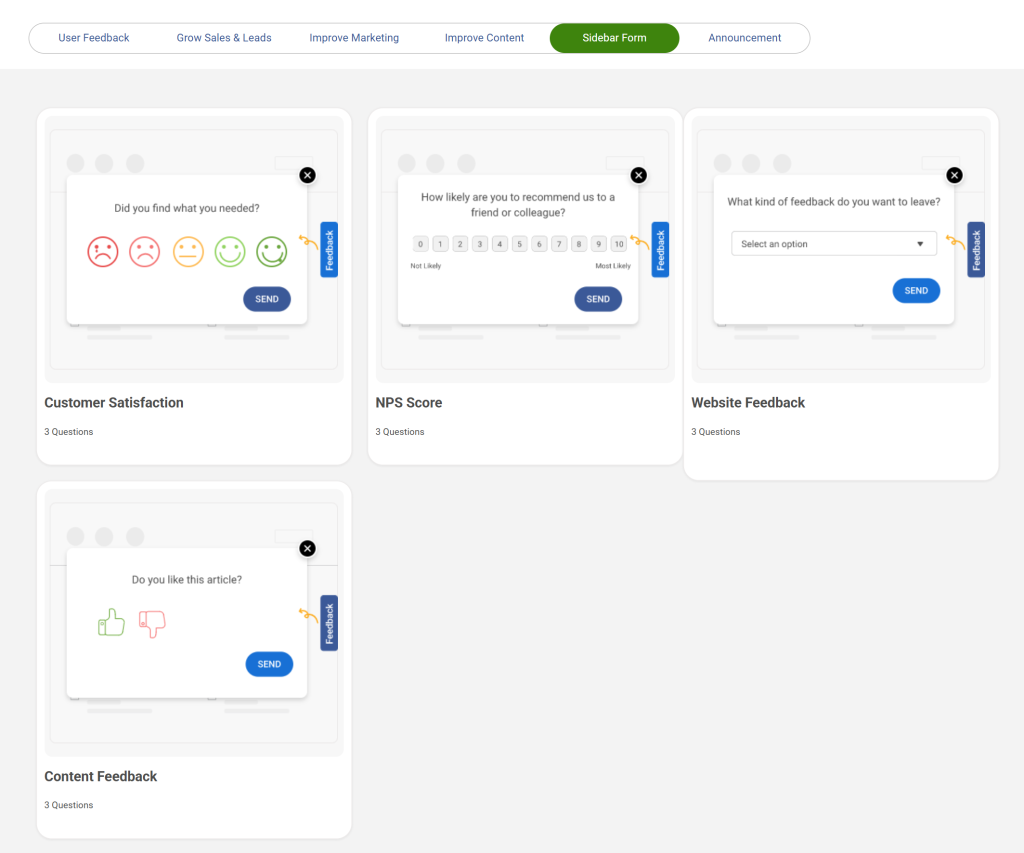
Match the method to the moment:
- After a support interaction → send a short survey within 24 hours.
- If churn spikes at month three → schedule interviews with that segment.
Choosing the wrong channel creates incomplete insight. Choosing the right one makes the next steps meaningful.
Step 3: Build the Survey Using AI (Stop Writing From Scratch)
If a survey is part of your plan, and it usually should be, this is where ProProfs Survey Maker comes in.
Let’s take the example of an NPS survey. Here’s the exact flow:
a) Start From the Dashboard
Log in and click “Create a Survey.” You can:
- Build from scratch, or
- Choose from pre-built templates
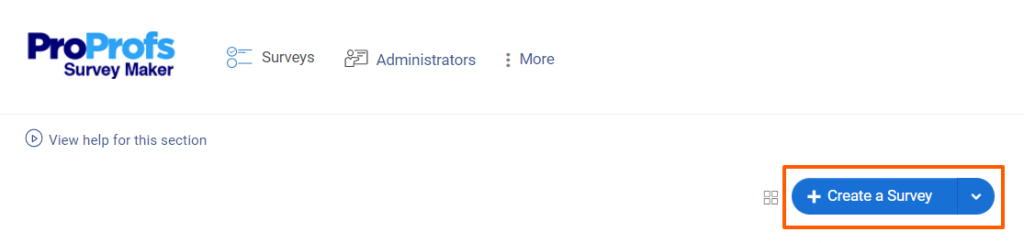
If your Step 1 goal matches a template, use it. Don’t reinvent structure.
b) Add Questions With AIOpen the question editor and click “Add Question.” Select “Generate with ProProfs AI.”
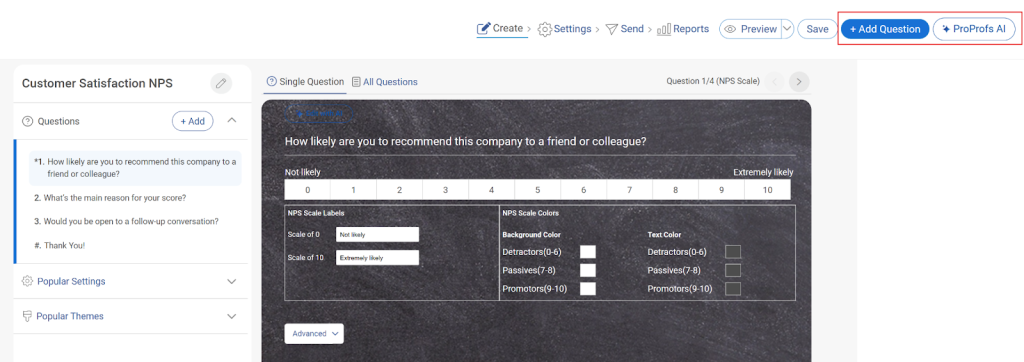
You’ll enter:
- What the survey is about (short description)
- A brief explanation of your goal
- The question type (multiple choice, rating scale, open-ended, etc.)
- The number of questions to generate
Click Generate.
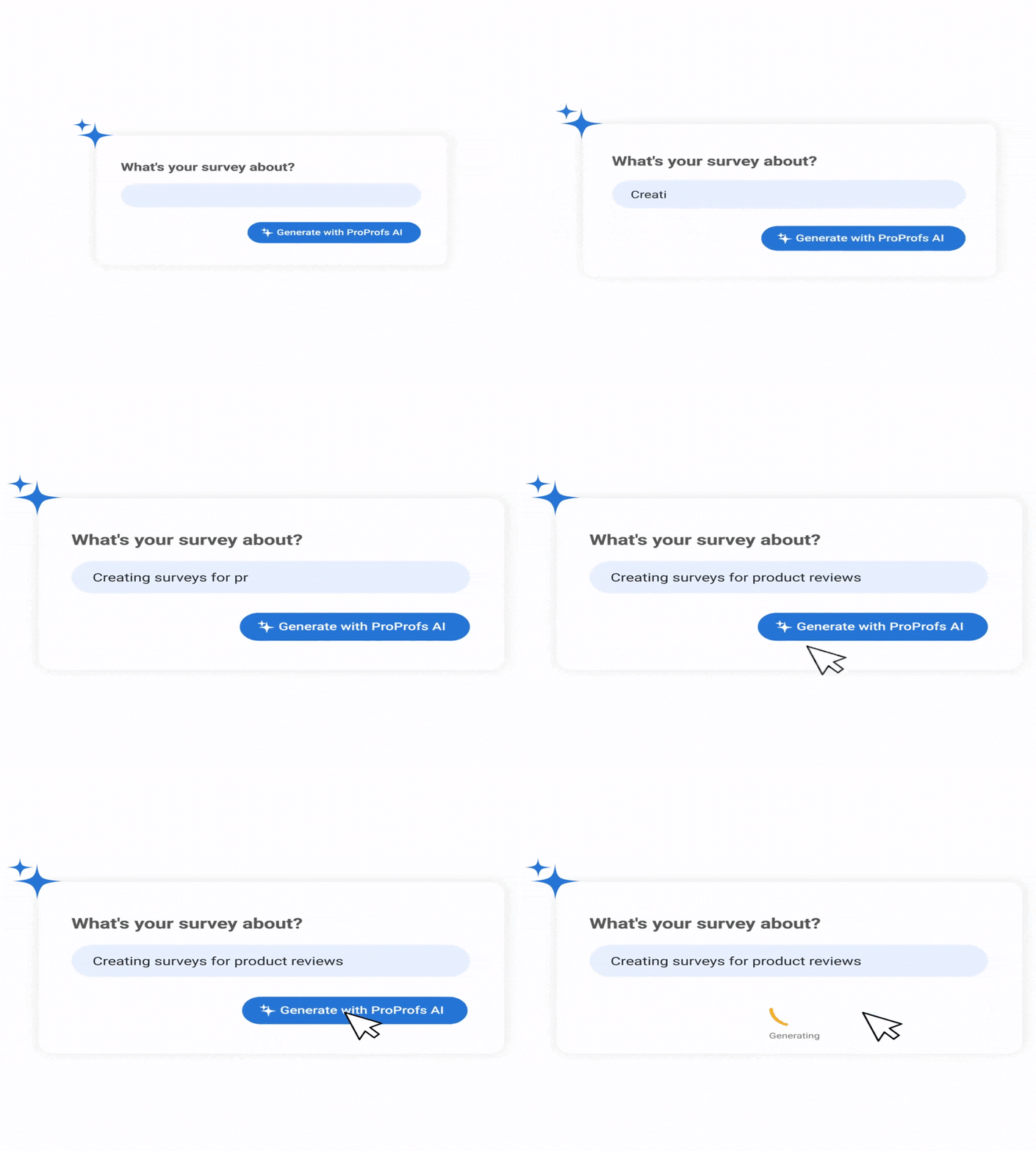
The AI produces clearly worded, neutral questions aligned with your goal.
c) Review and Refine
- Add all questions or select individual ones.
- Regenerate if needed.
- Delete anything that doesn’t fit.
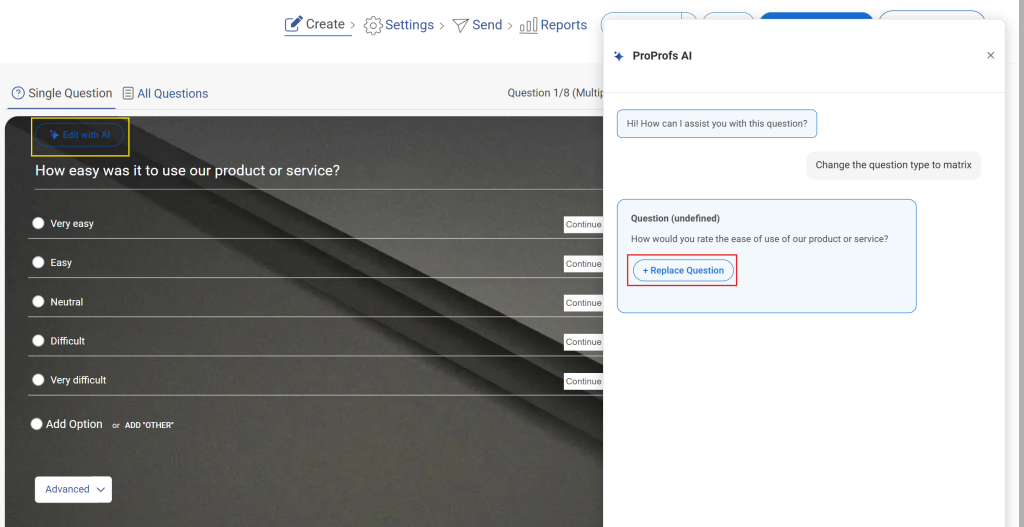
You can also click “Edit with AI” on any question you’ve written yourself. Tell it to make the wording clearer, simpler, more professional, or more engaging. Review the side-by-side comparison, then click “Add to Survey” if you approve.
d) Add Skip Logic and Branching
After finalizing your questions, set up conditional logic:
- If someone reports a negative experience → route them to follow-up questions.
- If someone reports high satisfaction → skip unnecessary complaint questions.
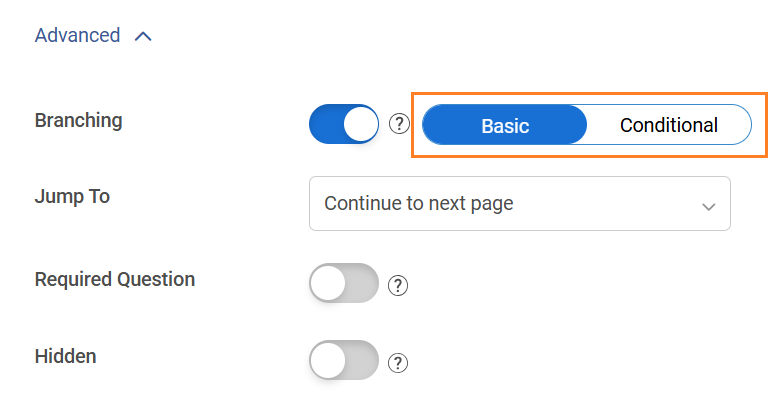
This keeps surveys relevant and reduces fatigue.
Step 4: Set the Trigger and the Timing
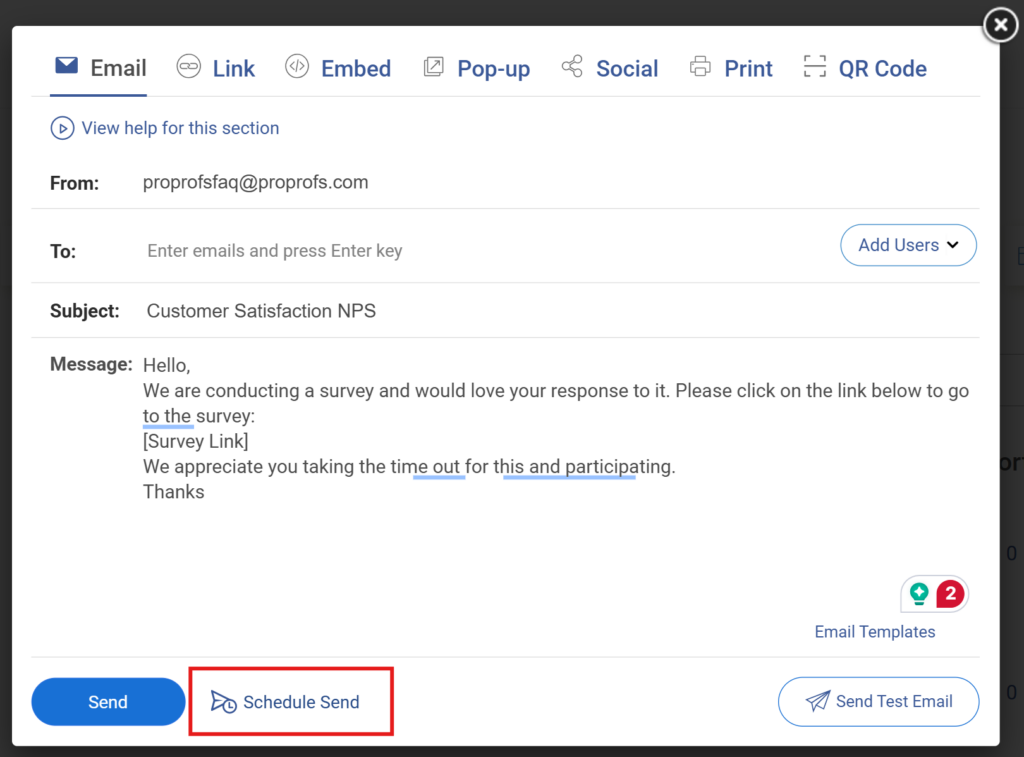
Timing directly impacts response quality. On your dashboard, there’s a “Send” button. Click on that and press “Schedule Send.”
For transactional feedback:
- Send within 24 hours of a purchase, onboarding milestone, or support resolution.
For relationship surveys:
- Send once per quarter.
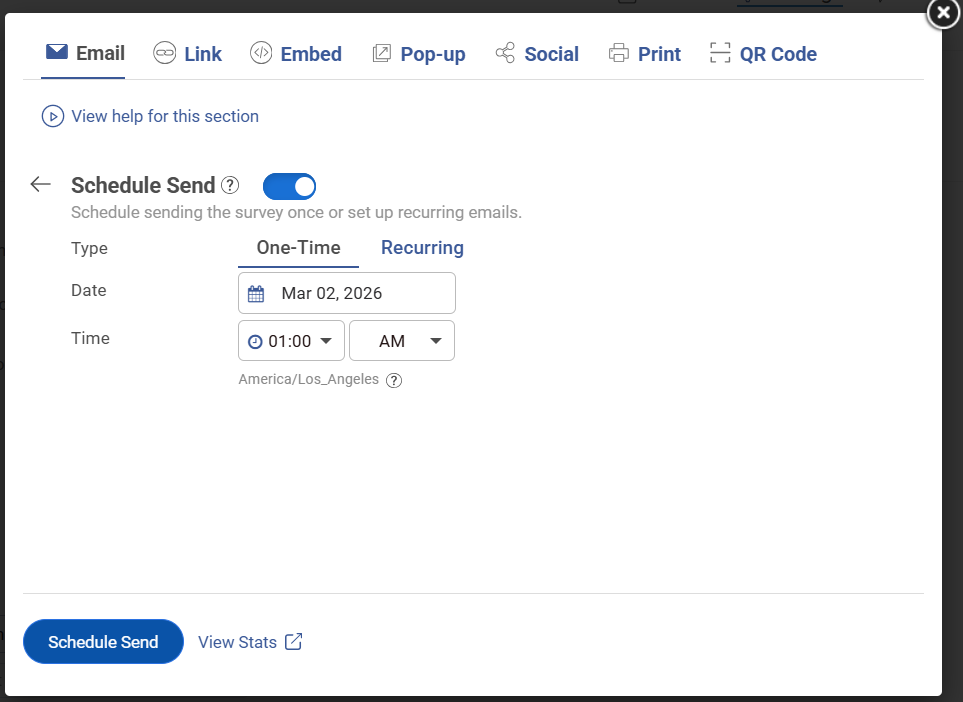
Don’t delay. Late surveys produce diluted, memory-based responses. Immediate surveys capture real sentiment.
Step 5: Distribute Through the Right Channels and Centralize Responses
With ProProfs Survey Maker, you can distribute surveys via:
- Email (high-deliverability system)
- Direct link
- QR code
- Website embed
- Social media
- Timed popup or exit-intent trigger
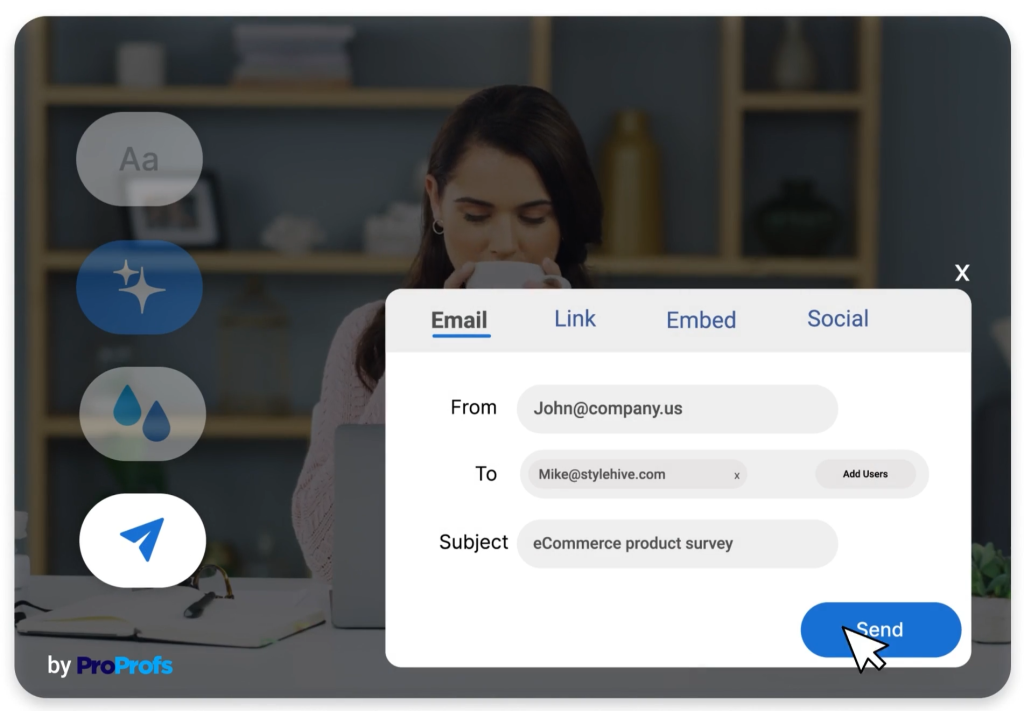
Choose the channel where your audience already engages.
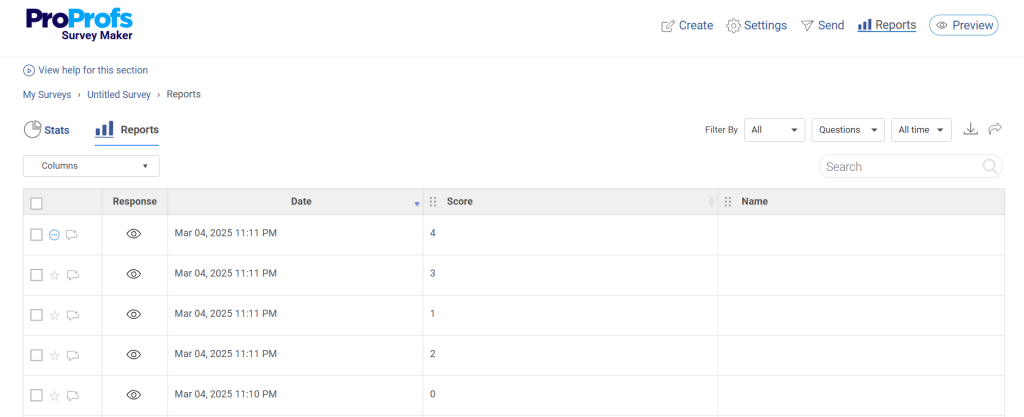
Most importantly: All responses feed into one centralized dashboard. No manual spreadsheets, scattered screenshots, and no fragmented data.
Everything lives in one reporting system that your entire team can access.
Step 6: Classify and Tag Every Response
Raw responses are noise. Tagged responses are a signal.
Immediately sort feedback by:
- Category (product, pricing, support, UX, onboarding)
- Sentiment (positive, neutral, negative)
- Segment (plan type, revenue tier, industry, tenure)
Use the reporting dashboard filters to view patterns by segment. This is where insights start turning into priorities.
Step 7: Prioritize by Business Impact, Not Volume
Do not treat every complaint equally.
Score each issue using two criteria:
- Frequency: How many customers mentioned it?
- Business Impact: What revenue is at risk? What’s the upside if fixed?
In B2B SaaS, weigh feedback by ARR and ICP fit.
High frequency + high impact = act first.
Low impact but loud = queue it.
This prevents your roadmap from being driven by the vocal minority.
Step 8: Implement, Measure, and Close the Loop
After prioritizing, take action.
Then measure:
- Did churn decrease?
- Did satisfaction scores improve?
- Did adoption increase in that segment?
Finally, close the loop.
Send a specific “You said, we did” email to customers who raised the issue. Reference their feedback. Let them know it led to change.
This step is skipped by most teams. It’s also the one that transforms a one-time survey respondent into a long-term, loyal advocate.
Check Out the 8-Step Customer Feedback Program Playbook
What Are the Best Methods to Collect Customer Feedback?
No single method gives you the full picture. The best feedback programs layer at least three of these together.
How Do Online Surveys Help You Collect Structured Customer Feedback at Scale?
Surveys are the backbone of any scalable feedback program. They give you consistent, quantifiable data you can compare over time and segment by customer type.
The rule is brevity. A two-question survey sent right after a key interaction beats a ten-question survey sent a week later, every single time.
Benchmark: Well-optimized surveys targeting engaged customers see 20 to 40% response rates. Generic ones average 5–10%.
Feature: Embedded rating inside the email body
Explanation: Customers click a number without visiting a separate page, which removes the biggest single point of drop-off in survey funnels.
Feature: Score-based follow-up routing
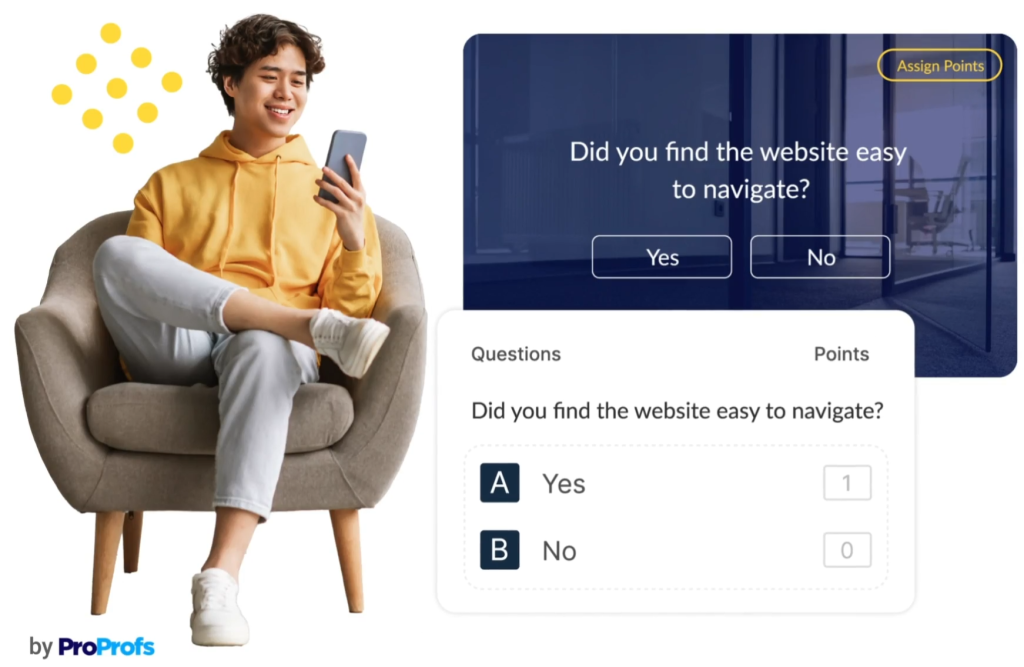
Explanation: Different response scores trigger different follow-up messages automatically, without anyone manually sorting through who said what.
How Does Live Chat Capture Customer Feedback in the Moment It Matters?
A post-chat prompt sent immediately after a session closes catches sentiment while the experience is completely fresh. This method is especially powerful for support teams because the customer is already in evaluation mode when a ticket closes.
Benchmark: Post-chat satisfaction prompts sent within 60 seconds of close see response rates of 25–45%, higher than almost any other standalone channel.
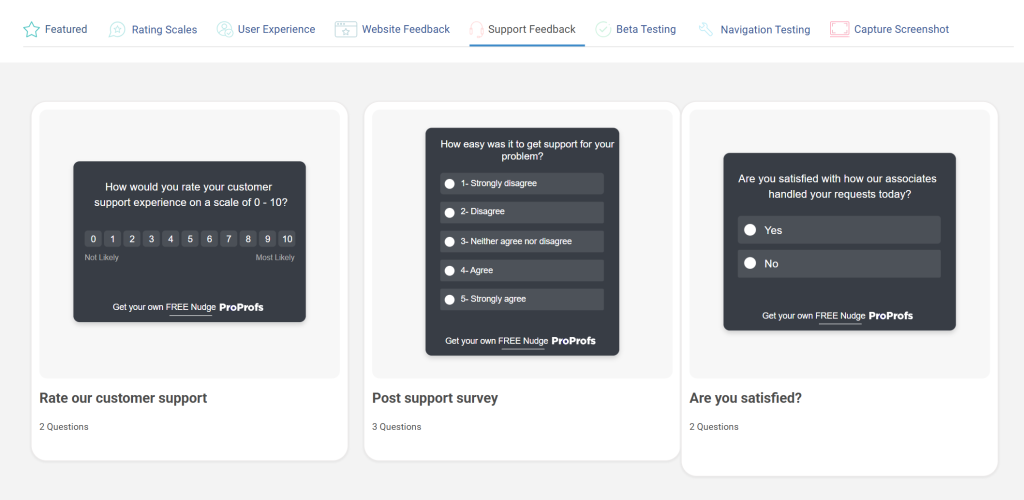
Here are a few post-chat prompts you can use:
How Can Social Listening Surface Customer Feedback You Never Thought to Ask For?
Reddit, LinkedIn, Twitter/X, and industry forums are full of unsolicited, unfiltered customer opinions about your product and category. This feedback is honest precisely because nobody asked for it and nobody is reading it over the customer’s shoulder.
Set up keyword alerts for your brand name, product name, and core use cases. Review weekly. Tag recurring themes.
Feed them into your central system alongside survey data. The patterns that show up across multiple channels consistently are usually the ones most worth fixing.
How Do Customer Interviews Uncover the Feedback Behind the Feedback?
A 15-minute call with 10 real customers will almost always surface more actionable insight than 100 survey responses. Why? Because surveys tell you what people think. Conversations tell you why.
The trick is asking about past behavior, not future intention.
A “Tell me about the last time you ran into a problem with the import flow” produces real data.
A “Would you use a feature that did X?” produces wishful thinking. Focus on what actually happened.
Run interviews across three cohorts: your best current customers, recently churned ones, and brand new users in their first month. Each group reveals a completely different set of truths.
How Do In-Product Feedback Widgets Capture Real-Time Customer Sentiment?
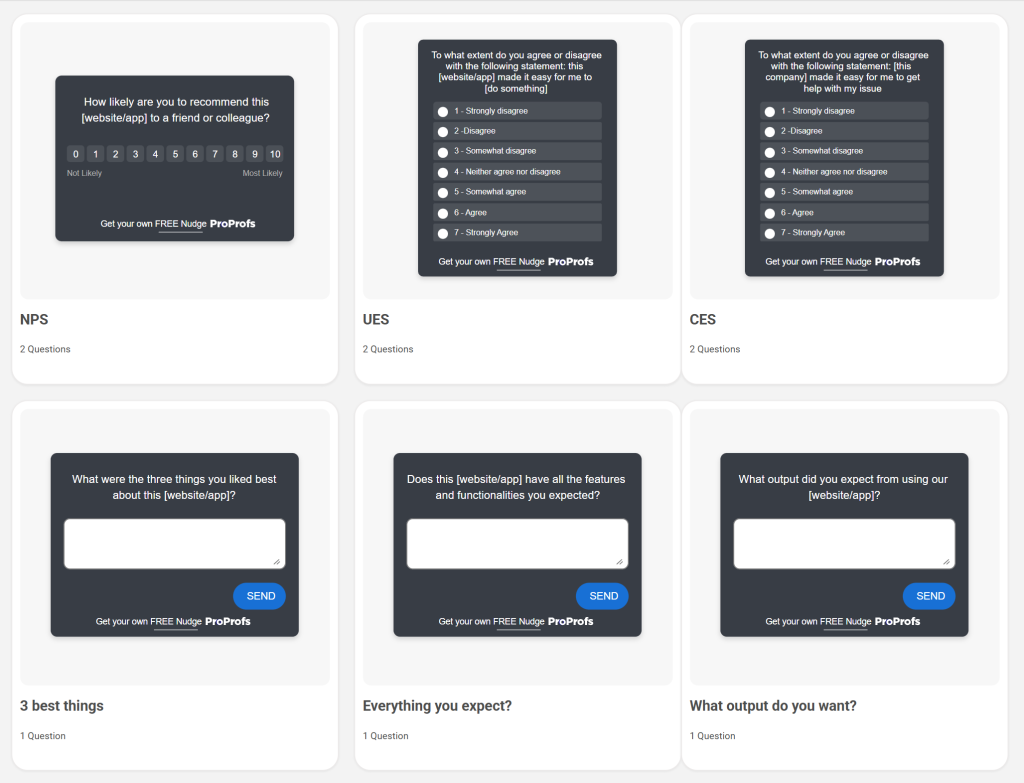
In-product microsurveys, or sidebar forms, are the always-on option: a thumbs-up or down button, a floating “share feedback” tab, a contextual prompt that appears when a user seems stuck. They catch frustration in the exact moment it happens, before memory softens and the customer moves on.
Best Practice: Pair a one-click sentiment option with an optional open-text field. “Was this helpful? Yes or No. Tell us why, optional.” Optional keeps the response rate high. The text field catches the people who are motivated enough to elaborate, and they are usually the ones with the most useful things to say.
Feature: Contextual behavior-triggered prompts
Explanation: Widgets tied to user behavior (three failed searches, extended time on a help page) catch customers who need support before they give up and disappear.
Here are a few in-app templates you can use:
How Do You Build an Omnichannel Feedback Strategy That Actually Works?
An omnichannel feedback strategy means pulling signals from multiple sources simultaneously and routing them into a single system. Here is what a working stack looks like:
The businesses that dominate retention are rarely just doing one of these better than everyone else. They connect the signals.
A frustration that shows up in a survey, then again in a support ticket, then again on Reddit, is not a minor issue. It is your most urgent roadmap item.
The challenge is not adding all six channels. It is centralizing the output so your team is not managing six different spreadsheets and calling it a feedback program.
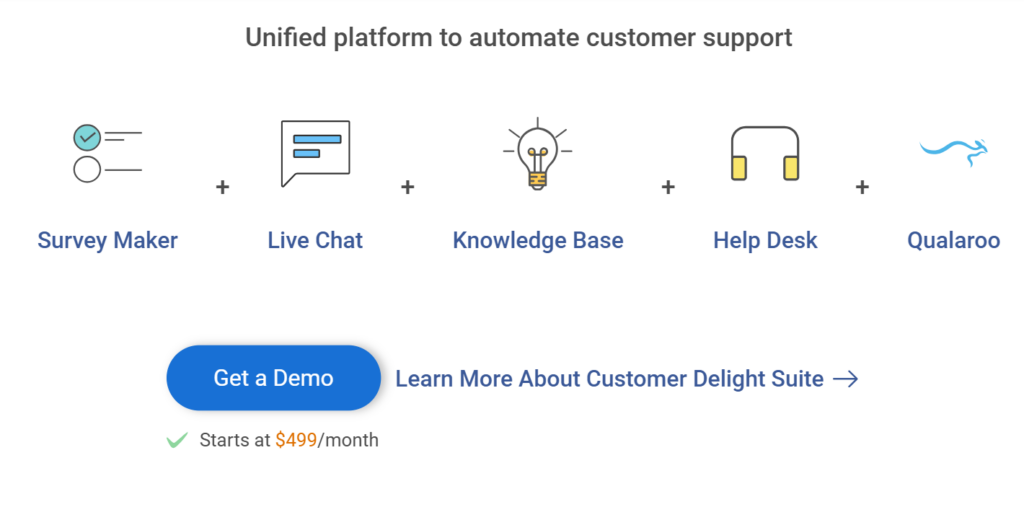
If you are using ProProfs, the Customer Delight Suite connects Survey Maker, Live Chat, Help Desk, and Knowledge Base into one system, which handles the centralization problem from day one. Centralize everything into one system from day one.
FREE. All Features. FOREVER!
Try our Forever FREE account with all premium features!
How Do You Analyze & Prioritize Customer Feedback Without Getting Overwhelmed?
You have months of survey responses, a support ticket backlog, and three different people with three different opinions about what to fix first. Classic “mountain of data” problem. Here is the framework you can use:
- Collect everything into one system. Automated, not manual.
- Classify every response by category (product, pricing, support, onboarding, UX), by sentiment, and by customer segment. Unclassified feedback sits in a pile. Classified feedback becomes a list.
- Prioritize using two variables: how many customers mentioned it, and what the revenue impact is if you fix or ignore it. Weight responses from high-value customers more heavily. A complaint from your top ten accounts deserves more attention than the same complaint from a one-week free trial user.
- Implement with a named owner and a real deadline. Not “someone should look at this.” A name, a date, and a ticket in your system.
- Measure whether the relevant metric moved after the change. Did satisfaction scores improve? Did churn drop? If the metric did not move, reopen the loop.
One properly closed loop. More impact than a year of quarterly surveys.
Who Benefits Most from Collecting Customer Feedback?
Different teams use the same system for very different purposes. Here is how it tends to look in practice.
- For SaaS startups, the most valuable move is post-onboarding feedback in the first 30 days. That window is when feedback is most emotionally honest and most specific.
Fifteen interviews with churned customers in months two and three will tell you more about product-market fit than six months of usage data.
- For enterprise teams, the problem is almost never a shortage of feedback. It is fragmentation.
Every department has its own survey tool, its own tagging system, and its own definition of what counts as urgent. One centralized system with agreed-upon categories is the highest-leverage investment available.
- For HR and people teams, feedback programs often run on eNPS and engagement surveys. The non-negotiable here is anonymity.
Employees will not give honest scores if they think responses can be traced. A simple toggle in tools like ProProfs Survey Maker makes surveys fully anonymous by blocking all identifiers, including IP addresses.
- For customer onboarding teams, transactional feedback at each milestone is the gold standard. First login, first value moment, first successful workflow completion.
Miss this window, and you are asking people to recall how they felt a month ago.
- For product teams, the goal is a defensible prioritization system. Feedback weighted by frequency and by ARR turns “everyone wants this” into “the customers who generate 60% of our revenue consistently need this.”
That is a product decision, not a political one.
What Are the Biggest Mistakes Businesses Make When Collecting Customer Feedback?
I have seen all of these up close. None of them is fatal alone. Together, they reliably produce a feedback program that generates reports nobody reads:
What Is the Future of Collecting Customer Feedback?
The future of collecting customer feedback is shifting fast. Here are four key trends to prepare for, backed by recent stats:
1. AI-Assisted Triage Slashes Manual Work
AI agents now handle up to 80% of routine interactions autonomously.
By 2029, agentic AI is projected to resolve 80% of common issues without humans, cutting ops costs by 30%.
Humans shift to high-stakes, relationship-focused cases, so no more inbox drudgery.
2. Behavioral Data Trumps Stated Data for Decisions
Observed actions (drop-offs, screen time, usage) beat survey claims for reliability.
71% of customers expect behavior-based personalization; 76% get frustrated without it.
Top programs blend both sources to close intent gaps and drive better product choices.
3. Proactive, Trigger-Based Outreach Overtakes Quarterly Surveys
Real-time signals (e.g., repeated help-center visits) catch issues early vs. calendar pings.
65% of customers expect companies to adapt to their preferences and provide proactive service, and will switch brands if missing.
Automated triggers deliver faster surfacing and prevention than scheduled outreach.
4. Prioritized, Enriched Feedback Beats Volume
Focus on smart routing over raw response count. Auto-enrich with ARR, segment, tenure, and usage.
95% of CX leaders invest in data enrichment/integration tech. This speeds high-value insights to owners, boosting actionability and impact.
These shifts point to efficient, predictive, AI-powered feedback systems that prioritize quality and speed over quantity.
FREE. All Features. FOREVER!
Try our Forever FREE account with all premium features!
Your Customers Are Already Telling You How to Collect Customer Feedback Better. Are You Listening?
The irony of collecting customer feedback is that the signals are everywhere and nowhere at the same time.
They are in the support ticket your team closed on Friday, the Reddit thread someone posted about your onboarding, and the silence of a customer who gave you a 7 out of 10, never heard back, and quietly started evaluating alternatives.
The businesses that grow are not the ones with the most feedback. They are the ones who built a system to hear it, route it, and act on it fast enough to matter.
You do not need a research team or a six-figure analytics stack to do this. You need a clear goal, the right method for the moment, and the discipline to close the loop every single time.
Start with one channel. Run one tight survey. Read the responses as a team this week, not next quarter.
If you want a tool that takes the operational weight off that process, ProProfs Survey Maker is where most teams I know start, and most of them never feel the need to leave.
Frequently Asked Questions
How often should you collect customer feedback without annoying customers?
Transactional feedback at every key touchpoint is fine. For relationship-level surveys, once per quarter. Set a 30-day blackout per customer across all survey types so the same person is not getting three different surveys in one month.
What is the right number of questions for a customer feedback survey?
One to three for transactional surveys. Five at most for relationship surveys. After question three, most respondents start skimming or abandoning. Add one optional open-text field at the end if you want depth from the people willing to give it.
How do you collect feedback from customers who have already churned?
Send within 48 hours of cancellation. Frame it as helping future customers, not as a winback attempt. Churned customers who feel respected give the most honest answers you will ever collect, precisely because they have nothing to lose.
How do you turn customer feedback into a product decision?
Classify it. Prioritize it by frequency and revenue impact. Assign a named owner with a real deadline. Ship the fix. Measure whether the metric moved. Feedback without an owner and a deadline is a note. A note does not become a decision on its own.
What is the difference between collecting feedback anonymously versus with identification?
Anonymous feedback gets more honest answers for sensitive topics like pricing frustration or internal culture. Identified feedback lets you follow up, weigh by customer value, and track sentiment changes over time. Use anonymous for employee surveys and anything emotionally loaded. Use it to identify everywhere you need to route a personalized response.
How do small teams collect customer feedback without a dedicated researcher?
Pick one channel. Build a short embedded survey for your most common customer interaction. Route everything into one shared system. Review as a team every week. One channel done well beats five channels done badly. Add a second channel only after the first one is consistently producing a signal you can act on.
How do you know if your customer feedback is actually representative?
Compare who responded against your actual customer base by segment, revenue tier, and tenure. If your feedback skews heavily toward one group (usually the most vocal or the most frustrated), weight the data accordingly or actively recruit from the segments you are not hearing from. Representativeness requires intention. It does not happen by accident.
FREE. All Features. FOREVER!
Try our Forever FREE account with all premium features!

 We'd love your feedback!
What did you like & how can we make it even better?

 Thanks for your feedback!
 Ask Your Question
Have a question? Get expert help to make your decision easier.