

Imagine there is a customer browsing your product page for a while. The customer explores the product images, scans through the features, checks the pricing, and hits the ‘Buy now’ button.
After encountering multiple slow-loading pages, the customer leaves without making the purchase. There are millions of customers who lose their faith in a brand when they have to put more effort than they had anticipated.
Whether it is about providing multiple details before buying a product or waiting on hold for a long time to speak to an agent, excessive effort on the part of the customer can be a deal-breaker.
And today, ‘effort’ shows up in sneaky places you might miss unless you measure it: mobile friction (tiny form fields, OTP delays, pages that force pinching/zooming), onboarding friction (‘Where do I start?’ moments), and post-purchase friction (tracking details scattered across emails, slow returns/refunds, or repeating order info to support).
On the contrary, an engaging and seamless experience enhances your brand image and gives your customers the confidence to continue with your brand.
But, how to calculate your customer’s ease of interaction with your brand?
The answer lies in the Customer Effort Score, a numerical score to calculate the customer’s effort in engaging with your brand.
Through this blog, let’s develop a complete understanding of “Customer Effort Score.”
Let’s begin!
What Is Customer Effort Score (CES) & Why Is it Important?
Imagine your customer makes multiple calls to the customer support team before their query is resolved. It involves a great effort that is both time-consuming and frustrating. The longer their wait time to get their challenge addressed, the more their struggle.
But on the other hand, less wait time indicates efficient customer service and low customer effort. The amount of effort a customer has to put in to engage with your business can make or break the customer experience.
Hubspot research shows that 33% of customers get frustrated because of high hold time, while another 33% feel frustrated when they have to repeat themselves to multiple customer representatives.
This is exactly why CES is often treated as a forward-looking diagnostic. Instead of measuring vague brand sentiment, CES highlights specific friction points (like onboarding confusion, checkout issues, ticket handoffs, or knowledge base gaps) while there’s still time to fix them—before they turn into churn.
Customer effort score measures the customer effort on a scale ranging from ‘Strongly agree‘ to ‘Strongly disagree.‘
Your ‘good’ CES depends on how you phrase the question. If you use an agreement statement like ‘[Brand] made it easy for me to handle my issue,’ your goal is to get higher scores.
But if you ask ‘How much effort did you personally have to put in?’ your goal is to get lower scores. Many teams misread CES simply because they don’t align the scoring direction with the question wording.
Here are a few examples of scale ranges:
Customer effort score measures the customer effort on a scale ranging from ‘Strongly agree‘ to ‘Strongly disagree.‘ The calculation technique has evolved over the years, with version 1 released in 2010 and version 2 (CES 2.0) released in 2013.
1. Range Scale of 1-5: Using this scale, you can capture customer effort on a scale of 1-5.
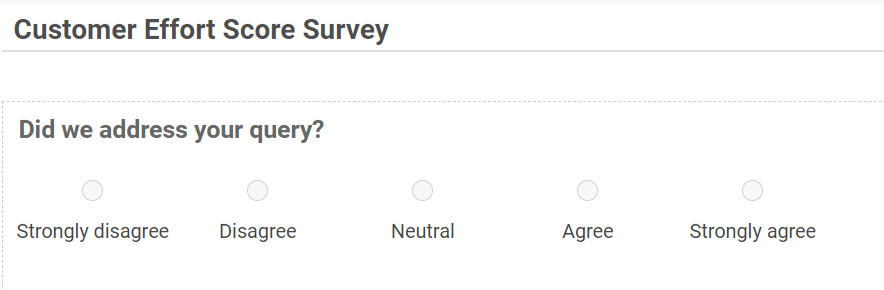
2. Range Scale of 1-7: This scale arrived in 2013 after fine-tuning the 2010 edition. The 2010 scale didn’t capture a vast amount of responses. However, the latest scale is more expansive as it captures customer responses on a 7-level scale.
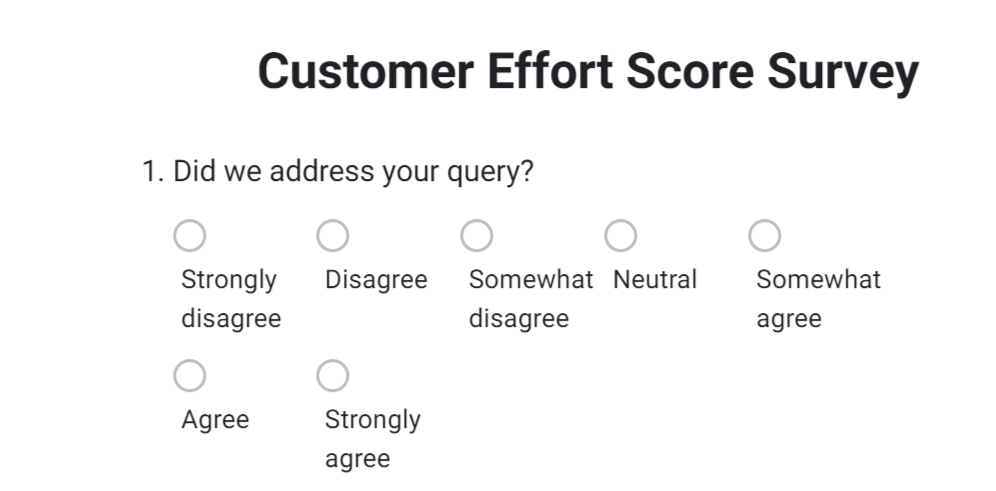
How to choose between 1–5 & 1–7
Use 1–7 when you want more nuance (great for onboarding and support, where ‘somewhat easy’ vs ‘very easy’ matters). Use 1–5 when you want faster responses (especially on mobile or high-volume touchpoints like checkout). Whatever you choose, keep it consistent for the same journey stage so you can track trends cleanly over time.
CES Sample Questions You Can Use)
Use one primary CES question (don’t stack multiple). Pick the one that matches your touchpoint:
- Support CES: ‘[Brand] made it easy for me to resolve my issue.’

- Onboarding: ‘It was easy to set up and get started with [Product].’
- Checkout/Post-Purchase: ‘It was easy to complete my purchase (or upgrade) without issues.’

- Mobile-Specific: ‘It was easy to complete this task on my phone.’
- Optional follow-up (1 line, open-text): ‘What made this easy or difficult?’
Now that you have understood the basics of a customer effort score, let us understand the benefits of calculating a customer effort score.
How to Calculate Customer Effort Score and Analyze the Results?
CES gives a measurable way to analyze your customer’s efforts. The higher the score, the less effort is put in by your customers while interacting with your brand.
The first step in calculating a customer effort score is to conduct a survey with CES questions as discussed above. You can use either a (1-5) range scale or a (1-7) range scale in your survey.
After you get the survey responses, the customer effort score is calculated by adding the individual scores of all respondents and dividing by the total number of respondents.

Let’s take an example to understand the customer effort score calculation,
Suppose ten respondents took part in a CES survey, and they gave the customer effort score as 4, 3, 8, 9, 5, 7, 8, 6, 1, 1
CES = (4+3+8+9+5+7+8+6+1+1)/10 = 52/10 = 5.2
Alternative way for customer effort score calculation: Some teams also track a Net Customer Effort Score (similar to NPS). You group responses into Easy (top 2 boxes), Neutral (middle), and Difficult (bottom 2 boxes), then calculate:
Net CES = % Easy − % Difficult
This makes it easier to explain trends to stakeholders because it shows whether ‘easy’ experiences are outweighing ‘difficult’ ones over time.
What Is a “Good” Customer Effort Score? (Benchmarks)
“A ‘good’ CES depends on your scale and your question direction:
- If higher = better (agreement statement like ‘[Brand] made it easy…’):
- 1–5 scale: 4.0–5.0 = good, 3.0–3.9 = watch, <3.0 = friction
- 1–7 scale: 5.5–7.0 = good, 4.5–5.4 = watch, <4.5 = friction
- If lower = better (effort question like ‘How much effort did you put in?’):
- 1–5 scale: 1.0–2.0 = good, 2.1–3.0 = watch, >3.0 = friction
- 1–7 scale: 1.0–3.0 = good, 3.1–4.5 = watch, >4.5 = friction
Quick rule: treat anything in the “watch” band as your priority list—those customers didn’t have a terrible time, but they definitely didn’t have an easy one either.”
Now that you have learned how to calculate Customer Effort Score, let’s see how to effectively analyze the CES survey results.
How to Analyze the Customer Effort Score (CES) Survey Results?
The CES falls into three categories: Low, Average, and High
Herein, if you get a score on the lower level, it means that the customer’s engagement experience with your brand was not comfortable. But, in the event of a higher score, the experience is deemed good and satisfactory.
An above-average score shows that your customers stand in a reasonably comfortable position while reaching your brand. You are doing a good job addressing their queries on time.
When Should You Trigger CES Surveys?
“Trigger CES right after a specific action (not as a monthly pulse) so customers rate the effort while it’s fresh. Here’s the simple way to do it:
- Pick 2–3 high-friction moments to start: onboarding setup, checkout/payment, and support resolution.
- Send it immediately after the moment ends (in-app prompt, email, or SMS)—the sooner, the more accurate the feedback.
- Ask one CES question first, then add one optional follow-up like ‘What made this hard?’ for the “why.”
Keep triggers journey-specific: new users get onboarding CES, buyers get post-purchase CES, and ticket-raisers get support CES.
This makes your score actionable because you’ll know exactly which step created effort.”
There are numerous techniques that can be used to enhance your customers’ experience, thereby reducing their effort. Let’s understand it in the next section.
FREE. All Features. FOREVER!
Try our Forever FREE account with all premium features!
How to Improve Customer Effort Score (CES)?
Start by fixing the biggest ‘repeat effort’ killers: customers having to switch channels, re-enter details, or explain the same problem again. These are the fastest CES wins because they remove effort without needing a full process overhaul. Certain simple yet practical tips can help you create an army of loyal customers.
1. Incorporate Multiple Channels of Interaction
Ensure that your customers can reach out to you through multiple channels, like toll-free numbers, social media, live chat, email, knowledge base, etc. In doing so, have sufficient customer representatives to respond to their queries promptly. It reduces your customers’ wait time and reposes their trust in your brand.
Keep it ‘connected,’ not just ‘more.’ Multiple channels reduce effort only when the context travels with the customer. If a customer starts on chat and moves to email or phone, ensure the agent can see the full history so the customer doesn’t have to repeat order details, screenshots, and issue summary again.
2. Leverage Self-help Tools
Before your customers reach out to you, give them the option to go through self-help resources on your website, like FAQs, Knowledge Base articles, etc. It brings convenience to your customers and allows them to resolve their queries without the need for interaction with a customer representative.
Design self-help for mobile too. Keep articles scannable (short steps, clear headings), add a quick ‘Was this helpful?’ prompt at the end, and ensure the top issues (login, billing, refunds, setup) are searchable in one tap. If customers can’t find answers easily on their phone, they’ll default to support—and their effort score will drop.
3. Automate Messages and Callbacks
Automated messages and callbacks help customers anticipate the resolution time of their queries. A simple automatic message can remind them of the callback. Here, you reach out to your customer well before they contact you with a follow-up query. The promptness creates a positive impression by making your customer feel valued and cared for.
One more easy win: confirm the next step in plain language. For example: ‘We’ve received your request. Next, we’ll review X and get back by Y time. If you need to add details, reply to this message.’ This prevents customers from doing ‘effort work’ like chasing updates, reopening tickets, or sending multiple follow-ups.
Importance of Customer Effort Score Calculation
Customer effort score is a significant factor that determines your business outcomes. Your future customer acquisition depends on how well the needs of the present customers are met.
Let’s understand this better.
Eliminate Delays:
Imagine your website is too slow to place an order, and your customers face a delay at the checkout stage of the purchase. It could result in cart abandonment and subsequently missed purchases.
A customer effort score survey helps you identify the problem areas faced by customers and take corrective action. The earlier you identify the flaw, the sooner it can be rectified.
Future Process Creation:
The customer effort score gives you a better picture of the process of handling your customer challenges. For example, maybe your customers had to reach out multiple times before their query was solved. Knowing this pain point will help you create a robust process for following up with your customers. This helps in ensuring customers have a seamless experience at every touchpoint.
Reduces Customer Churn Rate:
When you provide great customer experiences, the customers tend to stick to your brand rather than switching to your competitor. They continue to repose trust in your products and services. Hence, make sure that every interaction is smooth and effortless to reduce the customer churn rate.
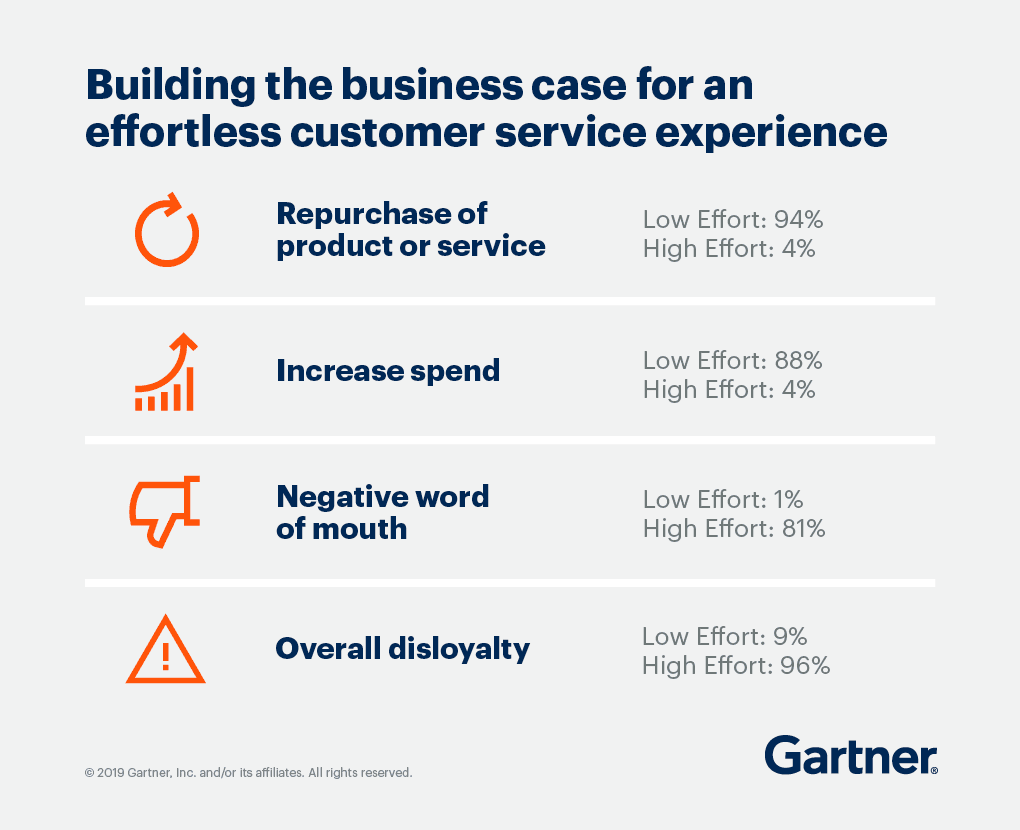
Source: Gartner
Use CES to Enhance Your Customer Experience
CES is a powerful way to understand the quality of your customer experience. The customer effort score captures the sentiments associated with your customer’s engagement.
To obtain the best results, make it a point to calculate the customer effort score after major touchpoints like product purchase and customer service. Though CES cannot guarantee customer loyalty, you can build trust and increase the probability of word-of-mouth marketing.
Don’t stop at the number—pair CES with one short ‘why’ question (open-text) and track themes like ‘couldn’t find info,’ ‘too many steps,’ ‘had to repeat myself,’ ‘mobile issues,’ or ‘slow response.’ That’s how CES turns from a score into a punch list your team can actually fix.
Keep multiple communication channels open, like live chat, a toll-free number, social media, and encourage self-help with a knowledge base.
Want to measure your customer effort score? Get started with ProProfs Survey Maker to create and share impactful surveys in minutes.
FREE. All Features. FOREVER!
Try our Forever FREE account with all premium features!

 We'd love your feedback!
What did you like & how can we make it even better?

 Thanks for your feedback!
 Ask Your Question
Have a question? Get expert help to make your decision easier.