

Your survey questions might be perfectly written. Your logic branching might be flawless.
But if your introduction does not answer the respondent’s first unspoken question, “Why should I bother?”, many people will never get to your questions.
Some respondents drop off before they answer the first question, and many decide whether to continue within seconds, based largely on what your introduction tells them. The survey introduction is where trust is built or broken.
This guide walks you through exactly what a survey introduction should include, why it affects response rates at a psychological level, and how to write one that gets your audience to say yes.
You will also find ready-to-use examples you can adapt for employee, NPS, customer satisfaction, and market research surveys today.
What Is a Survey Introduction?
A survey introduction is the opening statement of a survey that explains who is asking, why they are asking, how long the survey will take, and what will happen to the responses. It appears before the first question, either as a welcome page inside the survey or in the outreach email accompanying the survey link.
A survey introduction is not a formality. It is the first moment of contact between your organization and your respondent, and it directly shapes whether they proceed, disengage, or provide honest answers.
The introduction carries a specific job: reduce friction, build trust, and motivate action. When it does that job well, response rates improve. When it fails, even well-designed surveys fail with it.
What Should Be Included in a Survey Introduction?
Every survey introduction should address seven elements, in roughly this order.
| Element | What to Communicate | Why It Matters |
| Who Is Asking | Your organization name and the team behind the survey | Builds legitimacy. Respondents do not trust unnamed senders. |
| Why Are You Asking | The specific purpose of this survey | Contextualizes the questions. Mismatched context produces misaligned answers. |
| How Long Does It Take | Actual question count or time estimate | Sets accurate expectations. Overpromising raises drop-off. |
| What Happens With Responses | How data is used, aggregated, or stored | Addresses the privacy concern that blocks honest feedback. |
| What Respondents Gain | The benefit, outcome, or incentive for participating | Answers the “why bother” question. Benefit-led intros outperform obligation-based ones. |
| Is Participation Voluntary | That taking part is optional, and respondents can skip any question or stop at any time | Respects respondents and reduces pressure to answer. Pressure can lead to rushed or guarded answers. |
| Who Can They Contact | A named person or team, with an email address, for questions about the survey | Lets respondents check that the survey is legitimate and ask about their data. |
You do not need seven paragraphs to cover all seven. A well-written survey introduction can cover all of this in four to six sentences.
How Do You Create a Survey With a Good Introduction Using ProProfs Survey Maker?
ProProfs Survey Maker has a built-in AI Survey Maker that generates a complete survey, including a welcome page introduction, from a single plain-language prompt.
Here is how to use it to go from goal to ready-to-send survey in minutes.
Step 1: Log in and Open the AI Survey Maker
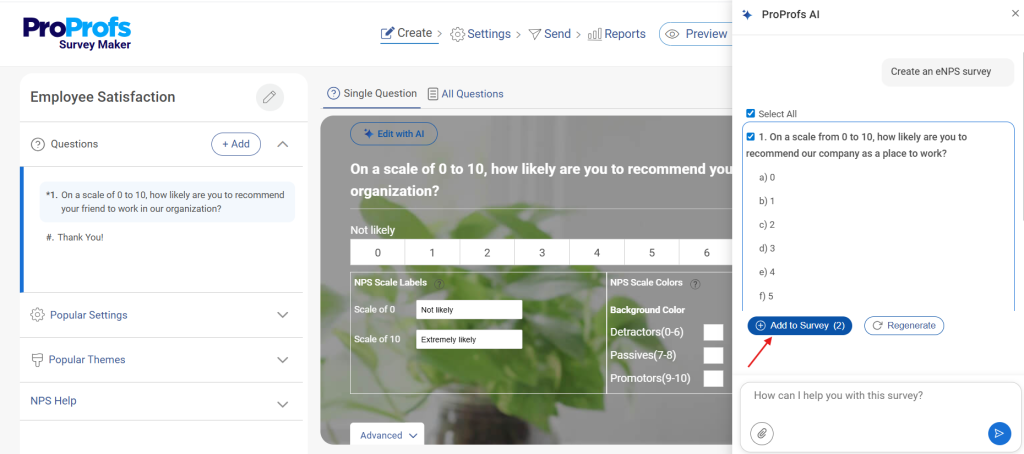
From your ProProfs Survey Maker dashboard, click “Create a Survey” and select the AI option. You will see a prompt field where you describe your survey goal in plain language.
Step 2: Describe Your Survey Goal and Audience
Type a prompt that includes your purpose, audience, and any context the AI needs. Be specific. The more detail you give, the more targeted the output.
For Example:
- “Create an employee engagement survey for a 200-person tech company. Responses should be anonymous. Focus on workload, manager support, and career growth.”
- “Build an NPS survey for SaaS customers after their first 30 days. Keep it under 5 questions.”
- “Generate a post-event feedback survey for a professional development workshop. Include an introduction that mentions responses are confidential.”
The AI generates a full survey instantly, including a welcome page with an introduction drafted to match your prompt.
Step 3: Review and Edit the Welcome Page Introduction
Open the welcome page that the AI created. Check that it covers the seven elements: who is asking, why, how long it takes, that taking part is voluntary, what happens with responses, what the respondent gains, and who to contact.
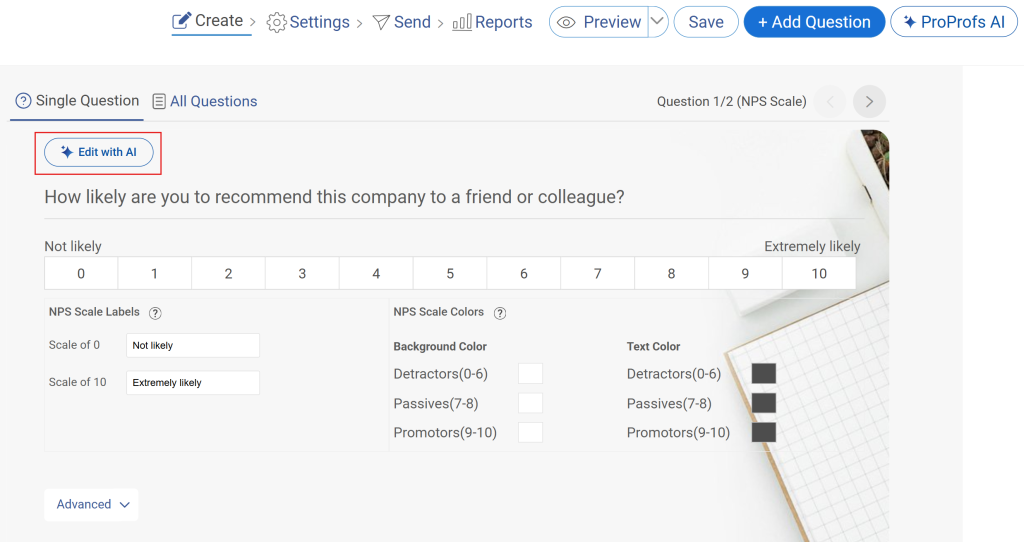
Edit any line that feels off for your audience or brand tone.
Step 4: Customize the Question Set
ProProfs Survey Maker gives you access to 1,000,000+ ready-to-use questions. You can accept the AI-generated questions, swap them from the question library, or add your own.
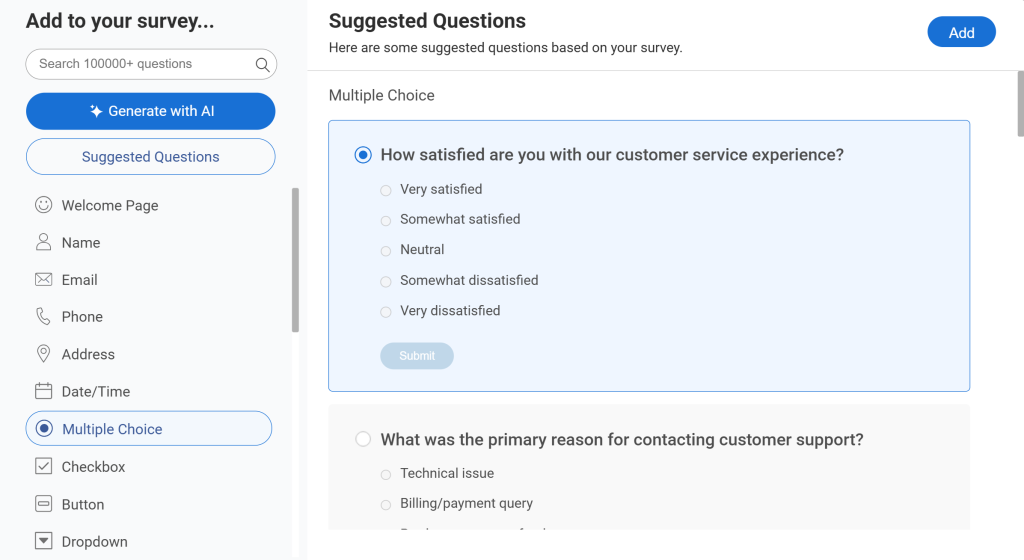
Use skip logic to show or hide questions based on prior answers, keeping the survey relevant throughout. Here’s how you can use:
Step 5: Set Anonymity and Privacy Controls
Go to survey settings and configure whether responses are anonymous, password-protected, or limited to one response per user.
Whatever you set here should be reflected in your introduction text so respondents know exactly what to expect.
Before you promise anonymity, check how responses are collected and reported, including any question that asks for a name, email address, or detail that could identify someone.
Step 6: Share and Track Drop-Off
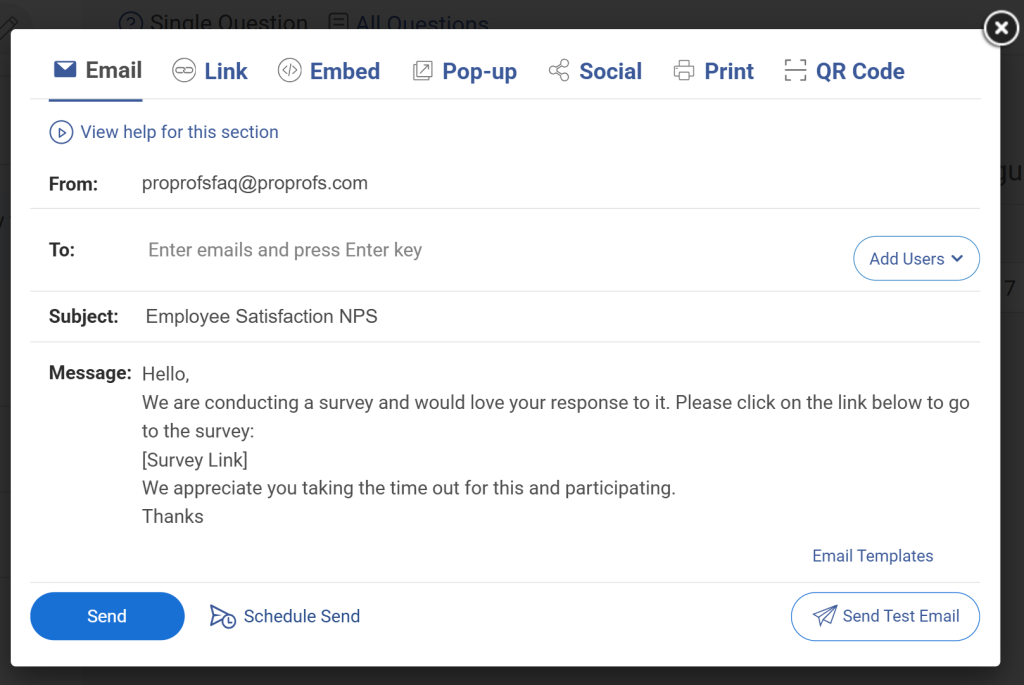
Distribute via email, direct link, QR code, or website embed. Once responses come in, use the real-time analytics dashboard to monitor where respondents drop off.
If a significant share exits on the welcome page, revise the introduction and re-test before the full send.
Justin Fredericks at Harvard Innovation Lab used ProProfs Survey Maker for market research and noted that the instant analytics made it easy to spot exactly where respondents dropped off and refine the experience before full distribution.
See the real-life success stories of teams using ProProfs Survey Maker for amazing survey introductions.
What Are Examples of Survey Introductions That Work?
These are ready-to-use templates for the most common survey types. Copy and adapt them directly.
Employee Engagement Survey Introduction
We are running our quarterly engagement survey to understand what’s working for you at [Company Name] and where we can do better.
This survey has 12 questions and takes about 6 minutes.
This survey does not collect your name or email, and results are reported only for groups of [5] or more people. Only aggregated results are reviewed by the HR team.
Add a new paragraph after the paragraph that ends “reviewed by the HR team.” and before “Your honest feedback shapes the decisions we make in the next quarter.”
Taking part is voluntary. You can skip any question or stop at any time, and your choice will not affect your role or how you are treated. Questions about this survey? Contact [Name] at [email address].
Your honest feedback shapes the decisions we make in the next quarter. Thank you for taking the time.
Why This Works: It names the purpose, sets accurate time expectations, explains how responses are collected and reported, makes participation voluntary, gives a contact for questions, and ties participation to a tangible outcome.
Confirm Before You Use This Template:
- Identifiers: Confirm the survey does not collect names, email addresses, employee IDs, or other identifiers.
- Group Size: Confirm results are reported only for groups of [5] or more people.
- Demographics: Keep questions about team, location, or tenure broad enough that no one can be picked out.
- Open Comments: Decide who reads written comments, and remove identifying details before sharing them.
If you cannot confirm all of these, replace the anonymity sentence with confidential wording: “Your responses are confidential. Your name is linked to your answers only so [HR team] can [reason], and individual answers are not shared with managers or leadership.”
Sample Questions to Follow This Introduction:
- On a scale of 1 to 10, how satisfied are you with your current workload?
- Does your manager give you the feedback you need to do your job well? (Yes/Sometimes/No)
- How supported do you feel in growing your career at [Company Name]? (Very supported/Somewhat supported/Not supported)
- What is the single biggest thing [Company Name] could do to improve your day-to-day experience? (Open-ended)
- How likely are you to recommend [Company Name] as a great place to work? (1 to 10 scale)
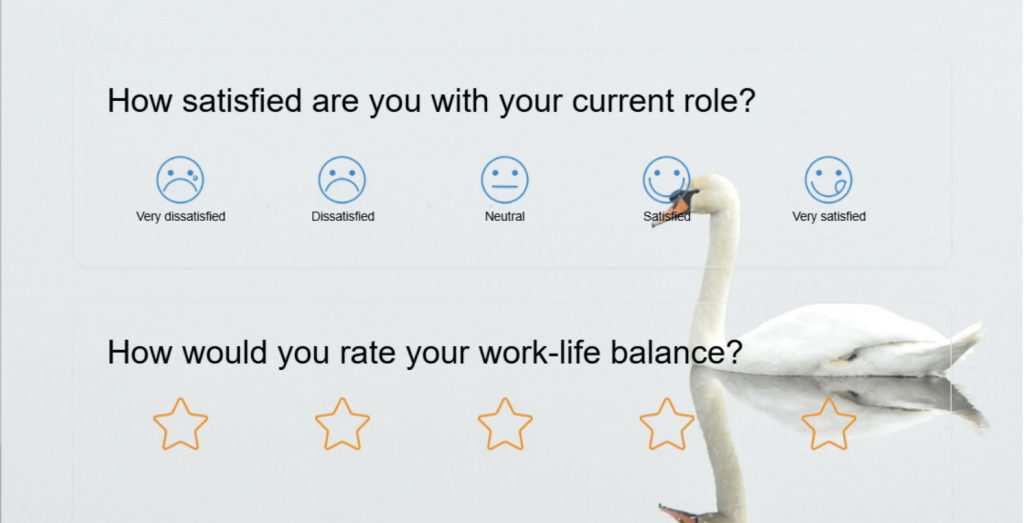
Here’s an employee engagement survey template you can easily use and tweak:
NPS Survey Introduction
Hi [First Name], thanks for being a customer.
We have one quick question, and then two optional follow-up questions. This takes under 2 minutes.
Your answers help us understand what we’re doing right and where we’re falling short. We read every response.
Taking part is optional. Questions? Contact [Name] at [email address].
Why This Works: It personalizes the opening, sets a very low time commitment, and signals that a real person will read the response. That last line is a high-trust signal that costs nothing to add.
Sample Questions to Follow This Introduction:
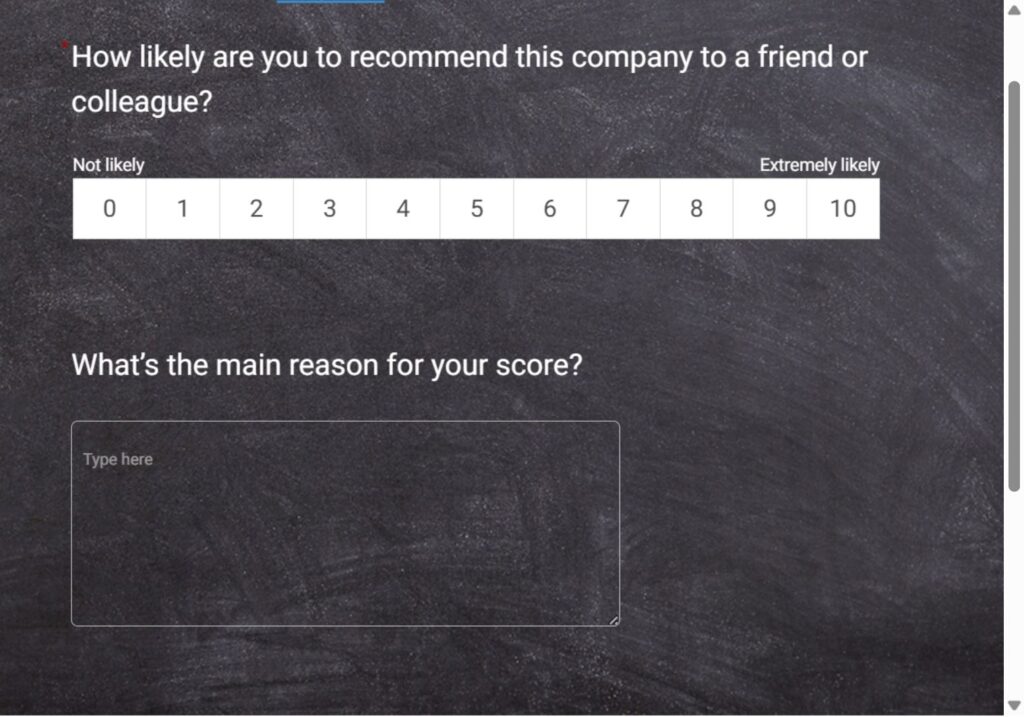
- How likely are you to recommend [Product/Company] to a friend or colleague? (0 to 10 scale)
- What is the main reason for your score? (Open-ended)
- Is there anything we could do to improve your experience? (Open-ended, optional)
Here’s an NPS survey template you can use:
Customer Satisfaction Survey Introduction
We’d love to hear about your recent experience with [Company Name]. This survey has 6 questions and should take about 3 minutes.
Your responses are used by our customer success team to improve the experience for you and other customers. All feedback is reviewed weekly.
Taking part is voluntary, and you can skip any question or stop at any time. Questions? Contact [Name] at [email address].
Why This Works: Time commitment is accurate and low. The data use is specific. “Reviewed weekly” signals a real process, not a vanity exercise.
Sample Questions to Follow This Introduction:
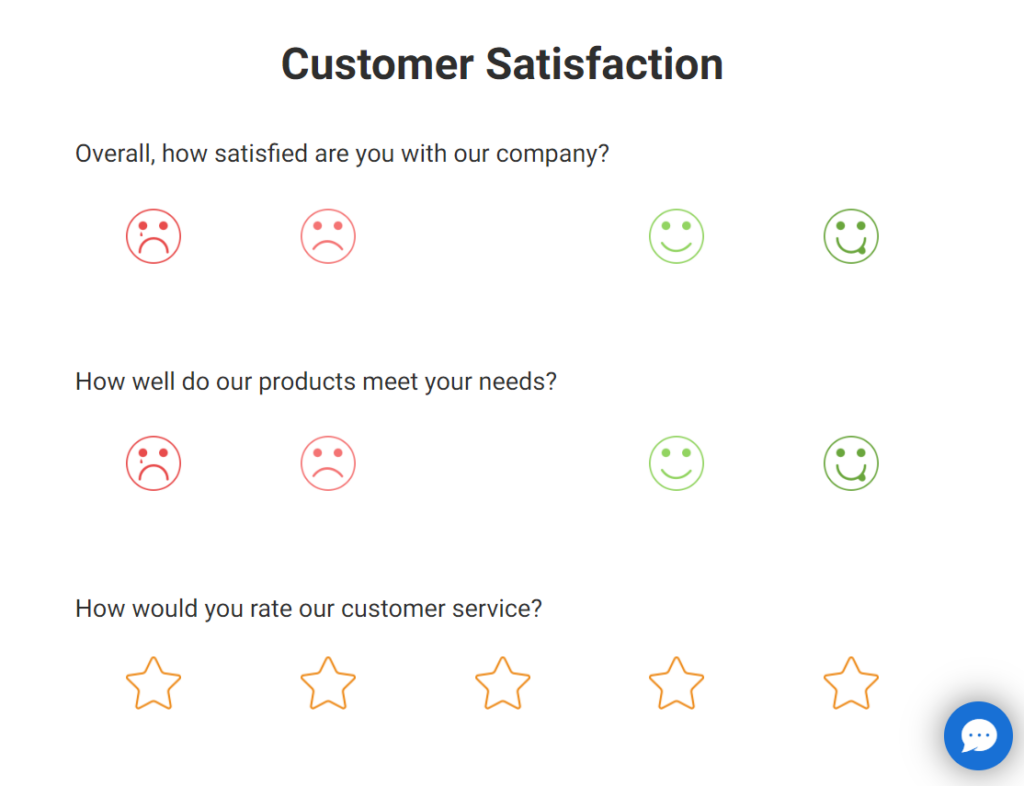
- Overall, how satisfied were you with your experience today? (Very satisfied / Satisfied / Neutral / Dissatisfied / Very dissatisfied)
- How would you rate the quality of support you received? (1 to 5 stars)
- Was your issue resolved in a single interaction? (Yes / No)
- How easy was it to get the help you needed? (Very easy / Easy / Difficult / Very difficult)
- What could we have done better? (Open-ended, optional)
Here’s a customer satisfaction survey template you can use:
Market Research Survey Introduction
We are conducting independent research on [topic] to better understand how [industry] professionals approach [problem area]. This survey has 10 questions and takes approximately 7 minutes.
Your responses are anonymous. Results will be shared in aggregate in a public report, which you can request a copy of at the end of this survey.
Your responses are anonymous. This survey does not collect your name or email, and results will be shared only in aggregate in a public report. If you would like a copy of the report, or are open to a follow-up conversation, you can leave your email in a separate form at the end, which is not linked to your answers here.
Thank you for contributing your perspective.
Taking part is voluntary, and you can skip any question or stop at any time. Questions about this research? Contact [Name] at [email address].
Why This Works: It is transparent about purpose and what happens with results. Offering the report as a benefit converts participation from a cost into an exchange.
Confirm Before You Use This Template:
- Identifiers: Confirm the survey does not collect names, email addresses, or other identifiers.
- Separate Contact Form: Confirm the form for the report and follow-up is separate from the survey, such as a second survey, with nothing linking it to the answers.
- Confidential Alternative: If you would rather collect email addresses inside this survey, describe it as confidential instead: “Your responses are confidential. We use your email only to send the report and to contact you about a follow-up conversation, and results are shared only in aggregate.”
Replace sample question 6: “Would you be open to a follow-up conversation about your answers? (Yes / No, with optional email field)”
Would you be open to a follow-up conversation? (Yes / No. If Yes, send the respondent to a separate contact form that is not linked to their answers.)
Sample Questions to Follow This Introduction:
- Which of the following best describes your current role? (Multiple choice, role list)
- How does your organization currently handle [problem area]? (Multiple choice or open-ended)
- What is your biggest challenge related to [topic]? (Open-ended)
- Which tools or methods does your team use to address [topic]? (Checkbox, multi-select)
- How satisfied are you with your current approach? (1 to 5 scale)
- Would you be open to a follow-up conversation about your answers? (Yes / No, with optional email field)
Here’s a market research survey template you can use:
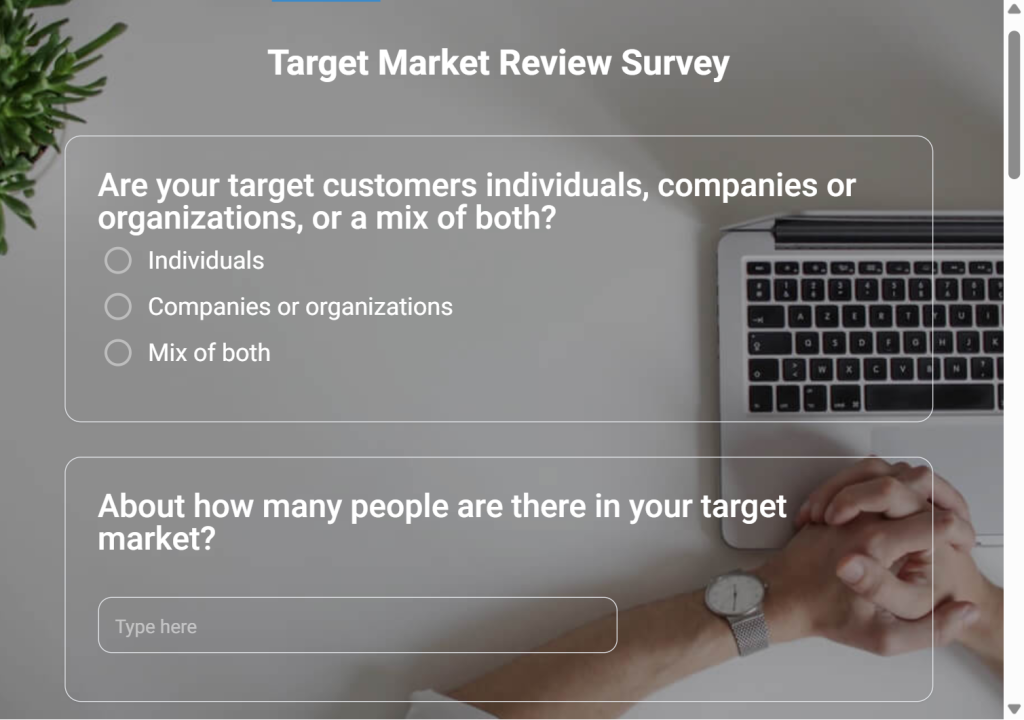
Lead Qualification Assessment Introduction
This 5-minute assessment will help us understand where you are today with [topic] and what kind of support would be most useful for your situation.
At the end, you will receive a personalized score and a summary of recommendations based on your answers. There are no right or wrong answers.
Taking part is voluntary, and you can skip any question or stop at any time. Questions? Contact [Name] at [email address].
Why This Works: It frames the survey as a tool for the respondent, not data collection for the organization. The scored result is the benefit. ProProfs Survey Maker supports scored surveys natively, where each answer carries a point value, and respondents see a custom result page based on their score. Consultants and HR teams use this format for maturity assessments, coaching worksheets, and discovery calls.
Sample Questions to Follow This Introduction:
- How would you describe your current approach to [topic]? (Multiple choice, each answer scored differently)
- How often does your team experience [pain point]? (Never / Occasionally / Frequently / Always, scored 0 to 3)
- Do you currently have a defined process for [area]? (Yes, fully documented / Yes, informal / No, scored 0 to 2)
- What is your team size? (Multiple choice, scored by segment)
- What outcome matters most to you right now? (Multiple choice, used to route to a relevant result page)
The respondent sees a custom result page based on their total score, for example, “Early Stage,” “Developing,” or “Advanced,” with a tailored recommendation for each tier.
FREE. All Features. FOREVER!
Try our Forever FREE account with all premium features!
Why Does a Survey Introduction Affect Response Rates?
Low response rates rarely have a single cause. Who you invite, how relevant the survey is to them, when you send it, how long it takes, and which channel you use all matter, and so does the introduction. The introduction is the part you fully control before the first question, which makes it a practical place to remove friction.
Respondents often evaluate a survey the same way they evaluate any cold request for their time.
They run a fast, mostly unconscious cost-benefit check. Is this worth my time? Will my answers actually be used? Can I trust this organization with my data?
Your introduction either answers those questions or leaves them unanswered. Unanswered questions become reasons to close the tab.
How Does Anonymity in the Introduction Change What Respondents Tell You?
Transparency is one of the most powerful levers in survey design.
When respondents understand exactly who is collecting their data, why, and how it will be used, they are more likely to participate and more likely to answer honestly.
Telling respondents clearly how their answers are handled can lower one of the biggest barriers to candid feedback, particularly in employee surveys where people worry about judgment or retaliation. That only works if what you say is true.
The practical implication: only call a survey anonymous if no one, including you, can link answers back to a person. Before you write that sentence, check how responses are collected and reported:
- Identifiers: Does the survey collect names, email addresses, employee IDs, or login details, directly or through the invitation link?
- Small Groups: Do team, location, or tenure questions narrow a result down to a handful of people? Set a minimum group size for reporting. Many teams use five.
- Open-Text Answers: Written comments can reveal who wrote them. Decide who reads them, and remove identifying details before sharing.
- Follow-Up: If you want to contact respondents later, collect their details in a separate form or describe the survey as confidential instead.
If you cannot meet that bar, say the survey is confidential instead: “Your name is linked to your answers only so [team] can [reason], and individual answers are not shared with [managers or leadership].” Honest wording builds more trust than a promise you cannot keep.
Here’s how you can set up an anonymous survey:
:
Why Does Perceived Time Commitment Matter More Than Actual Survey Length?
Overpromising length is one of the most common and damaging mistakes in survey introductions. When an introduction says “this will take just 2 minutes” and the survey takes 8, respondents feel deceived.
That misalignment destroys trust not just for this survey but for every future one from your organization.
State the actual time honestly. If your survey takes 5 to 7 minutes, say that. If it has 10 questions, say that. Respondents who proceed with accurate information are far more likely to finish.
Stop Losing Responses Before the First Question
A weak introduction is one common reason people drop out, but it is rarely the only one. Response rates also depend on who you invite, how relevant the survey is to them, when you send it, how long it takes, and which channel you use. If your response rate is lower than expected, check those factors too, and use your drop-off data to see whether people leave on the welcome page or later in the survey.
What the introduction can do is remove avoidable friction. Write a purpose statement that is specific enough to be credible. State the actual time it takes. Say that taking part is voluntary. Tell respondents what happens with their answers, and promise anonymity only where it is true. Give them one reason to care, and a contact for questions.
That is it. Seven elements, four to six sentences, and your survey has a better chance of being completed, and completed honestly.
If you want to skip the blank page entirely, ProProfs AI Survey Maker generates a complete survey with a welcome page introduction from a single prompt.
Frequently Asked Questions
How long should a survey introduction be?
Three to five sentences for most surveys, two short paragraphs maximum for formal employee or academic surveys. Introductions longer than 150 words consistently see higher drop-off before question one, especially on mobile. If you cannot cover the five core elements in five sentences, trim the purpose statement first.
What tone works best in a survey introduction?
Conversational and direct, matched to your relationship with the respondent. Corporate language creates distance and suppresses candid responses. Employee surveys should use warm, anonymous-first language. Customer surveys should be brief and gratitude-led. Market research surveys should be neutral and transparent about purpose and data use.
What are the most common survey introduction mistakes?
Asking for personal information before establishing trust, overpromising survey length, using vague purpose statements like "help us improve," skipping the anonymity assurance in employee surveys, and not explaining what happens with the data. Each of these increases abandonment before the first question is ever seen.
How does a survey introduction affect data quality, not just response volume?
When respondents feel uncertain about anonymity or purpose, they self-censor and give safe answers instead of honest ones. In employee surveys this produces engagement scores that look fine while real sentiment festers. A transparent introduction removes that friction and generates more candid, decision-ready data throughout the survey.
How do you personalize a survey introduction for different audiences?
Use the respondent's first name in the opening line, reference their relationship with your organization, and tailor one line by role or segment. An HR manager and a field engineer should not receive the same intro for an internal survey. One line of customization per segment consistently outperforms generic introductions on completion rate.
Should a survey introduction appear in the email or inside the survey itself?
Both, but they serve different purposes. The email introduction motivates the click. The in-survey welcome page motivates completion. Keep the email version shorter and benefit-led. The in-survey version should include the time estimate, anonymity assurance, and data use details respondents need before they start answering.
What is a survey opening statement?
A survey opening statement is the first sentence of your introduction. It should immediately communicate who is asking and why. Strong opening statements are specific ("We want to understand what slowed down your onboarding") rather than vague ("We value your feedback"). The opening statement sets the tone for every answer that follows.
How do you write a survey introduction for an employee survey?
State the purpose clearly, explicitly assure anonymity, give an accurate time estimate, and close with how feedback will be used. Skip HR jargon entirely. Write it the way you would explain the survey to a colleague in 30 seconds. Employees who trust the process give honest answers. Employees who do not give safe ones.
FREE. All Features. FOREVER!
Try our Forever FREE account with all premium features!

 We'd love your feedback!
What did you like & how can we make it even better?

 Thanks for your feedback!
 Ask Your Question
Have a question? Get expert help to make your decision easier.