ProProfs Survey Maker Editorial Team is a diverse group of professionals passionate about survey creation and market research. We update you on the latest trends, dive into technical topics, and offer insights to elevate your business.
Every survey you have ever abandoned had the same problem.
Somewhere around question six, it asked you something that had nothing to do with your situation, and you either guessed an answer or closed the tab.
That is not a length problem. It is a relevance problem, and conditional survey questions are the fix.
A conditional survey question appears only if a respondent’s earlier answer makes it relevant. Tools like ProProfs Survey Maker do this at the individual-question level, so you don’t have to restructure your whole survey to get there.
Below is a working list of conditional questions organized by scenario, what triggers each one, and what it is actually designed to measure.
After the list, you will find the exact steps to build these using ProProfs AI Survey Maker.
What Are Conditional Survey Questions?
Conditional survey questions are follow-up questions that appear or disappear based on how a respondent answered a prior question in the same survey. Instead of every respondent seeing every question, the survey adapts in real time, showing only the items relevant to that person’s specific answer, role, or experience.
Think of it as an if-then rule attached to a single question. If someone rates their experience as poor, a follow-up asking what went wrong appears.
If they rate it excellent, that question never shows up, and a different one appears instead.
ProProfs Survey AI Coach
Ask anything about surveys, feedback, and user insights
","text/html");
function clean(node){
if(node.nodeType===3){var t=node.textContent.replace(/\s+/g," ").trim();return t?t:"";}
if(node.nodeType!==1)return "";
var tag=node.tagName;
if(!allowed[tag])return Array.prototype.map.call(node.childNodes,clean).join("");
if(tag==="BR")return " ";
var inner=Array.prototype.map.call(node.childNodes,clean).join("");
if(tag==="A"){
var href=(node.getAttribute("href")||"").trim();
if(!/^https?:\/\//i.test(href))return inner;
return ''+inner+"";
}
return "<"+tag.toLowerCase()+">"+inner+"";
}
return Array.prototype.map.call(doc.body.childNodes,clean).join("");
}
function addBot(html,stacked){var r=document.createElement("div");r.className="proprofs_ai_chat__row";r.innerHTML='
'+(stacked?'':'')+'
'+linkify(html)+'
';scroll.appendChild(r);scrollToBottom();}
function addUser(t){var r=document.createElement("div");r.className="proprofs_ai_chat__row proprofs_ai_chat__row--user";var b=document.createElement("div");b.className="proprofs_ai_chat__user-bubble";b.textContent=t;r.appendChild(b);scroll.appendChild(r);scrollToBottom();}
function addCrisis(){var r=document.createElement("div");r.className="proprofs_ai_chat__row";r.innerHTML='
';scroll.appendChild(r);scrollToBottom();}
function typingOff(){var t=document.getElementById("proprofs_ai_chat_typing");if(t)t.remove();}
function typingOn(){typingOff();var r=document.createElement("div");r.className="proprofs_ai_chat__row";r.id="proprofs_ai_chat_typing";r.innerHTML='
';scroll.appendChild(r);scrollToBottom();}
function respond(text,questionType){
questionType=(questionType===1)?1:0;
startAiChatDurationTimer();
if(crisisLatch||hitsTripwire(text)){
crisisLatch=true;
addCrisis();
saveChatTurn(text,CRISIS.title+" "+CRISIS.body.replace(/<[^>]+>/g," "),true,questionType);
return;
}
busy=true;sendBtn.disabled=true;typingOn();
history.push({role:"user",content:text});
fetch(PROXY_URL,{
method:"POST",headers:{"Content-Type":"application/json"},
body:JSON.stringify({messages:history,articleTitle:ARTICLE_TITLE,artile_description:artile_description,coachName:"ProProfs Survey AI Coach"})
}).then(function(r){return r.json();}).then(function(data){
typingOff();
var reply=(data&&data.reply)?data.reply:"Sorry, something went wrong. Please try again.";
history.push({role:"assistant",content:reply});
saveChatTurn(text,reply,false,questionType);
var chunks=reply.split(/\n\s*\n/).map(function(c){return c.trim();}).filter(Boolean);
if(chunks.length===0){busy=false;sendBtn.disabled=false;return;}
var delay=0;
chunks.forEach(function(chunk,idx){
setTimeout(function(){
typingOff();
addBot(sanitizeHtml(chunk),idx>0);
if(idxYou could start with';
STARTERS.forEach(function(q){var b=document.createElement("button");b.className="proprofs_ai_chat__starter";b.textContent=q;b.addEventListener("click",function(){send(q,1);});st.appendChild(b);});
scroll.appendChild(st);
})();
30 Conditional Survey Questions You Can Use by Scenario
These are grouped by the program you are most likely running, so you can copy the ones relevant to you without wading through questions meant for a different use case.
Employee Engagement Conditional Questions
Use these to route employees to specific follow-ups based on their role, tenure, or satisfaction score, rather than asking every employee the same fixed list.
Conditional Question
Appears If
What It Gauges
What’s the main reason for that rating?
Job satisfaction rated 1 to 2 out of 5
Root cause of low morale
What would need to change for you to feel more supported?
“Do you feel supported by your manager?” is No
Specific management gaps
How connected do you feel to your team?
Work location is Hybrid or Remote
Remote or hybrid connection quality
What’s the biggest reason you wouldn’t recommend us as an employer?
Employee NPS score is 0 to 6
Detractor-specific friction points
Which specific benefit matters most to you?
“Are you satisfied with your benefits package?” is No
Benefits gap priority
How likely are you to still be here in 12 months?
Tenure is more than one year
Flight risk among tenured staff
Customer Satisfaction Conditional Questions
These questions split respondents by rating first, so detractors get a chance to explain what went wrong, and happy customers get a chance to reinforce what worked.
Conditional Question
Appears If
What It Gauges
What went wrong with your experience?
CSAT rating is 1 to 2 out of 5
Root cause of dissatisfaction
What did we do well?
CSAT rating is 4 to 5 out of 5
Reinforceable strengths
Which part of the process took longer than expected?
“Was your issue resolved quickly?” is No
Process bottlenecks
Would you like a follow-up call from our team?
CSAT rating is 1 to 2 out of 5
Service recovery opportunity
How does our product compare with what you used before?
“Have you used a similar product before?” is Yes
Competitive positioning
What almost stopped you from completing your purchase?
“Did you consider not completing this purchase?” is Yes
Purchase friction points
NPS Conditional Questions
Every score band, promoter, passive, or detractor, needs a different follow-up if you want an actionable reason behind the number instead of just the number itself.
Conditional Question
Appears If
What It Gauges
What’s the main reason for your score?
Any NPS score is given
Core driver behind the score
What would move your experience from good to great?
NPS score is 7 to 8 (passive)
Passive-to-promoter conversion levers
What’s the biggest reason you wouldn’t recommend us?
NPS score is 0 to 6 (detractor)
Detractor root cause
What do you love most about the product?
NPS score is 9 to 10 (promoter)
Advocacy triggers
Would you be open to a short customer story interview?
NPS score is 9 to 10 (promoter)
Referral and advocacy pipeline
Event Survey Conditional Questions
The attendance type and format change what a question should even ask, so route in-person, virtual, and no-show respondents to different follow-ups in event feedback surveys.
Conditional Question
Appears If
What It Gauges
How would you rate the venue and logistics?
“Did you attend in person?” is Yes
On-site experience quality
How was the streaming quality?
“Did you attend virtually?” is Yes
Virtual experience quality
Which session was most valuable to you?
“Did you attend more than one session?” is Yes
Content prioritization
What kept you from attending?
“Did you register but not attend?” is Yes
No-show reasons
Would you attend a similar event next year?
Overall event rating is 4 to 5 out of 5
Repeat attendance likelihood
Scored Assessment Conditional Questions
Once a respondent lands in a score bracket, the follow-up should match what that bracket actually needs, whether that is a nudge to act or an offer to talk.
Conditional Question
Appears If
What It Gauges
Would you like a follow-up call to discuss your results?
Score falls below the qualifying threshold
Consultation or lead interest
Which area would you like to improve first?
Score falls in the developing bracket
Prioritized improvement focus
What’s currently holding your team back the most?
Score falls in the lowest bracket
Primary blocker identification
Are you ready to implement changes in the next 30 days?
Score qualifies for the advanced bracket
Implementation readiness
Onboarding and HR Conditional Questions
New hire experiences vary widely in the first week, so these conditions surface who needs help and who is already thriving.
Conditional Question
Appears If
What It Gauges
What part of onboarding felt unclear?
“Did onboarding answer your questions?” is No
Onboarding content gaps
Which tool did you struggle with the most?
“Did you have technical issues in your first week?” is Yes
Tooling friction points
What made your first week difficult?
First-week satisfaction rated 1 to 2 out of 5
Early attrition risk factors
Who helped you the most during onboarding?
First-week satisfaction rated 4 to 5 out of 5
Effective onboarding support identification
How Do You Create Conditional Survey Questions Using ProProfs AI Survey Maker?
All you need is a ProProfs Survey Maker account and either an existing survey or a rough idea of what you want to ask.
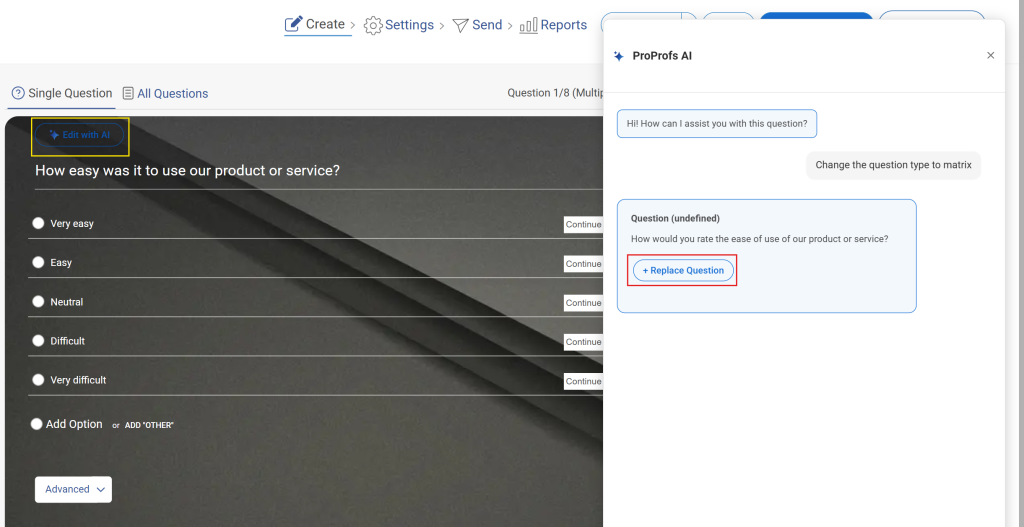
You do not need to build the base survey question by question before adding logic. ProProfs AI Survey Maker can generate the full first draft, and you layer conditions on top of it:
Here’s the full breakdown:
Step 1: Describe Your Survey Goal in Plain Language
Tell ProProfs AI Survey Maker what you are trying to learn, the way you would explain it to a colleague, rather than write it as a formal brief.
“Employee engagement pulse survey for a 50-person team” or “post-purchase CSAT survey for an online store” is enough to work with.
Try it here:
Let ProProfs AI Build a Survey
Describe your survey and we'll create it for you
Already have a past survey or a research brief sitting in a document? Upload it as a PDF, DOCX, or TXT file instead, and the AI builds your draft from that instead of a prompt.
The AI turns that into a complete draft, with question wording, question types, and a sensible order already in place.
Read through the whole thing once before you touch any logic.
If something does not fit your audience, cut it or rework it now. It is much easier to settle on your questions first than to build a condition on top of one you end up deleting later.
Step 2: Review the Generated Questions and Pick Your Trigger Questions
Read back through the draft and notice which questions are closed-ended, meaning they have a small, fixed set of possible answers.
Those are your trigger candidates. Rating scales, NPS scores, Yes-or-No questions, and multiple-choice questions all work well here.
Open-ended text does not, because a condition needs a specific, predictable answer to check against, not a paragraph.
For a CSAT survey, the satisfaction rating itself is usually your trigger.
For an event survey, it is often a simple Yes or No about how someone attended.
Start with just one or two trigger questions. Trying to condition everything at once is how a survey ends up tangled before it even launches.
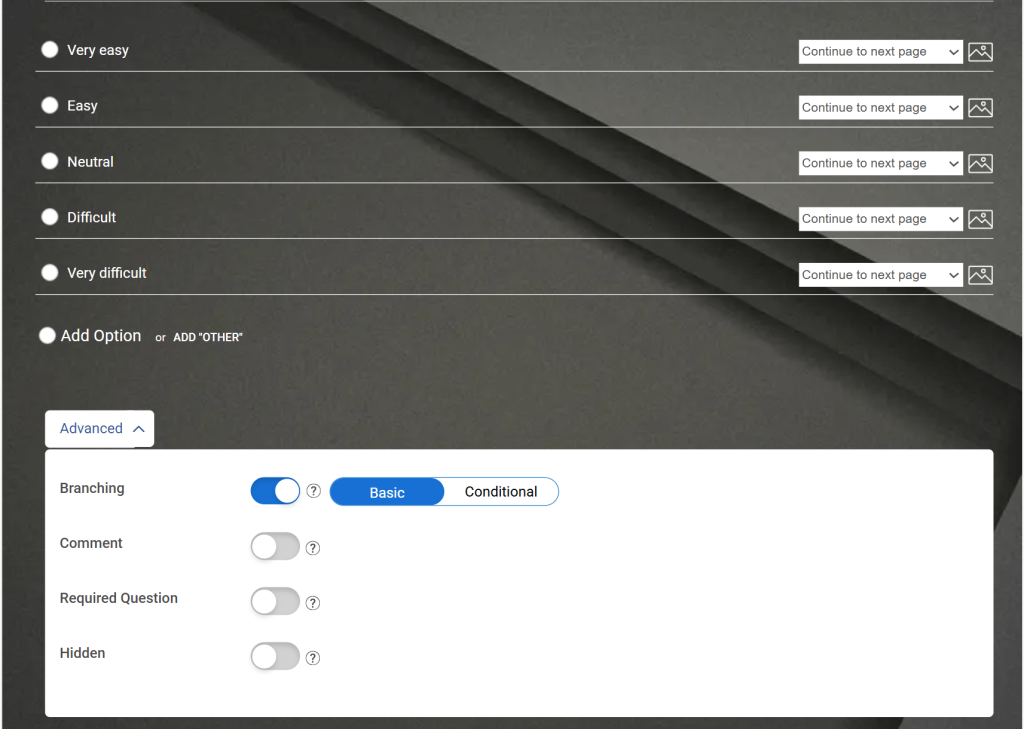
Step 3: Turn On Branching for the Trigger Question
Find the trigger question you picked and turn branching on for it specifically. This is what reveals the rule-building options for that question, which otherwise stay out of sight.
If those options are not showing up, double-check that you are working on the trigger question itself, not the follow-up question you eventually want to show.
The rule always belongs to the question that comes first in the sequence.
Here’s how it works:
Step 4: Handle Single-Answer Rules in Basic Mode
Basic mode is the default, and it covers most of the questions in the list above. For each individual answer to your trigger question, you can point to what should happen next.
Send that specific answer to the follow-up question it should lead to.
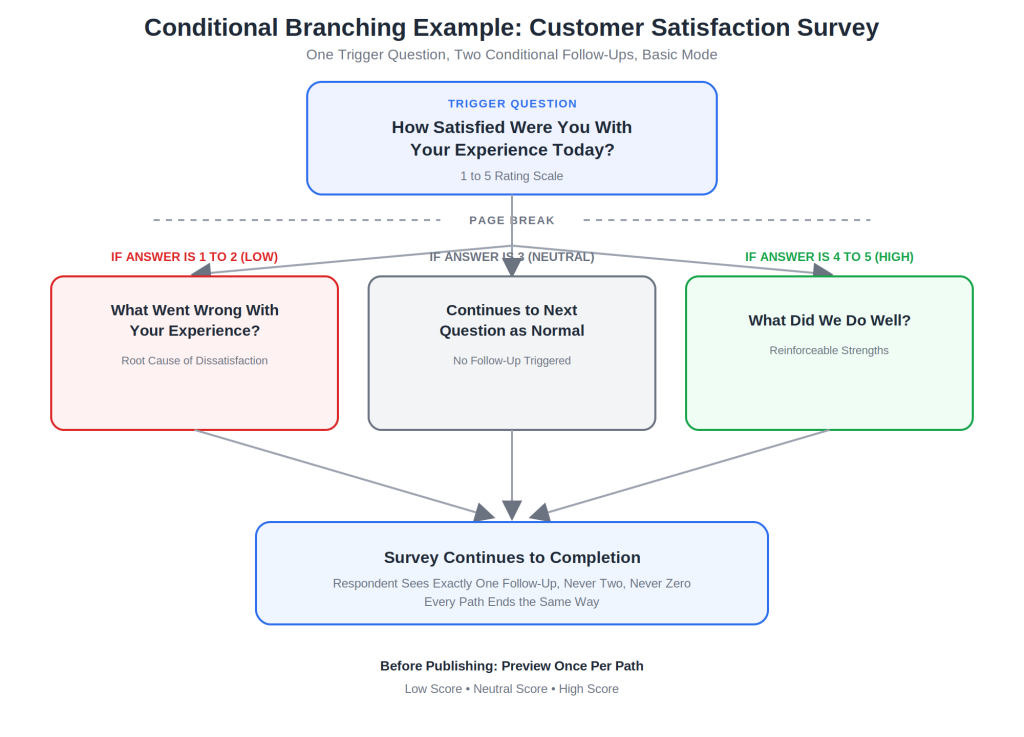
For example, on a CSAT question with a 1 to 5 scale, send answers 1 and 2 to your “what went wrong” follow-up, and send answers 4 and 5 to your “what did we do well” follow-up. Leave answer 3 to continue on as normal, since a neutral score does not clearly belong to either one. This single setup covers the entire Customer Satisfaction table above.
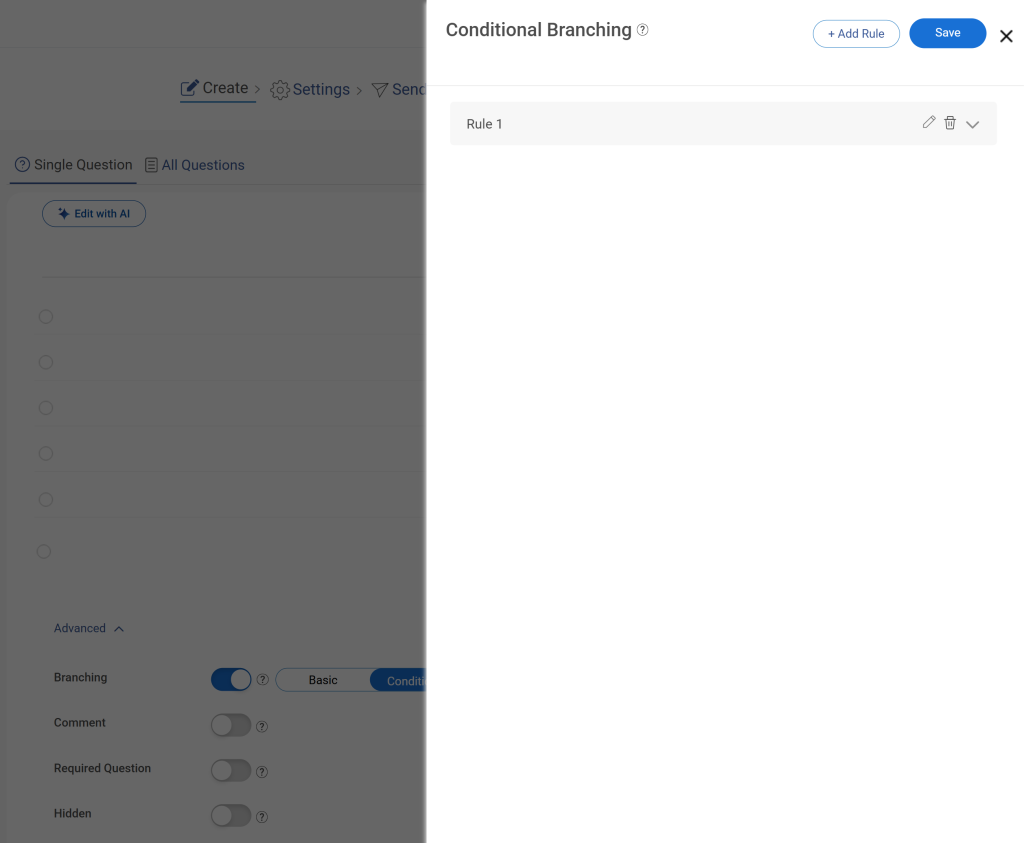
Step 5: Move to Conditional Mode When a Rule Needs More Than One Answer
Reach for this only when a single answer is not enough information to decide the next question, meaning the rule needs to weigh two or more prior answers together.
Switch that question’s logic from Basic to Conditional.
Decide whether every condition needs to be true at once, which calls for AND, or whether just one being true is enough, which calls for OR.
Then build each condition in turn: the question it checks, how it should be evaluated (is, is not, contains, or greater than, depending on the question type), and the value it is being checked against.
A scored assessment that shows a follow-up only when the score is below the threshold and the respondent is a manager needs this mode, since the Basic mode cannot weigh two answers together.
Step 6: Walk Through Every Path Before Publishing
Preview the survey once for every distinct answer you attached a condition to.
Confirm the right follow-up shows up, the wording still reads naturally given that path, and the survey wraps up properly, no matter which way someone went through it.
Because the AI already handled the base structure and question types, most of what’s left is attaching conditions to two or three key questions, not rebuilding the survey from scratch.
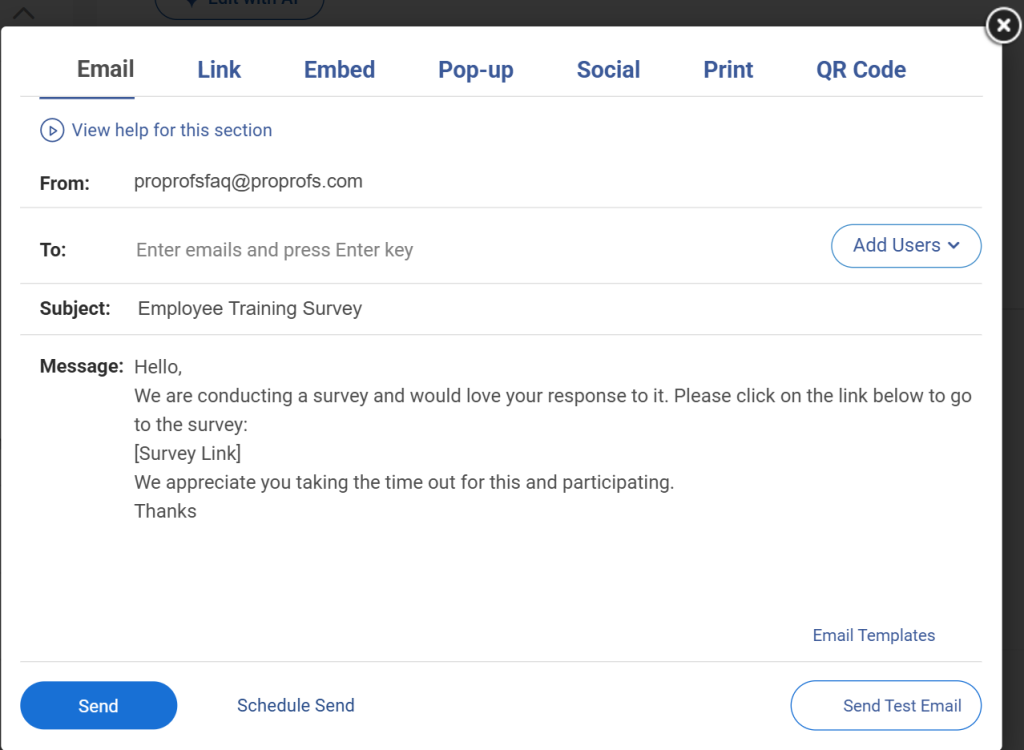
Then publish and distribute your survey.
What Does This Look Like End to End?
Here is one full example, start to finish, using a customer satisfaction survey.
Your trigger question is: “How satisfied were you with your experience today?” on a 1 to 5 scale. In the question’s Advanced settings, you turn on branching and stay in Basic mode, since each answer choice can be handled on its own.
For answers 1 and 2, you set the Jump To destination to a new question: “What went wrong with your experience?” This is the exact row from the Customer Satisfaction table above.
For answers 4 and 5, you set the destination to a different question: “What did we do well?”
Answer 3 continues on to whatever comes next in the default order, since a neutral score does not clearly belong to either follow-up.
You then add a page break directly after the trigger question, so the two possible follow-ups do not sit on the same page as unrelated questions.
Finally, you preview the survey three times, once selecting a low score, once a middle score, and once a high score, confirming each time that the respondent only ever sees one of the two follow-ups, never both, and never neither.
That is the entire build. Two questions, one rule, three preview runs, and the survey now adapts based on how someone actually felt about their experience.
FREE. All Features. FOREVER!
Try our Forever FREE account with all premium features!
What Should You Check Before Publishing a Conditional Question?
A rule that looks correct in the builder can still break in front of a real respondent. Work through these before you publish, not after responses start coming in.
1. Preview Every Distinct Path, Not Just the Default One
Open preview mode and answer the trigger question with each option you have a rule attached to, one run per option.
If your trigger has four possible answers with different destinations, that is four separate preview runs.
Confirm the correct follow-up shows up every time, and that no path accidentally leads to a dead end or loops back to a question already answered.
2. Confirm How Skipped Questions Are Recorded in Your Reports
Before you collect a single response, open your reporting dashboard on a test response and check how a skipped question appears. It should show as not applicable, not as blank.
If your export or dashboard does not distinguish between the two, note that now, since fixing it after real data has already come in means you cannot always tell which skips were intentional.
3. Test on an Actual Phone, Not Just a Desktop Preview
Open the live preview link on your own phone and walk through at least one branched path.
Look specifically for a follow-up question that lands below the fold, since a respondent who does not immediately see it may assume the survey ended and close it out.
If anything is cut off or requires scrolling to notice, shorten the question above it or reorder the flow.
4. Double-Check Whether a Rule Needs AND or OR Logic
If any question uses Conditional mode with more than one condition, reread the rule out loud before publishing.
Ask whether the outcome should only happen when every condition is true at once, which needs AND, or whether any single condition being true is enough, which needs OR.
This is the single most common source of a rule firing for the wrong group of respondents. The payoff for getting this right shows up in the numbers.
Pew Research Center’s March 2026 panel survey recorded a 87% response rate and a break-off rate of just 1% among respondents who started it, evidence that a survey which stays relevant and short for each respondent keeps people through to the end.
Where Do You Go From Here?
You do not need to overhaul your entire survey to see the benefit.
Pick one question from the list above that fits a survey you already have, whether that is a low CSAT score, a detractor NPS response, or a rough first week for a new hire, and attach a single condition to it.
That one change is usually enough to show up in your next round of results.
Respondents who used to guess through irrelevant questions get a shorter, more relevant path, and the follow-up data you collect actually tells you what to do next instead of just confirming there was a problem.
From there, expanding to two or three conditions across your most important surveys is a small, repeatable habit, not a redesign project.
If you are building this in ProProfs Survey Maker, the setup takes a few minutes on a question you already have live today. The free plan covers this, so there’s nothing stopping you from testing it on a live question today.
Frequently Asked Questions
What is the difference between conditional survey questions and a building condition survey?
A conditional survey question is a follow-up that appears inside an online survey based on a prior answer, controlled by tools like ProProfs Survey Maker. A building condition survey is unrelated. It is a physical inspection of a property's structure, roofing, electrical, and plumbing systems, usually performed by a licensed surveyor or engineer.
Can you add conditional logic to a checkbox question?
Yes, most modern survey tools support conditional logic on checkbox questions, and this one is no exception. Behavior can get tricky when a respondent selects multiple options that are each tied to a different rule, since the tool has to decide which path takes priority. Always test multi-select conditions with several answer combinations before you launch the survey to respondents.
How many conditions can one question have?
This depends on the survey tool you use. Basic modes usually support one condition per rule, checking a single prior answer. If a follow-up needs to depend on two or more prior answers at once, switch to a conditional or rule-based mode that supports AND and OR logic, since basic mode cannot combine multiple conditions.
Should demographic questions use conditional logic?
Yes, in most cases. Gate sensitive or demographic questions behind a condition, so only the relevant respondents see them, such as only asking about team size after someone confirms they hold a leadership role. Always include an option to decline answering, and place these questions later in the survey rather than at the very start.
What happens to skipped questions in my survey data?
A correctly skipped question should be recorded as not applicable, not left blank, since a blank value could mean the respondent skipped it, abandoned the survey entirely, or was routed past it by a rule. Confirm exactly how your survey platform labels these before you start collecting real responses, so your analysis is not distorted later.
Can I preview a branched survey before sending it?
Yes, every major survey tool includes a preview mode, and you should use it before every launch. Walk through each distinct answer path individually rather than only checking the default route, since previewing just one path is the most common reason builders miss dead ends or duplicate follow-ups hiding in less common branches of the survey.
Does ProProfs AI Survey Maker write the conditional questions for me?
It generates the base survey and suggests relevant question types directly from your plain-language prompt, giving you a working first draft in seconds. You still choose which questions act as triggers and set the specific conditions yourself, since only you know which answers should route to which follow-up question for your particular audience and goal.
Let ProProfs AI Build a Survey
Describe your survey and we'll create it for you
FREE. All Features. FOREVER!
Try our Forever FREE account with all premium features!
ProProfs Survey Maker Editorial Team is a passionate group of seasoned researchers and data management experts dedicated to delivering top-notch content. We stay ahead of the curve on trends, tackle technical hurdles, and provide practical tips to boost your business. With our commitment to quality and integrity, you can be confident you're getting the most reliable resources to enhance your survey creation and administration initiatives.




 We'd love your feedback!
 Thanks for your feedback!