

A net promoter score email is a short, single-question survey sent to customers or employees asking how likely they are to recommend your business on a 0 to 10 scale.
Responses fall into three groups: Promoters (9-10), Passives (7-8), and Detractors (0-6). Your NPS is the percentage of Promoters minus the percentage of Detractors.
Most businesses send an NPS survey, collect a number, and do absolutely nothing with it. The score sits in a dashboard. Leadership mentions it in a quarterly review. The customer who gave you a 3 never hears back. That is not a loyalty program. That is survey theater.
A well-built net promoter score email does three things: it asks the right question at the right moment, routes the response to the right follow-up, and closes the loop in a way that actually builds trust.
Tools like ProProfs Survey Maker are built specifically for this, handling everything from the initial send to the segmented follow-up without needing five different platforms.
Here is how to do it right, from writing the email to acting on the data.
What Do You Do Before Creating a Net Promoter Score Email Survey?
Creating an NPS email means deciding who gets it, when it goes out, what question it asks, and what happens after someone responds. The email itself is simple. The system behind it is what makes it work.
There are two types of NPS emails, and choosing between them is your first decision:
| Type | Timing | Goal | Frequency | Best For |
|---|---|---|---|---|
| Relationship NPS | Quarterly or biannually | Overall brand loyalty | Max twice a year | Long-term trend tracking |
| Transactional NPS | Within 24 hours of a trigger | Specific experience quality | Once per event | Immediate feedback |
Once you know which type you are running, here is the full workflow:
- Choose your survey type. Relationship NPS measures overall sentiment over time. Transactional NPS captures how someone felt about a specific moment, purchase, support call, onboarding step, cancellation.
- Define your audience segment. New customers, long-term accounts, churned users, or employees (eNPS). Each group requires different tone and timing.
- Set your trigger. Purchase confirmation, resolved support ticket, onboarding completion, calendar-based send, or cancellation event.
- Analyze by cohort and time period. A single score means very little. Trend direction and segment differences are where insights live.
Quick Note: For B2B accounts, prioritize the primary decision-maker’s response over individual user volume. One honest response from the contract owner outweighs ten casual users.
How Do You Create a Net Promoter Score Email Survey?
To demonstrate the build process, I’m using ProProfs Survey Maker because it keeps the setup straightforward without removing important configuration options. You can either build with AI assistance or use a structured NPS flow.
Method 1: Use ProProfs AI to Refine Follow-Up Questions
The rating captures the score. The follow-up captures the reason, and wording matters more than most teams realize. Here’s a quick video for you to learn how to create an NPS survey:
Step 1: Create the Base Survey
- Hover over “Create a Survey.”
- Choose “Create from Scratch” or select an NPS template.
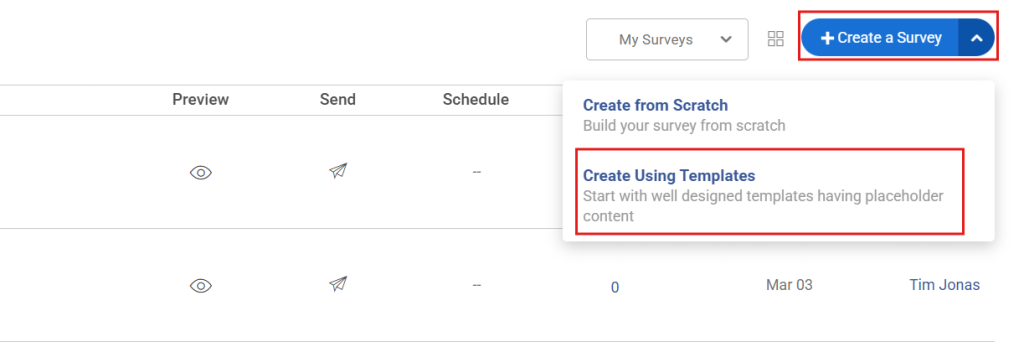
- The standard 0–10 question and basic follow-up are included.
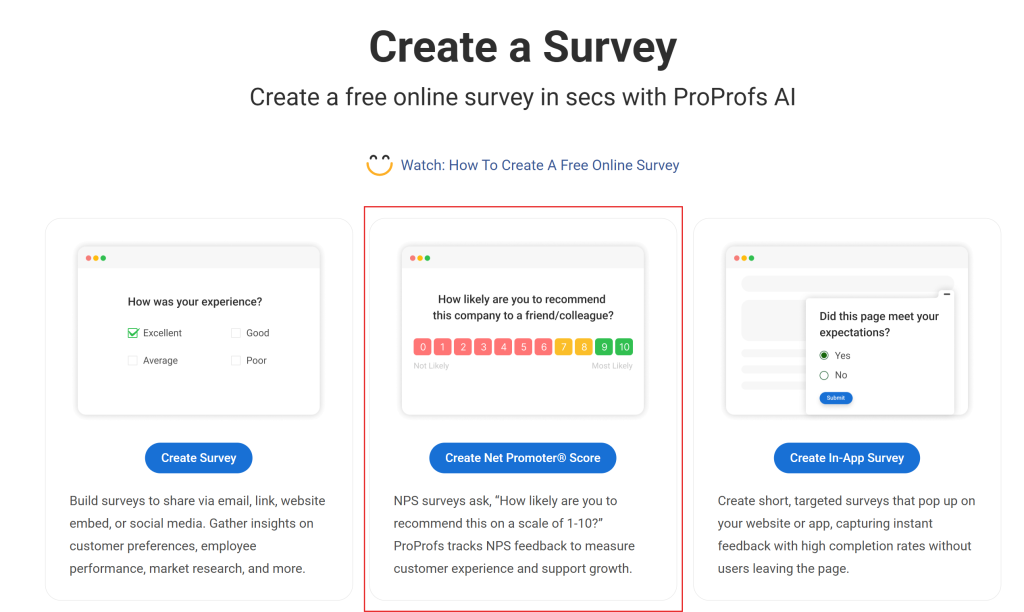
Step 2: Select “Create Net Promoter® Score.”
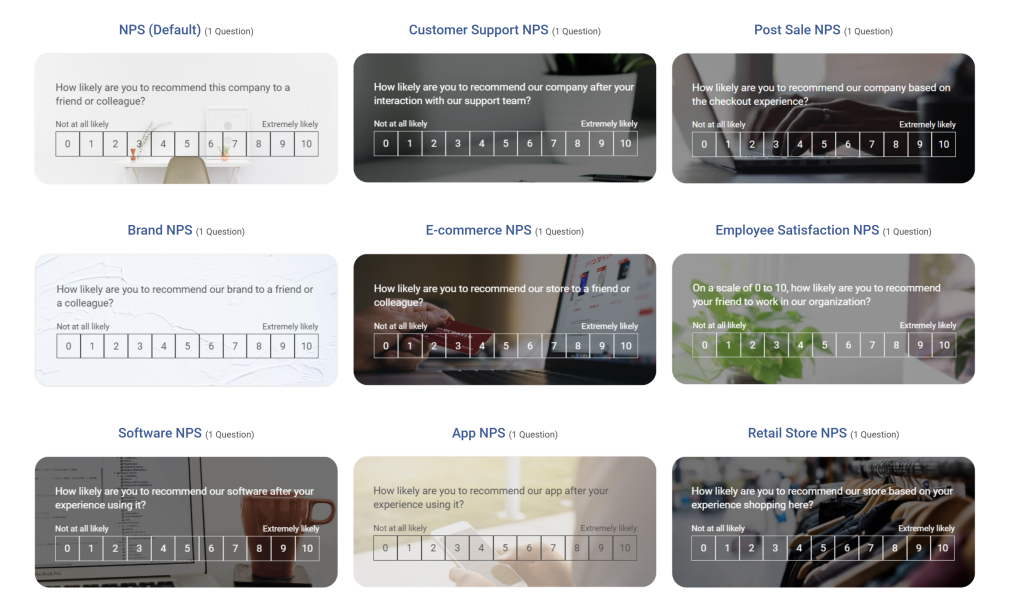
Step 3: Choose from the NPS templates the one you want to use:
Step 4: Generate or Improve Follow-Ups With AI
Click “Add Question” → “Generate with ProProfs AI.”
- Enter a short description (e.g., “Customer NPS survey for SaaS onboarding”)
- Add brief context
- Select NPS as the question type
- Choose number of questions
- Click Generate
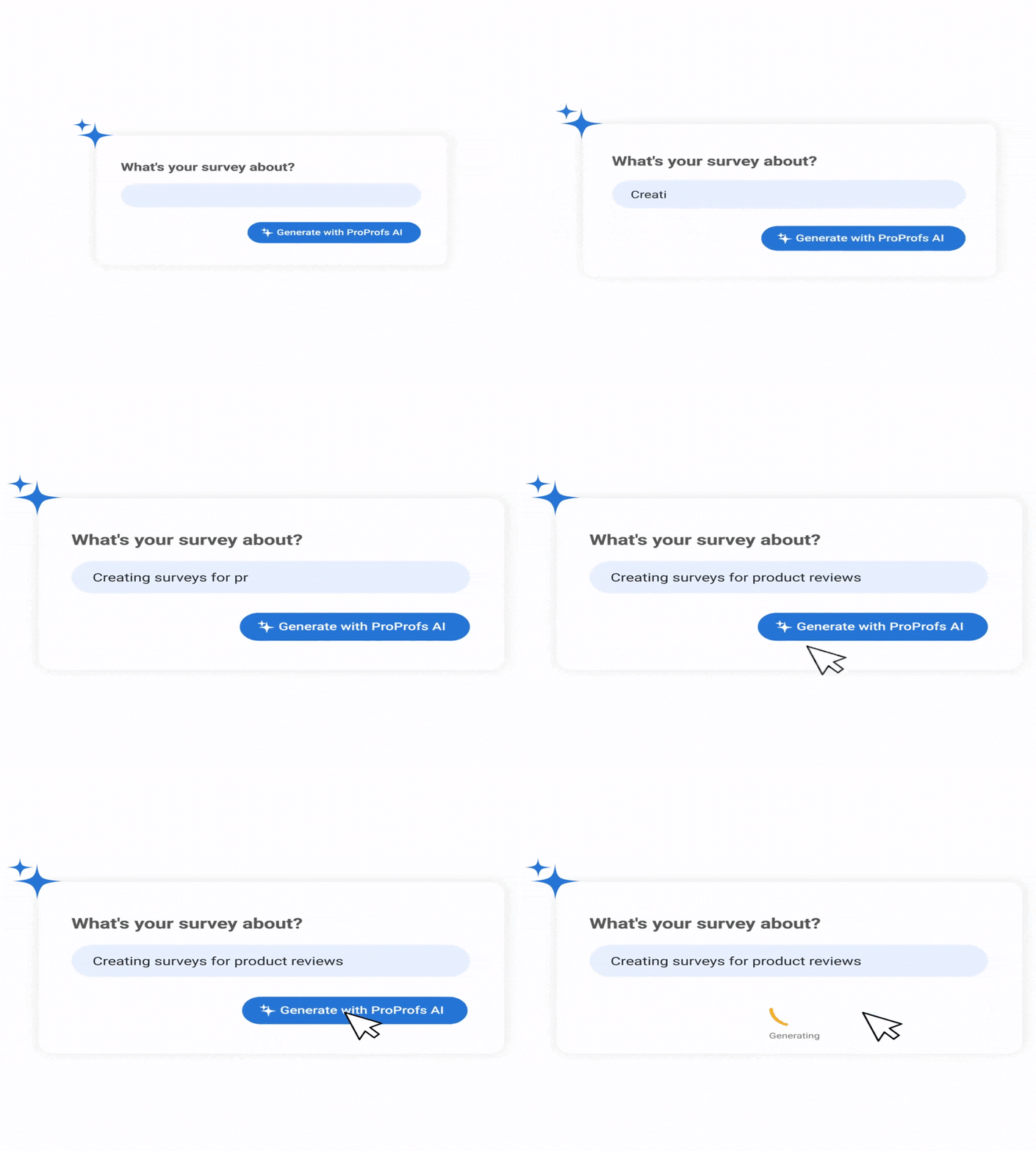
Review, add, delete, or regenerate.
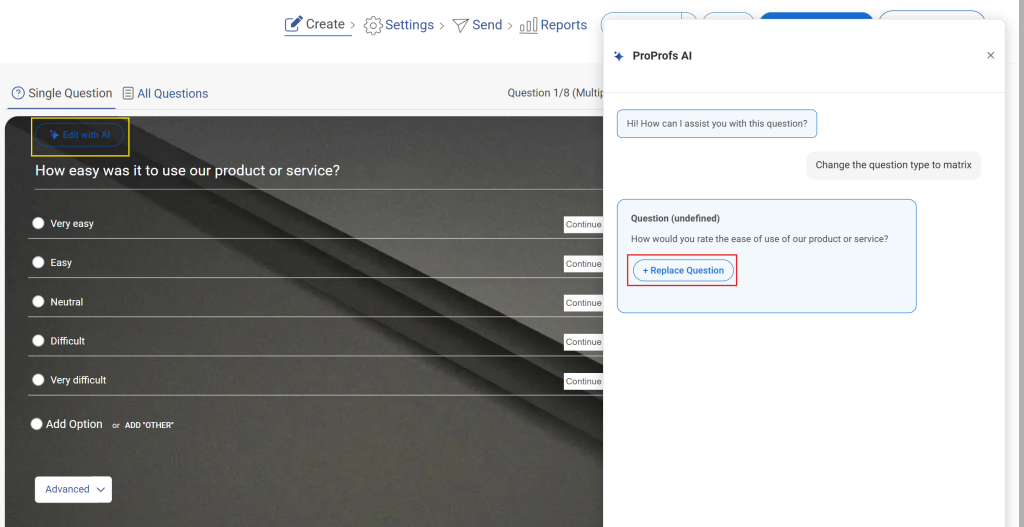
To refine an existing question, click “Edit With AI”, enter an instruction like “make this more conversational,” then regenerate and replace.
Step 5: Configure Settings
In Settings:
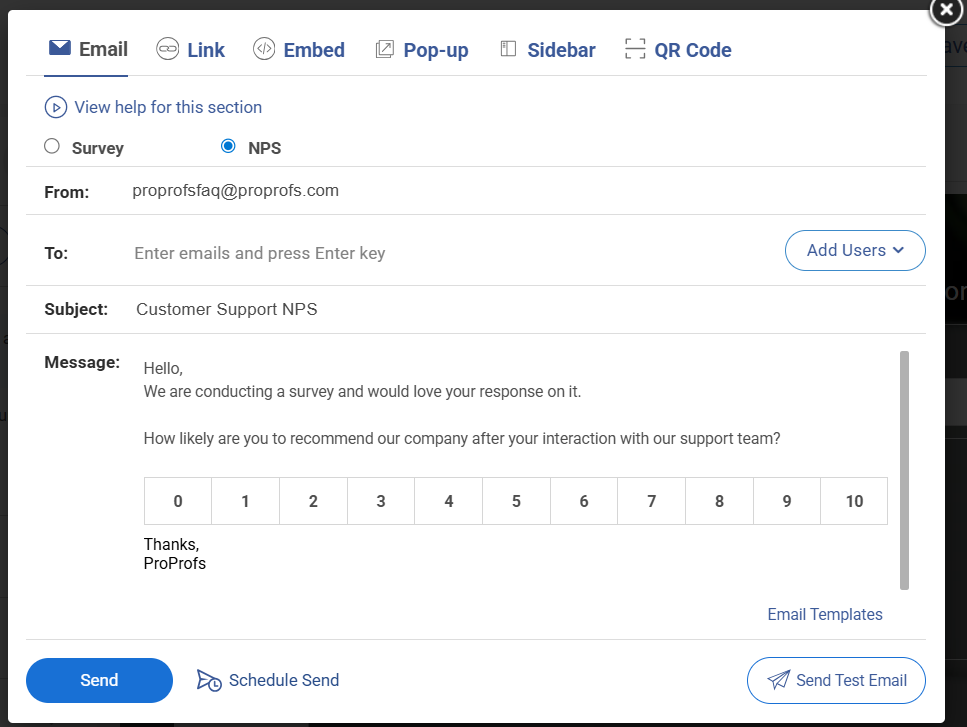
- Choose distribution channel
- Set start/end dates
- Limit response frequency
- Enable anonymous mode
Here’s a quick video for you to learn more about creating anonymous surveys:
Launch and monitor responses in the dashboard.
What Should You Include in an NPS Email?
A good NPS email has five components: a subject line that earns the open, a short personalized intro, an embedded rating scale, one follow-up question, and a clear sender identity. Anything beyond that is friction.
How Should the Subject Line for an NPS Email Be Written?
The subject line has one job: get the open. Short, lowercase, interpersonal subject lines outperform branded formal ones by a significant margin.
- “Quick question” and “How did we do?” consistently hit good open rates.
- Using a fake “RE:” prefix or urgency language spikes spam reports and erodes trust fast.
- Including the sender’s real name in the preview text signals that a person is asking, not a CRM. That difference alone moves open rates.
- Lowercase informal subject lines feel less like marketing and more like a message from someone inside the company.
Three subject line formulas that consistently work:
- “Quick question, [Name]” mimics a direct message, triggers low-stakes social obligation to respond.
- “How was your experience with [recent interaction]?” is specific, contextual, and shows you know what they just did.
- “[Name], one question” is minimal and direct; works especially well for transactional surveys.
What Message Length Works Best for NPS Emails?
Under 100 words in the body copy. That is the ceiling, not a suggestion. One CTA: the embedded rating scale. No secondary links, no product announcements, no promotional content tucked at the bottom.
- Test the email on your own phone before sending. If the scale requires zooming or horizontal scrolling, the response rate drops sharply.
- Plain text or minimal HTML emails reach the inbox more reliably than heavily designed templates. They also feel more personal.
- If you include a follow-up question, it should appear after the click, on a confirmation page, not inside the original email.
How Do You Personalize NPS Emails to Improve Responses?
Personalization is not just adding a first name. It is connecting the email to something the customer actually did.
- Reference the specific recent interaction in the intro: “Thanks for working with our support team last week” beats “Thanks for being a customer.”
- Send from a real person, not a no-reply address. “Alex from Customer Success” with a monitored reply-to performs significantly better than “The [Brand] Team.”
- For B2C, segment by lifecycle stage. A new user email reads differently from one sent to a two-year customer.
- For B2B, route to the primary decision-maker first. Their response represents the account. Individual user responses can be collected separately.
Feature Breakdown:
| Feature | Explanation |
|---|---|
| Embedded Rating Scale | Removes the need to click out to a form. Reduces friction and lifts response rates to the 35–40% range versus link-only surveys at 15–25%. |
| Real Sender Name | Increases open and reply rates. Signals human communication rather than automation. Customers who want to reply can actually reach someone. |
| Open-Ended Follow-Up | Surfaces qualitative themes the numeric score cannot explain. The comment is where the real data lives. The number tells you sentiment; the comment tells you why. |
| Mobile-Optimized Layout | Over 60% of emails are opened on mobile. A rating scale that requires zooming will not get clicked. Test before sending, every time. |
What Are the Best NPS Email Templates for Every Situation?
The right NPS email template depends on where the customer is in their journey with you. A post-purchase email reads differently from a churn follow-up. Use these as starting points and adjust the tone to match your brand.
Template 1: Customer Satisfaction NPS
When to Use: Post-purchase or post-onboarding milestone.
Timing Note: Send within 24-48 hours of a purchase or milestone. Embed the scale as clickable buttons. Keep everything above the fold on mobile.
Subject Line: Quick question about your recent experience
Body: Hi [Name],
Thanks for choosing [Product/Company]. We are always working to improve, and your feedback helps more than you might think.
On a scale of 0 to 10, how likely are you to recommend us to a friend or colleague?
[0] [1] [2] [3] [4] [5] [6] [7] [8] [9] [10]
Thanks,
[Your Name], [Company]
Template 2: Detractor Follow-Up
When to Use: Score 0-6.
Timing Note: Empathy comes first, resolution second. Send personally within 24-48 hours. Do not automate the tone out of this one.
Subject Line: We hear you and want to make it right
Body: Hi [Name],
Thank you for your honest feedback. I am sorry we fell short this time.
I would genuinely like to understand what went wrong so we can fix it, not just for you, but for everyone. If you are open to it, hit reply or book a quick 5-minute call: [Link]
We are listening and we will act on what you tell us.
[Your Name]
Template 3: Promoter Follow-Up
When to Use: Score 9-10.
Timing Note: Warm, not transactional. The referral or review ask should feel like a natural extension of a good conversation, not a sales push.
Subject Line: Glad you loved it. Can you help us grow?
Body: Hi [Name],
Thank you so much for the kind feedback. It genuinely means a lot to the team.
If you know someone who would benefit from [Product], we would love it if you passed us along. You can also leave us a quick review here: [Link]
It helps others find us and helps us keep building something worth recommending.
Thanks again,
[Your Name]
Template 4: Passive Follow-Up
When to Use: Score 7-8.
Timing Note: Specific and low-pressure. The “one thing” framing makes it easy to respond. Log recurring answers to your product backlog.
Subject Line: How can we make this a 10 for you?
Body: Hi [Name],
Thanks for your feedback. We are glad things went reasonably well, but we want to do better.
If there is one thing we could change to make your experience a 10, what would it be? Just hit reply. Even a short answer helps a lot.
Appreciate your time,
[Your Name]
Template 5: Post-Onboarding NPS
When to Use: 1-2 weeks after setup.
Timing Note: Early impressions are high-signal. This is where you catch confusion or friction before it turns into churn.
Subject Line: Now that you have settled in, how is it going?
Body: Hi [Name],
You have been using [Product] for a little while now.
We would love to know how your first impression is holding up.
On a scale of 0 to 10, how likely are you to recommend us to a colleague?
[0] [1] [2] [3] [4] [5] [6] [7] [8] [9] [10]
Thanks for helping us improve,
[Your Name]
Template 6: Churn Feedback NPS
When to Use: After cancellation.
Timing Note: Non-defensive tone is critical here. The data from churned customers is some of the most valuable you will ever collect.
Subject Line: We are sorry to see you go. Can you tell us why?
Body: Hi [Name],
We are sorry to see you go, and we genuinely appreciate the time you spent with us.
If you have a moment, we would love to understand your decision a little better. On a scale of 0 to 10, how likely are you to recommend us to others, despite canceling?
[0] [1] [2] [3] [4] [5] [6] [7] [8] [9] [10]
No hard feelings. Just honest feedback. [Your Name]
ProProfs Survey Maker comes with these templates pre-built, so you can launch your first NPS email in minutes without writing from scratch.
You can also customize them for your brand, set up automated follow-up sequences by score, and track trends over time, all from one place.
FREE. All Features. FOREVER!
Try our Forever FREE account with all premium features!
What Are the Best Practices to Increase NPS Email Response Rates?
NPS email best practices are the decisions that separate a 12% response rate from a 35% one. Most of them are not about design. They are about trust, timing, and what you do after the response lands.
Why Do Most NPS Emails Fail to Get Responses?
| Mistake | What Goes Wrong | The Fix |
|---|---|---|
| Sending too often | Fatigue, ignores, unsubscribes | 30-day blackout per contact; quarterly max for relationship NPS |
| No-reply sender address | Feels robotic; customers who want to respond cannot | Real name and monitored reply-to address, always |
| Ignoring detractors | Customer churns feeling unheard | Personal outreach within 24-48 hours, every time |
| Generic copy | Low open and response rates | First name plus recent interaction in the opener |
| Score-based incentives | Biased data; inflated scores that mean nothing | Remove score link; reward completion only, not the number given |
| Never closing the loop | Customers stop responding over time | "You said, we did" update to respondents every 30-60 days |
What Do NPS Email Response Rate Benchmarks Look Like?
According to Bain & Company, the NPS originators, anything less than 40% for B2C is a red flag; aim for 40%+ for reliable insights.
Response rates drop sharply after three surveys within a 90-day window to the same contact. If you are seeing declining rates, survey fatigue is usually the cause before deliverability.
NPS Scores Mean Different Things in Different Markets
NPS scores vary culturally. As I read in a Reddit thread, generally, Americas (e.g., US, Brazil) tend to give higher scores, and Asia (Japan, South Korea) often yields lower scores due to cultural tendencies against giving perfect ratings.
Northern European respondents, particularly in Germany, Finland, and the Netherlands, rarely give a 10, even when they are fully satisfied. A raw NPS in the low 30s from a customer base concentrated in those markets may actually represent very strong loyalty.
Always track directional change over time rather than anchoring to an absolute number, and benchmark against regional norms when possible. This is one of the most commonly missed variables in global NPS programs.
What Does a Real Before-and-After NPS Email Improvement Look Like?
Before:
- Generic subject line: “Tell us how we did”
- Link-only survey, no embedded scale
- Same follow-up sent to all respondents
- No reply to detractors within 48 hours
- No loop closure
- Result: 12% response rate, high detractor churn
After:
- Personalized subject with name and recent event
- Embedded 0-10 scale in email body
- Segmented follow-ups by score within 24 hours
- Personal detractor reply within 48 hours, every time
- “Here is what changed” email sent 30 days later
- Result: 31% response rate, 22% detractor-to-passive shift
The lesson: the email template was not what changed. The workflow behind it was. A well-written survey sitting in a broken process will always underperform.
How Does Deliverability Affect Whether Your NPS Email Gets Seen?
This is the section most guides skip entirely. Your NPS email can be perfectly written and still land in Promotions or spam.
- Plain text or minimal HTML reliably outperforms heavily designed templates for inbox placement. It also feels more personal.
- Avoid spam-trigger words in subject lines: “free,” “urgent,” “limited time,” anything in ALL CAPS.
- If you are using a new sending domain, warm it up with small batches and monitor bounce and complaint rates before scaling.
- A real sender name reduces the likelihood of hitting the Promotions tab compared to a brand alias address.
- Keep your send list clean. Bounced or unengaged addresses hurt your sender reputation over time.
When Should You Send an NPS Email?
Timing an NPS email is about catching someone when the experience is still fresh and their attention is actually available. Too early and they have not formed an opinion. Too late and the moment has passed.
What Is the Right Timing for Relationship NPS Emails?
- Send quarterly or biannually during stable business periods, not during outages, right after a price increase, or around major holidays.
- Mid-week is your best window: Tuesday through Thursday, 9-11am in the recipient’s local time zone. Monday carries inbox backlog; Friday carries weekend wind-down.
- For B2B teams, rotate respondents within an account across survey cycles rather than hitting the same contact repeatedly. This keeps data fresh without burning out individuals.
When Should Transactional NPS Emails Go Out?
- Trigger within 0-24 hours of the event: a purchase, a support ticket resolved, an onboarding step completed, or a cancellation.
- Beyond 48 hours, recall degrades. The response becomes less about the specific experience and more about general sentiment.
- The faster the follow-up, the sharper the data. For support interactions, especially, same-day sends show the clearest signal.
How Does Timing Work for Employee NPS (eNPS) Surveys?
- Quarterly pulse surveys work best at consistent intervals, so employees expect them and trust the cadence.
- Avoid scheduling annual engagement surveys during performance review cycles. Employees conflate the two, and the results become less honest.
- Anonymity is non-negotiable for eNPS. Without a genuine guarantee of anonymity, employees answer in ways they think are safe, not in ways that are true.
Which Features Should You Look for in Tools to Help You Send and Automate NPS Emails Effectively?
High NPS correlates with revenue growth and retention, but raw scores matter less than directional trends and competitive context. Bain & Company’s report stresses that loyalty leaders prioritize episode-level (journey-stage) insights and action on feedback, and tools that automate this (like AI tagging or closed-loop workflows) deliver the most impact.
An NPS email tool handles the mechanics: building the survey, delivering the email, segmenting responses, triggering follow-ups, and tracking trends over time. Doing this manually across spreadsheets and separate email platforms creates data gaps and delays the follow-up that actually matters.
What Features Should You Look for in an NPS Tool?
Not all NPS tools are built for long-term program management. Some simply collect scores. The right platform, however, improves response rates, automates follow-up, eliminates manual work, and gives you trend visibility over time.
When evaluating options, focus on features that reduce friction, protect data integrity, and turn feedback into action, not just ones that let you send a survey.
- Embedded Survey in Email: Removes the external form click. Directly lifts response rates into the 35–40% range versus 15–25% for link-only setups.
- Segmented Follow-Up Automation: Routes Promoters, Passives, and Detractors into different response sequences automatically, without manual sorting.
- Trend Tracking and Analytics: Single scores are not useful. Directional change across quarters and differences between cohorts are where the insight lives.
- CRM or HRIS Integration: Eliminates manual contact uploads. Syncs demographic and account data for proper segmentation without extra administrative work.
- Pre-Built Templates: Reduces setup from days to minutes. Particularly useful for teams running both customer NPS and employee eNPS in the same platform.
- Anonymity Controls: Non-negotiable for eNPS surveys. Without it, you get socially acceptable answers, not honest ones.
How Does ProProfs Survey Maker Help With Net Promoter Score Emails?
Instead of just sending a basic survey link, ProProfs helps you build, automate, and manage a complete NPS email workflow from embedded scoring to follow-up and reporting.
• Embeds the 0–10 scale directly in the email: Removes the extra click to an external form, which helps increase completion rates and reduces friction.
• Automates follow-up by score: Instantly routes Promoters, Passives, and Detractors into different response sequences so no feedback sits unattended.
• Supports both customer NPS and eNPS: Run external customer surveys and internal employee surveys in the same platform with different anonymity and segmentation controls.
• Offers AI-powered creation and follow-up question generation for net promoter score email survey: Helps refine open text questions so you collect meaningful “why” responses instead of vague comments.
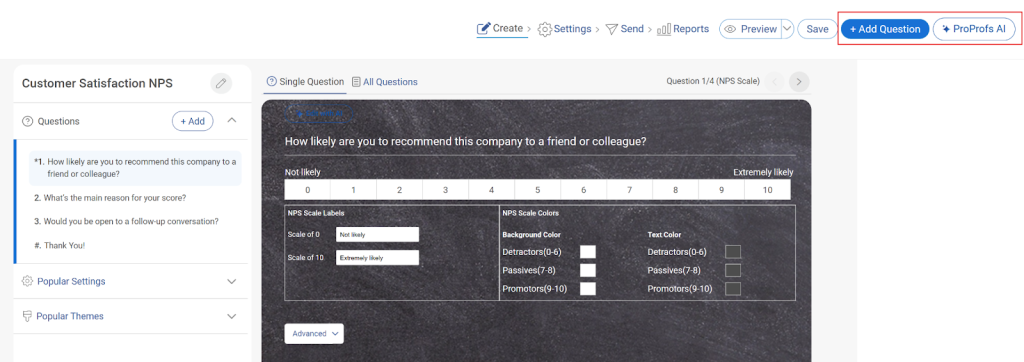
Provides real-time analytics and trend tracking: Monitor directional change across time periods and filter by cohorts to identify patterns, not just snapshot scores.
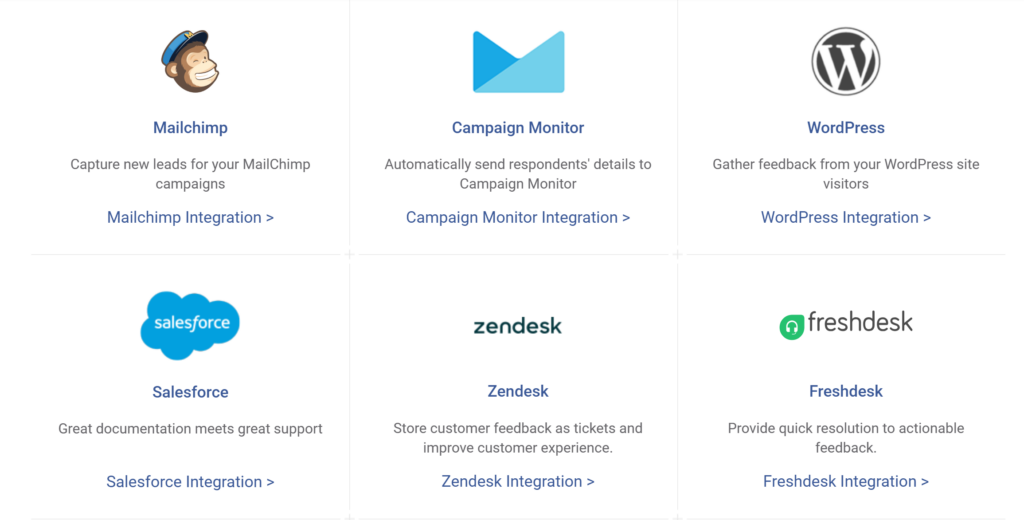
• Integrates with CRM and HR systems: Syncs contact and account data automatically to eliminate manual uploads and improve segmentation accuracy.
• Includes pre-built NPS templates: Reduces setup time from days to minutes while still allowing full customization of scale labels, branding, and messaging.
Together, these capabilities turn a simple NPS email into a structured feedback system that drives measurable action.
Who Uses NPS Email Tools and How?
1. SaaS Startups:
Start simple and intentional.
- Primary use: One biannual relationship NPS to understand overall sentiment.
- Goal: Establish a baseline and identify early product-market fit signals.
- How to run it well:
- Send from a founder or recognizable name to boost trust.
Pair the score with one open-ended question: “What’s the main reason for your score?” - Tag responses manually (e.g., pricing, bugs, missing features) to find patterns.
- Send from a founder or recognizable name to boost trust.
- When to expand: Once you have consistent support volume or onboarding flows, introduce transactional NPS (e.g., after onboarding or support resolution).
2. Mid-Market SaaS:
Move from insight → system.
- Primary use:
- Transactional NPS: after support tickets, onboarding completion, key feature usage.
- Quarterly relationship NPS: to track overall sentiment trends.
- Goal: Turn feedback into a repeatable input for product and CX decisions.
- How to run it well:
Segment responses by persona (admin vs end-user), plan tier, or lifecycle stage. - Track trends over time, not just the score, but why it’s moving.
- Set internal SLAs: e.g., follow up with detractors within 24–48 hours.
- What becomes critical:
- Trend tracking dashboards (weekly/monthly)
- Closed-loop workflows tied to support or success teams
- Identifying leading indicators of churn (especially neutral scores)
- 3. HR Teams:
- Trust and anonymity are everything.
- Primary use:
- Quarterly eNPS (employee sentiment pulse)
- Annual engagement survey (deeper diagnostics)
- Goal: Measure employee loyalty and uncover systemic culture issues.
- How to run it well:
- Guarantee and clearly communicate anonymity—this directly impacts honesty.
- Break results down by department, tenure, and manager (without exposing individuals).
- Add a follow-up like: “What’s one thing we could improve?”
- Operational needs:
- HRIS integration (for org structure, segmentation, and automation)
- Clear ownership: HR analyzes, managers act on team-level insights
- Best practice: Share results transparently and follow up with visible actions—otherwise trust drops quickly.
- 4. Enterprise:
- Scale, segmentation, and precision.
- Primary use:
- Multi-layered NPS: relationship + transactional across touchpoints
- Global programs across regions, languages, and business units
- Goal: Tie customer sentiment directly to revenue, retention, and account health.
- How to run it well:
- Weight responses by account value (e.g., ARR, contract size)
- Prioritize feedback from decision-makers and key stakeholders
- Localize surveys (language + cultural nuance) for higher accuracy
- Advanced capabilities:
- Account-level NPS (aggregating multiple contacts per account)
- Integration with CRM (e.g., triggering alerts for at-risk accounts)
- Role-based dashboards (exec, regional, product teams)
- What success looks like:
- NPS feeds directly into account planning, renewals, and expansion strategy
- Regional teams act on localized insights, not just global averages
| Use Case | Recommended NPS Type | Frequency | Key Feature Needed |
|---|---|---|---|
| SaaS Startups | Relationship NPS | Biannual | Pre-built templates, embedded scale |
| Mid-Market SaaS | Relationship + Transactional | Quarterly + per trigger | Trend tracking, segmented follow-up automation |
| HR Teams | eNPS | Quarterly | Anonymity controls, HRIS integration |
| Enterprise | Relationship + Transactional | Quarterly + per trigger | Account-level weighting, multi-region support |
ProProfs Survey Maker handles all four of these use cases in one platform: customer NPS, employee eNPS, transactional workflows, and trend analytics, without the need for separate tools or manual data consolidation. It is built so your team can get the first survey out the same day you set it up.
What Does a Good NPS Email Program Actually Look Like When It All Comes Together?
Most teams treat NPS as a reporting exercise. Send the survey, log the score, move on.
But the businesses that actually use it to grow do something different: they treat the response as the start of a conversation, not the end of one.
The score tells you where you stand. The follow-up tells you why. The closed loop tells your customers that you were actually listening.
Put those three things together, and NPS stops being a vanity metric and starts being one of the most reliable signals you have for retention, referrals, and product direction.
You do not need a complex system to get started. You need a clear trigger, a short, honest email, and a follow-up workflow that routes responses to the right person within 48 hours. Everything else builds from there.
If you are starting from scratch or fixing a program that has gone quiet, ProProfs Survey Maker gives you the foundation to do it without stitching together multiple tools.
It also has a free forever plan that includes all premium features, so you can set up your first NPS email, test the follow-up workflow, and see real responses before committing to anything.
Frequently Asked Questions
How often should you send NPS emails without causing survey fatigue?
For relationship NPS, once per quarter is the maximum, and twice a year is often better. For transactional NPS, once per trigger event. Apply a 30-day blackout per contact between any surveys to avoid fatigue and response quality decline.
What is the difference between transactional and relationship NPS emails?
Relationship NPS measures overall brand sentiment and is sent quarterly or biannually during stable periods. Transactional NPS captures how someone felt about a specific interaction and should be sent within 24 hours of that event to get accurate data.
Should you offer an incentive to complete an NPS email survey?
Avoid tying any reward directly to the score given. Score-based incentives produce inflated, biased data that is not useful for decisions. If you use incentives at all, offer them for completing the survey regardless of what number the customer selects.
How do you follow up with a customer who gives a low NPS score?
Send a personal reply within 24-48 hours. Lead with empathy, not a solution. Acknowledge what went wrong, ask one specific question about what they experienced, and then follow up with what you changed. Research shows that a small percentage of detractors can represent significant lost revenue if ignored.
Can you embed the NPS rating scale directly inside the email?
Yes, and you should. Embedded surveys consistently outperform link-only setups by 10-15 percentage points in response rate. Most modern email survey tools support clickable 0-10 buttons directly in the email body without requiring the recipient to visit an external page.
What subject line format gets the best open rate for NPS emails?
Short, lowercase, interpersonal subject lines consistently outperform branded formal ones. "Quick question" and "How did we do?" regularly hit 25-30% open rates. Avoid fake RE: prefixes and urgency language; they spike spam reports and permanently damage sender reputation.
How do you calculate NPS from email survey responses?
Subtract the percentage of Detractors (scores 0-6) from the percentage of Promoters (scores 9-10). Passives (7-8) are excluded from the calculation. A score of 30-70 is generally considered strong, and above 70 is world-class. Always analyze directional change over time, not just the absolute number.
FREE. All Features. FOREVER!
Try our Forever FREE account with all premium features!

 We'd love your feedback!
What did you like & how can we make it even better?

 Thanks for your feedback!
 Ask Your Question
Have a question? Get expert help to make your decision easier.