
Picking a voice of customer tool used to mean choosing between “cheap and basic” or “powerful and painful.” That gap has closed a lot faster than most buying guides admit.
You’re probably here because a current tool got expensive, got acquired, or never gave you insights you could actually act on.
All three are common right now. But some tools are built specifically to avoid that trap, with AI-assisted survey creation and no per-user fees.
This guide ranks the 10 best voice of customer tools, including ProProfs Survey Maker, based on real Capterra ratings, current pricing, and what each tool is genuinely good at, not just what its homepage claims.
What Is Voice of Customer (VoC) Software?
Voice of customer software is a category of tools that collect, organize, and analyze what customers say about your product or service, then help your team act on it. It pulls feedback from surveys, in-app prompts, support tickets, reviews, and calls into one place, so patterns show up instead of getting lost in individual comments.
Not every VoC tool does all of this. Some focus purely on collection, like survey builders and on-site micro-surveys.
Others add sentiment analysis, theme detection, and closed-loop workflows on top. Knowing which layer you actually need is the first decision, before you compare a single feature list.
10 Best Voice of Customer Tools for Your Team
Before the full breakdown, here’s how all 10 stack up side by side on cost and Capterra rating alone.
| Tool | Best For | Capterra Rating | Starting Price |
| ProProfs Survey Maker | AI-powered surveys, sentiment analysis, and no per-user fees | 4.8/5 | Free plan, $19.99/month |
| Qualaroo | AI-powered in-app and on-site micro-surveys, heatmaps and session recordings, and AI-powered feedback analysis | 4.7/5 | Free plan, $19.99/month |
| SurveyMonkey | Fast, familiar survey builder | 4.6/5 | Free plan, $30/user/month |
| Qualtrics XM | Enterprise omnichannel VoC | 4.7/5 | Custom quote |
| Medallia | Global enterprise CX orchestration | 4.5/5 | Custom quote |
| Zonka Feedback | Omnichannel AI feedback and closed loop | 4.8/5 | Custom quote |
| InMoment | Predictive text and speech analytics | 4.4/5 | Custom quote |
| CustomerGauge | B2B account-level NPS | 4.8/5 | Custom quote |
| Hotjar | Heatmaps and on-site feedback | 4.6/5 | Free plan, $79/month |
| SurveySparrow | Conversational, chat-style surveys | 4.4/5 | From $19/month |
Ratings and pricing only tell you so much. Here’s what each tool is actually like to use, where it falls short, and who it fits best.
1. ProProfs Survey Maker: Best for Easily Creating Custom Customer Surveys, CSAT, CX, & NPS Forms Using AI
ProProfs Survey Maker is the one I keep coming back to for VoC work, mostly because pricing scales with responses, not with how many people on my team need access.
The AI Survey Maker is the part that actually saves time. Describe what you’re trying to learn, and it builds a complete survey with logic already in place, instead of you starting from a blank template every time.
Describe your goal in a short prompt, such as “post-purchase CSAT for an online store.” Then, review the AI-generated question set, question types, and any branching logic it added.
Try here:
Let ProProfs AI Build a Survey
Describe your survey and we'll create it for you
For lead qualification or coaching assessments, the scored survey feature assigns point values to answers and routes respondents to a custom result page based on their score. That’s a specific, high-value use case most basic survey tools don’t offer at all.
Pros:
- AI-powered survey creation from a plain-language prompt
- Access to 100+ professionally designed templates
- Scored surveys with custom result pages for lead qualification
- 20+ question types, including NPS, ranking, and slider
- Skip logic and branching for longer, more precise surveys
- Multilingual surveys in 70+ languages
- Salesforce and HubSpot integration for CRM-connected workflows
- White label option to run surveys under your own brand, useful for agencies and client-facing programs
- SSO, GDPR, and ADA compliance built in for secure, accessible distribution
- Access to 1,000,000+ ready-to-use questions across industries and use cases
Cons:
- No dark interface for long working sessions
- Dedicated onboarding support is limited to paid plans
Capterra Rating: 4.8/5
Pricing: Free plan available with all premium features, up to 50 responses. Paid plans start at $19.99/month.
2. Qualaroo: Best for Capturing Real-Time User Insights In-App & on Your Website Using Contextual, AI-Powered Micro-Surveys
I’ve also used Qualaroo, usually on a different job than ProProfs Survey Maker. It’s built for catching feedback in the moment, right as someone hesitates on a pricing page or abandons a cart.
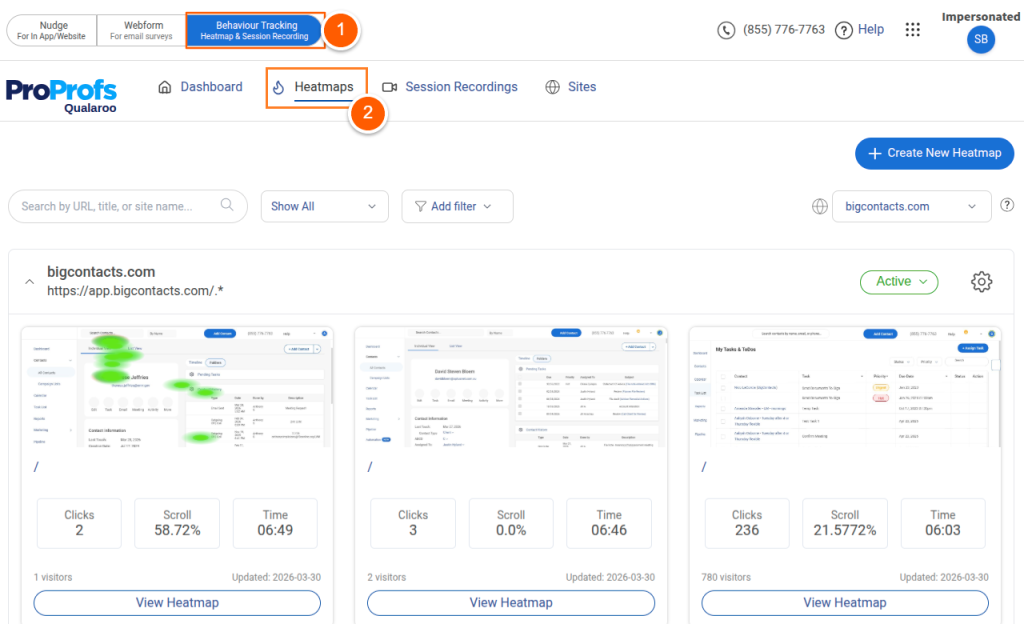
Its Nudge™ feature pops a short, targeted question based on user behavior, not a scheduled send. That distinction matters for anything intent-based, like exit surveys or feature adoption checks.
The AI Survey Creator handles the setup side, turning a plain-language prompt into a ready-to-launch survey instead of making you build one field at a time.
It also pairs that feedback with heatmaps and session recordings, so you can see what someone was actually doing on the page right before or after they answered a Nudge™.
Pros:
- Nudge™ delivers feedback prompts based on real-time behavior, not schedules
- AI Survey Creator builds a complete survey from a plain-language prompt
- Native AI feedback analysis gives automated tagging, key summaries, and action points
- Identify API connects anonymous feedback to known user and account data
- Exit-intent, CSAT, and NPS survey types built in
- Straightforward setup with no coding required
- Heatmaps show exactly where visitors click, scroll, and drop off on a page
- Session recordings let you watch real visitor sessions play back, step by step
Cons:
- Dedicated onboarding support is limited to paid plans
- There is no on-premise version available
Capterra Rating: 4.7/5
Pricing: Plans start from $19.99/month, billed annually.
3. SurveyMonkey: Best for a Fast, Familiar Starting Point for VoC Programs
SurveyMonkey shows up in almost every VoC conversation as a starting point, and it’s easy to see why.
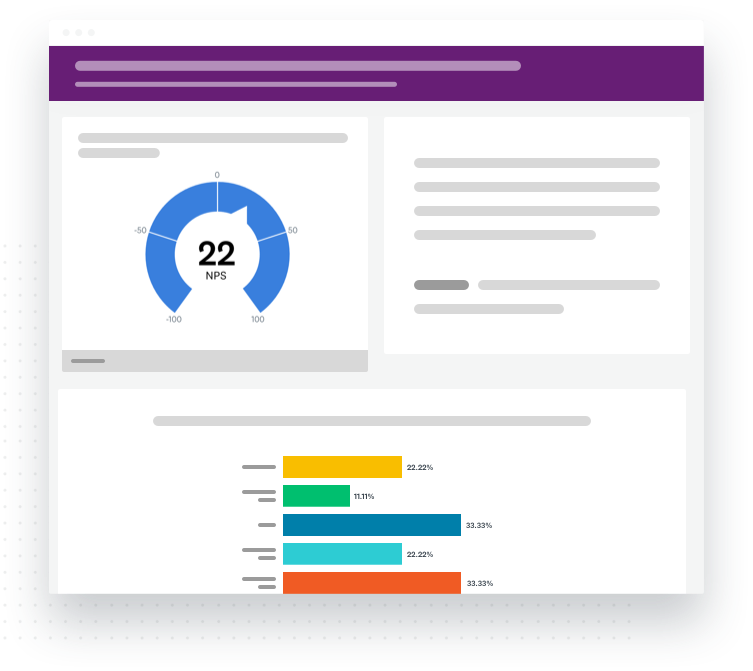
Almost everyone has seen the interface before, so onboarding a new team member takes minutes, not a training session.
The honest limitation, and one that comes up constantly in comparison threads, is the ceiling. Once you need theme detection across hundreds of open-ended responses or closed-loop case management, SurveyMonkey shows its limits fast.
Pros:
- Familiar, low-learning-curve interface
- Broad third-party integrations, including Slack, Salesforce, and Mailchimp
- Free plan available for very light use
- Strong brand recognition inside most organizations
Cons:
- Free plan caps surveys at 10 questions with limited exports
- Advanced analytics and theme detection are thin compared to purpose-built VoC platforms
- Recent enterprise-tier pricing pushes it closer to Qualtrics territory
Capterra Rating: 4.6/5
Pricing: Free plan available. Paid plans start at $30/user/month, billed annually with a three-user minimum.
4. Qualtrics XM: Best for Large Enterprise Omnichannel VoC Programs
Qualtrics comes up in nearly every VoC conversation, and for good reason. And the analytics depth is real.
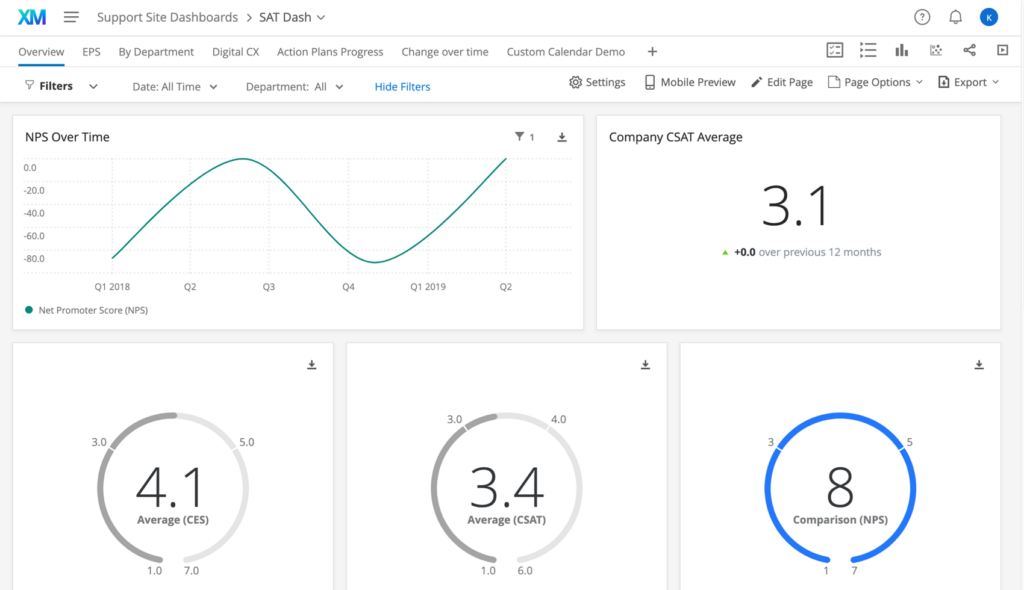
I came across it most often through university research teams and large CX departments that needed to unify surveys, calls, chats, and reviews into one system.
The tradeoff shows up in cost and complexity. Total cost of ownership is a recurring concern in review threads, and rollouts commonly run 8 to 12 weeks.
Pros:
- Recognized Gartner Leader for VoC platforms, five years running
- Deep omnichannel data unification across surveys, calls, chats, and reviews
- Advanced statistical and predictive analytics
- Highly configurable for complex, multi-stakeholder research programs
Cons:
- Expensive relative to team size, especially for mid-market buyers
- Steep learning curve for non-technical users
- Long implementation timelines for enterprise rollouts
Capterra Rating: 4.7/5
Pricing: Custom quote, not published.
5. Medallia: Best for Global Enterprise CX Orchestration
Medallia is the name that comes up when a company needs to run VoC programs across dozens of countries at once. Its strength is coordinating that scale, not simplicity.
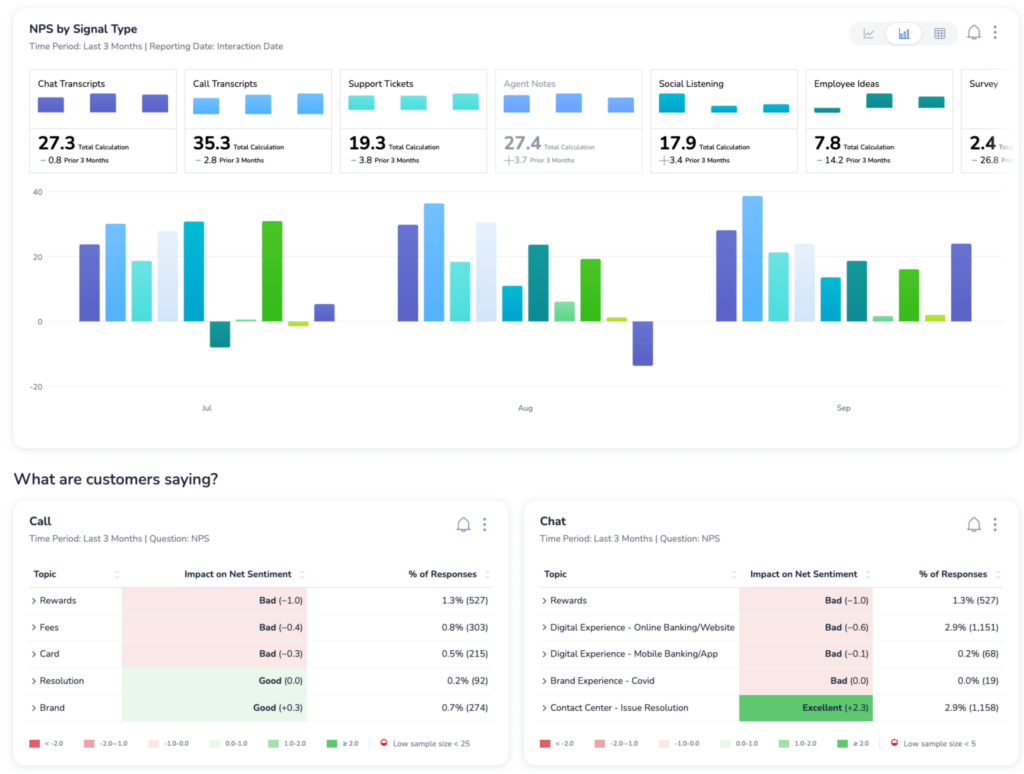
I’ve seen it recommended repeatedly in CX leadership communities for large retail and hospitality brands, specifically for the way it correlates feedback with operational data like staffing or store performance.
Pros:
- Strong at correlating feedback with operational and business metrics
- Multi-country program orchestration built in
- Established AI and machine learning layer for sentiment and behavior prediction
- Wide range of third-party integrations
Cons:
- Pricing is quote-only and generally high for smaller teams
- Reports are difficult to customize without support involvement
- Steeper setup than most mid-market alternatives
Capterra Rating: 4.5/5
Pricing: Custom quote, not published.
6. Zonka Feedback: Best for AI-Driven Omnichannel Feedback and Closed-Loop Workflows
Zonka Feedback showed up repeatedly while researching this list as one of the highest-rated VoC platforms, and the ratings hold up.
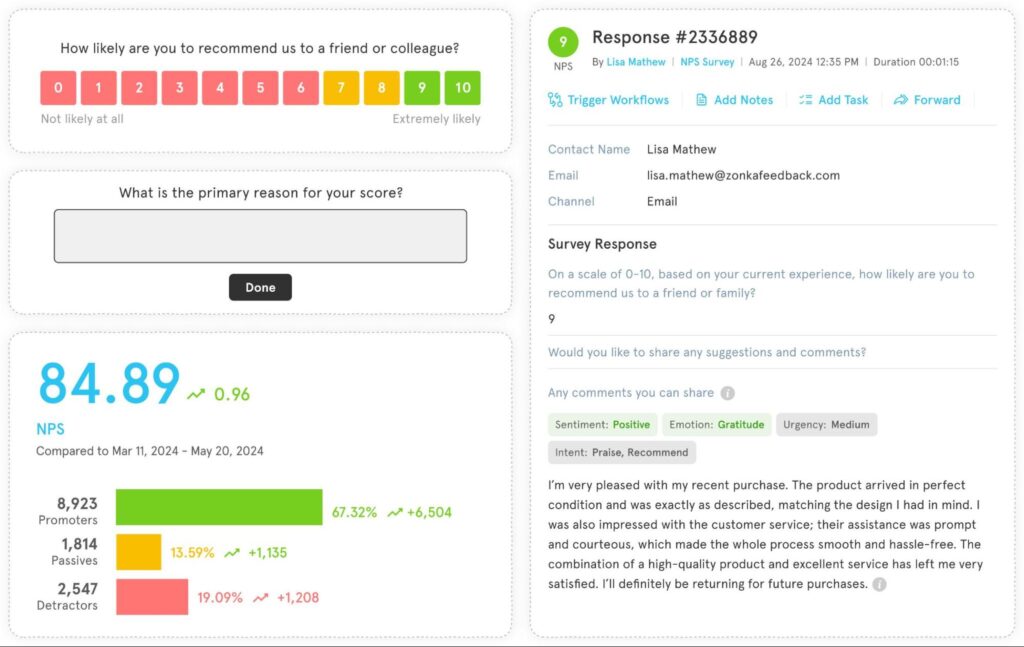
It covers the full loop: survey creation, AI-driven theme and sentiment analysis, and automated follow-up.
It’s positioned squarely at mid-market CX and support teams, particularly multi-location businesses, which makes it a genuine alternative to jumping straight to Qualtrics or Medallia.
Pros:
- Full feedback lifecycle in one platform, from creation to closed-loop action
- Strong AI layer: thematic analysis, sentiment scoring, and a natural-language query copilot
- Wide channel coverage, including SMS, WhatsApp, web, and kiosk
- High marks for customer service in reviews
Cons:
- Jump from the base tier to the AI Feedback Intelligence tier is a significant price increase
- Advanced taxonomies and workflows take real setup time
- Less brand recognition than Qualtrics or Medallia in enterprise procurement
Capterra Rating: 4.8/5
Pricing: Custom quote, not on the website.
7. InMoment: Best for Predictive Analytics and Text or Speech Intelligence at Scale
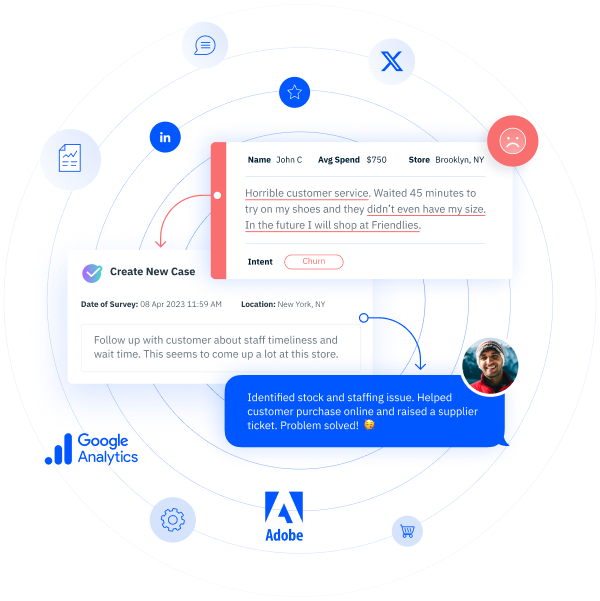
InMoment specializes in pulling signal out of unstructured feedback: long text comments, call transcripts, and reviews.
Worth knowing before you shortlist it: InMoment was acquired by Press Ganey Forsta in May 2025, which was itself later agreed to be acquired by Qualtrics.
Following the completion of Qualtrics’ $6.75 billion acquisition of Press Ganey Forsta in May 2026, InMoment, Forsta, and Qualtrics XM now operate under a single corporate umbrella.
Given that history, it’s worth asking a sales rep directly about the product’s long-term roadmap before committing.
Pros:
- Strong text and speech analytics for unstructured feedback
- Closed-loop case management with rapid resolution workflows
- Broad industry coverage, including insurance, retail, and financial services
- Responsive customer support, according to recurring review feedback
Cons:
- Ongoing ownership changes mean roadmap uncertainty in the near term
- Limited flexibility for smaller or lighter-weight programs
- Advanced features generally require services support to configure
Capterra Rating: 4.4/5
Pricing: Custom quote, not published.
8. CustomerGauge: Best for B2B Account-Level NPS Tied to Revenue
An ex-colleague on a B2B SaaS team swore by CustomerGauge, and the reason clicked once I saw the use case.
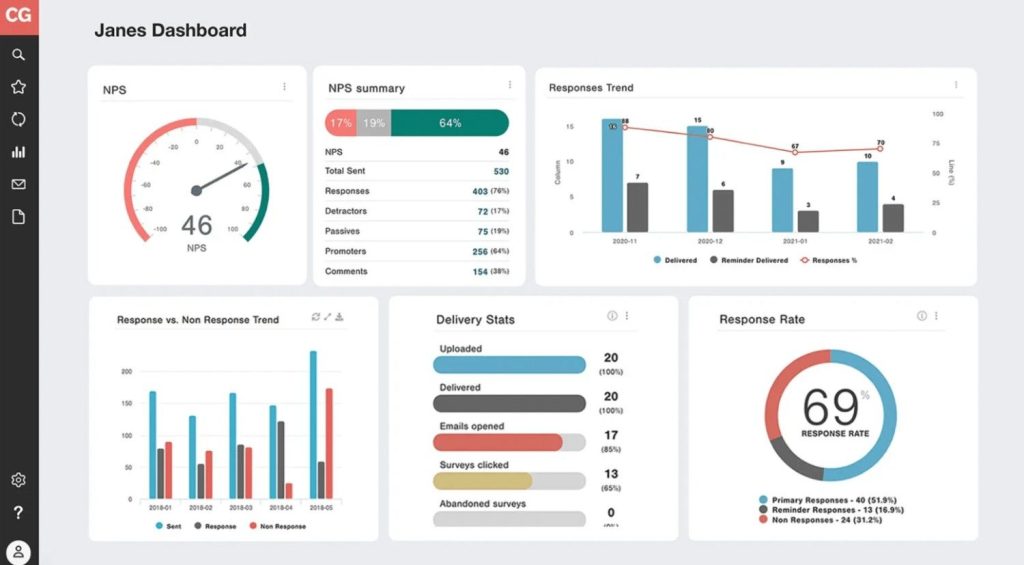
It tracks NPS at the account level, not just the individual respondent level, and ties it directly to churn and expansion revenue.
That’s a genuinely different angle from most consumer-facing VoC tools, and it shows in the reviews, where B2B teams consistently praise the closed-loop follow-up workflow.
Pros:
- Built specifically for account-level, B2B NPS programs
- Connects CX scores directly to revenue metrics like churn and expansion
- Strong closed-loop workflow for following up on detractors
- High marks for customer support responsiveness
Cons:
- Narrower focus than general-purpose VoC platforms
- Reporting customization is somewhat limited
- Pricing isn’t published, so budgeting requires a sales call
Capterra Rating: 4.8/5
Pricing: Custom quote, not published.
9. Hotjar: Best for On-Site Behavioral Feedback and Heatmaps
Hotjar earns its spot for a different reason than the others on this list: it pairs feedback with actual on-site behavior.
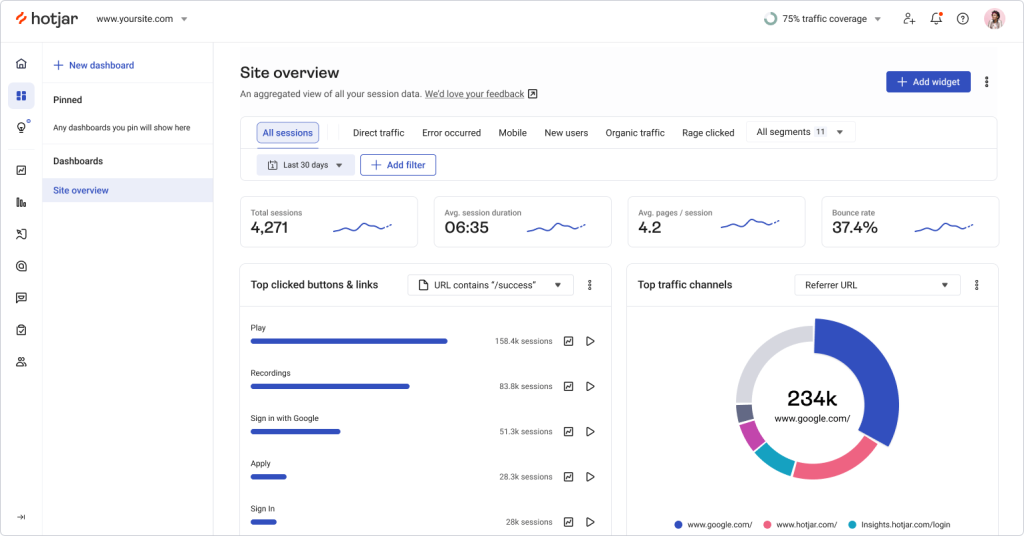
Heatmaps and session recordings show you what someone did right before or after answering a survey.
I’ve used it mainly for UX-focused feedback loops, and it’s genuinely useful for spotting friction points a text response alone wouldn’t explain.
Pros:
- Combines feedback collection with heatmaps and session recordings
- Fast, simple setup with a JavaScript snippet
- Free plan available for smaller sites
- Widely recognized by UX and CRO teams
Cons:
- Not built for enterprise-scale, multi-channel VoC programs
- Heatmap accuracy can vary on dynamic or highly interactive pages
- Deeper text analysis is limited compared to dedicated VoC platforms
Capterra Rating: 4.6/5
Pricing: Free plan available. Paid plans start at $79/month.
10. SurveySparrow: Best for Conversational, Chat-Style Surveys
SurveySparrow came up often in discussions about improving survey completion rates.
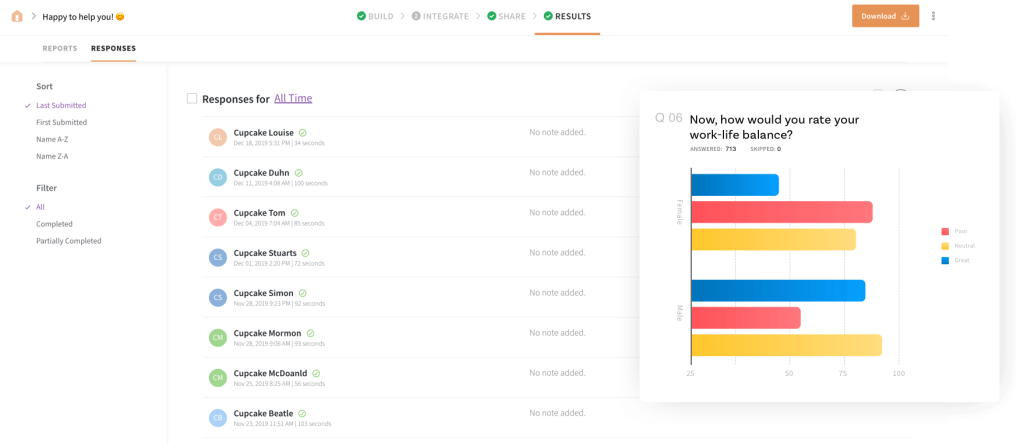
Its conversational format, one question at a time, in a chat-like interface, tends to feel less like a form and more like a quick exchange.
That format shows up in the reviews too: people call out how quick and almost enjoyable it is to build and take, which matters more than it sounds for response rates.
Pros:
- Conversational, chat-style survey format built to lift completion rates
- Offline mode for field data collection without an internet connection
- Multiple distribution channels, including embedded, chatbot, and link formats
- Accessible entry-level pricing
Cons:
- Backend reporting and data export need real cleanup work for large datasets
- Upgrading to advanced tiers gets costly quickly
- Customer support response times draw regular criticism in reviews
Capterra Rating: 4.4/5
Pricing: Plans start around $19/month.
Which 3 Voice of Customer Tools Are Worth Your Time First?
Ten tools is a lot to sit with. If you only evaluate three, start here, and match yourself to the one that fits where your program actually is right now, not where you eventually want it to be.
1. ProProfs Survey Maker: Best for Teams Building Their First Real VoC Program
Most teams reading this aren’t short on ambition, they’re short on a clean starting point that won’t need to be replaced in a year. That’s the gap ProProfs Survey Maker fills.
The AI Survey Maker takes the blank-page problem off the table, and the scored survey option means the same tool can run a CSAT program today and a lead-qualification or coaching assessment next month, without switching platforms.
Pricing scales with response volume instead of seats, so adding an HR manager, a CX lead, and a founder to the account doesn’t change your bill.
That single detail is usually what makes or breaks a first-year VoC budget.
Choose This If: you’re setting up your first VoC program, you’ve outgrown a free form tool, or you need scored assessments alongside standard NPS and CSAT surveys.
2. Zonka Feedback: Best for Teams Outgrowing a Basic Survey Tool
Zonka Feedback is the right next step once feedback volume outpaces what a spreadsheet or a basic dashboard can make sense of.
The AI layer does the work a person would otherwise spend hours on: tagging themes, scoring sentiment, and flagging the responses that actually need a reply.
Where it earns its place on this list is the closed loop. A negative response doesn’t just sit in a report, it triggers a workflow that routes it to the right person automatically.
That’s the piece most teams try to bolt on with Zapier and email rules before realizing it needs to be native.
The AI Feedback Intelligence tier is a real price jump from the base plan, so it’s worth confirming your feedback volume justifies it before upgrading.
Choose This If: you’re getting more open-ended feedback than your team can manually tag, or you need automated follow-up on negative responses without building it yourself.
3. CustomerGauge: Best for B2B Teams Tying NPS to Revenue
Most VoC tools were built with individual consumers in mind, then adapted for B2B. CustomerGauge was built the other way around, which shows up in the one feature that actually matters for account-based selling: NPS scored and tracked at the account level, not just per respondent.
That structure lets a B2B or SaaS team see when a champion is happy but a decision-maker at the same account isn’t, and connect both signals directly to churn risk and expansion revenue.
The closed-loop follow-up workflow is built around that same account context, so nothing gets lost between the survey and the account manager who needs to act on it.
Choose This If: your feedback program needs to answer “which accounts are at risk” as clearly as it answers “how satisfied are customers,” and you’re running a B2B or subscription revenue model.
Here’s the Evaluation Criteria section as it now appears in both files:
Voice of Customer Tools blog
Evaluation Criteria
The evaluation of products or tools chosen for this article follows an unbiased, systematic approach that ensures a fair, insightful, and well-rounded review. This method employs six key factors:
User Reviews/Ratings: Direct experiences from users, including ratings and feedback from reputable sites, provide a ground-level perspective. This feedback is critical in understanding overall satisfaction and potential problems.
Essential Features & Functionality: The value of a product is ascertained by its core features and overall functionality. Through an in-depth exploration of these aspects, the practical usefulness and effectiveness of the tools are carefully evaluated.
Ease of Use: The user-friendliness of a product or service is assessed, focusing on the design, interface, and navigation. This ensures a positive experience for users of all levels of expertise.
Customer Support: The quality of customer support is examined, taking into account its efficiency and how well it supports users in different phases, such as setting up, addressing concerns, and resolving operational issues.
Value for Money: Value for money is evaluated by comparing the quality, performance, and features. The goal is to help the reader understand whether they would be getting their money’s worth.
Personal Experience/Experts’ Opinions: This part of the evaluation criteria draws insightful observations from the personal experience of the writer and the opinions of industry experts.
FREE. All Features. FOREVER!
Try our Forever FREE account with all premium features!
What Should You Look for in a Voice of Customer Tool?
Run any shortlist through this before you commit to a demo call.
| Question to Ask | Why It Matters |
| Does pricing scale with responses or with seats? | Per-seat pricing punishes growing teams fast |
| Can non-technical staff build a survey without training? | Determines real adoption, not just purchase |
| Does it support skip logic or scored results? | Needed for assessments, qualifications, and longer surveys |
| Is analysis included, or is it collection-only? | Determines whether you need a second tool for insights |
| Has the vendor been acquired or merged recently? | Signals a possible roadmap or support disruption |
| Does it integrate with your CRM or help desk? | Determines whether feedback reaches the team that acts on it |
A ready-to-use starting point, if you’re building your first VoC survey today:
Quick VoC Survey Starter (5 Questions)
- How likely are you to recommend us to a colleague, on a scale of 0 to 10?
- What’s the single biggest reason for that score?
- What almost stopped you from choosing us?
- What’s one thing we could improve right now?
- Can we follow up if we have a question about your answer? (Yes/No)
Which Voice of Customer Tool Should You Choose?
Don’t just go with the tool with the longest feature list. Pick the one that matches what your team will actually do with the feedback next week, not the program you might run in three years.
If a per-seat price hike, a stalled roadmap, or a vendor that just got acquired is what brought you here, that’s reason enough to start somewhere lighter instead of trading one oversized contract for another.
That holds whether you’re an HR manager launching your first employee pulse survey, a CX lead replacing a tool you’ve outgrown, or a consultant who needs a scored assessment to qualify leads before a sales call.
The use case changes, but the test stays the same: will this tool tell you something you can act on within a week of launch, without a services contract standing between you and an answer?
ProProfs Survey Maker is built around that test. You get a scored, AI-built VoC survey live in minutes, on a plan that scales with response volume instead of headcount.
Frequently Asked Questions
What is the difference between a survey tool and a voice of customer platform?
A survey tool primarily helps you create, distribute, and analyze surveys. A full voice of customer platform goes further by combining feedback from multiple channels, analyzing sentiment and themes, and supporting closed-loop workflows. This makes VoC platforms better suited for organizations that need to connect customer feedback with broader CX initiatives and operational follow-up.
How much do voice of customer tools typically cost?
Voice of customer tools can range from free plans to enterprise contracts costing tens of thousands of dollars annually. Mid-market options such as ProProfs Survey Maker and Zonka Feedback offer affordable plans for growing teams, while enterprise platforms such as Qualtrics and Medallia typically use custom pricing based on users, features, response volume, and implementation requirements.
Can small businesses use enterprise voice of customer tools?
Yes, small businesses can use enterprise VoC platforms, but they may not need all the advanced capabilities. Enterprise tools often include complex analytics, integrations, governance, and implementation services designed for larger organizations. For smaller teams, a simpler survey platform with AI-assisted creation, NPS and CSAT, and reporting can deliver the essential capabilities at a much lower cost.
What is a Nudge in a voice of customer tool?
A Nudge is a short, targeted survey prompt that appears based on a user's behavior or interaction rather than following a fixed survey schedule. For example, a Nudge might ask for feedback when someone hesitates on a pricing page. Qualaroo popularized this approach, making contextual, in-the-moment feedback a common VoC technique.
Do voice of customer tools work without coding knowledge?
Yes. Many modern voice of customer tools are designed for non-technical teams and don't require coding knowledge. Platforms such as ProProfs Survey Maker, SurveyMonkey, and SurveySparrow provide drag-and-drop builders, ready-made templates, visual workflows, and AI-assisted survey creation. This allows marketers, CX teams, HR professionals, and researchers to build and launch surveys without relying on developers.
What is a scored survey, and why does it matter for VoC?
A scored survey assigns points to specific responses and uses the total score to place respondents into predefined categories or outcomes. For VoC programs, this can turn feedback into actionable assessments. Teams can use scored surveys for customer health checks, qualification, employee assessments, training evaluations, or identifying respondents who may need follow-up.
Is it risky to choose a voice of customer tool right now, given the consolidation?
Not necessarily, but it's smart to evaluate a vendor's ownership, product roadmap, integrations, support, and contract terms before committing. Consolidation can affect pricing, product direction, or feature availability. For annual contracts, check whether the vendor has a clear roadmap and whether your data can be exported easily if you ever need to switch platforms.
Which voice of customer tool is best for a team just getting started?
ProProfs Survey Maker and SurveyMonkey are practical starting points for teams building their first VoC program. Both are accessible to non-technical users and support core feedback methods such as NPS, CSAT, and open-ended questions. ProProfs Survey Maker is particularly useful if you want AI-assisted survey creation alongside customization, branching, scoring, and reporting capabilities.
FREE. All Features. FOREVER!
Try our Forever FREE account with all premium features!

 We'd love your feedback!
What did you like & how can we make it even better?

 Thanks for your feedback!
 Ask Your Question
Have a question? Get expert help to make your decision easier.