
Most survey invitation emails fail before anyone reads a single question. They get skimmed, ignored, or archived because the email itself gives no reason to click.
The fix is not better writing. It is a better structure.
A survey invitation email template that leads with a clear reason, a fair time estimate, and one obvious next step will consistently outperform a longer, more polished message that buries the ask.
This guide gives you ready-to-use templates for customer feedback, employee engagement, and participation nudges, along with the exact steps to build and send them in ProProfs Survey Maker.
What Is a Survey Invitation Email Template?
A survey invitation email template is a pre-written email structure used to ask a customer, employee, or contact to complete a survey. It typically includes a greeting, a short explanation of purpose, a time estimate, a survey link, and a closing thank you. Teams reuse the same template across campaigns, adjusting only the names, subject line, and survey link each time.
Think of it less like a piece of marketing copy and more like a checklist with words attached.
The moment you turn survey invites into a proper template, you stop reinventing the email every time someone on your team needs to send one.
You also make it easier to test what works because you change one variable at a time instead of writing a brand-new email every round.
Here is what separates a working template from a weak one:
- It states the reason for the survey in one sentence, not three
- It gives a specific time estimate, never “just a few minutes”
- It has exactly one link or button, never two competing calls to action
- It explains, even briefly, how the response will be used
- It closes with a short thank you, not a hard sell
If your current template is missing two or more of these, that is usually why your response rate is stuck.
Here is a quick way to picture it: imagine two people asking a coworker for feedback.
One says, “Hey, quick favor, got two minutes for something?”
The other sends a long paragraph explaining the entire project history before finally asking.
The first one gets a yes almost every time.
A survey invitation email template works the same way. It is not about sounding impressive; it is about getting out of your own way so the reader can say yes fast.
How Do You Create a Survey Invitation Email Template Using AI Survey Maker?
The blank page is the real blocker for most people writing survey invites. You know you need to send one, but staring at an empty email draft eats up twenty minutes you did not plan for.
AI Survey Maker inside ProProfs Survey Maker eliminates that step by generating both the survey and a matching invitation email from a short prompt, so you never start from scratch.
Here is how the process works, step by step.
Step 1: Describe Your Goal
Start by typing a plain-language description of what you are trying to learn. You do not need survey jargon or a formal brief. Something like “customer satisfaction survey after a support call” or “quarterly employee engagement pulse check” is enough for the AI to understand your intent.
Try it here:
Let ProProfs AI Build a Survey
Describe your survey and we'll create it for you
The more specific you are about the audience and the moment you are surveying, the more relevant the output will be.
If you only say “customer feedback survey,” you will get a generic result. If you say “feedback survey for customers who just renewed their annual plan,” the tone and questions will already lean in that direction.
If you already have participant emails saved elsewhere, you do not need to retype names one by one.
Upload a PDF, DOCX, or TXT file and pull the contact details straight in. This step alone saves the most time for HR teams sending to large employee lists or CX teams sending to a full customer segment.
Step 2: Let AI Survey Maker Build the Survey
Once you submit your description, AI Survey Maker generates a complete question set in seconds.
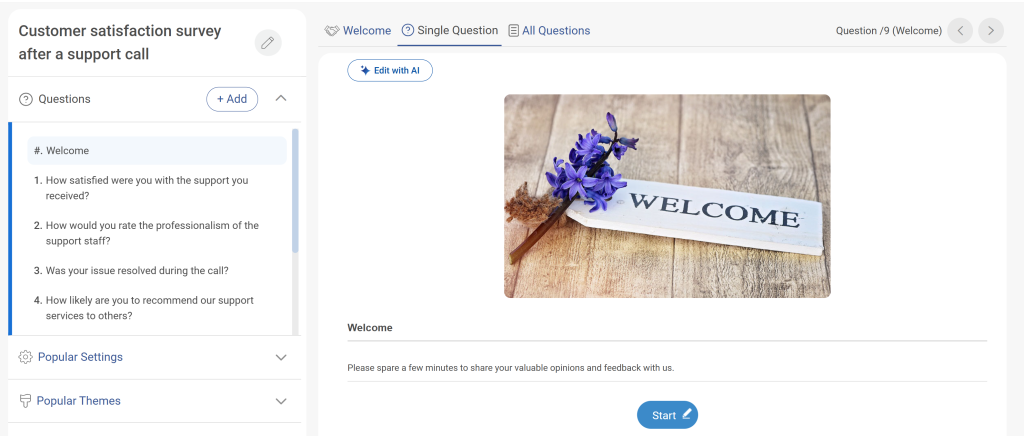
It draws from a library of over 1,000,000 ready-to-use questions across 20-plus question types, so you are choosing from proven questions rather than writing each one from scratch.
Review the generated draft before sending it out. AI gets you most of the way there, but you should still remove any questions that do not apply to your specific product, team, or situation.
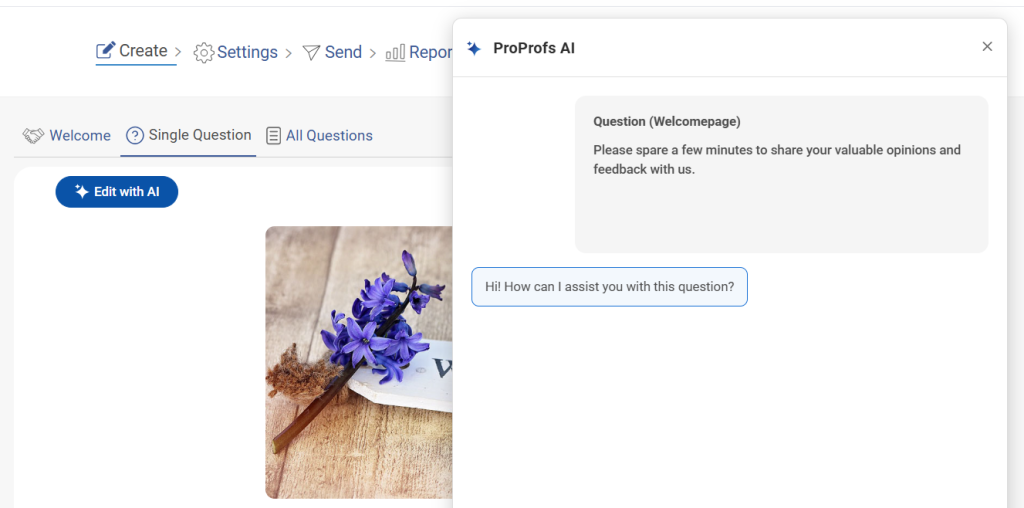
Step 3: Generate the Invitation Copy
Use the same context you gave the AI to draft a short invite email.
This keeps your survey and your invitation aligned, since both are built from the same underlying goal instead of being written separately by two different people at two different times.
Edit the tone, greeting, and time estimate so the email sounds like your brand, not a template. This is also the point where you decide which of the four templates in the next section fits your scenario best.
Step 4: Add Your Survey Link
Every survey created in ProProfs Survey Maker generates a shareable link you can drop straight into an email.
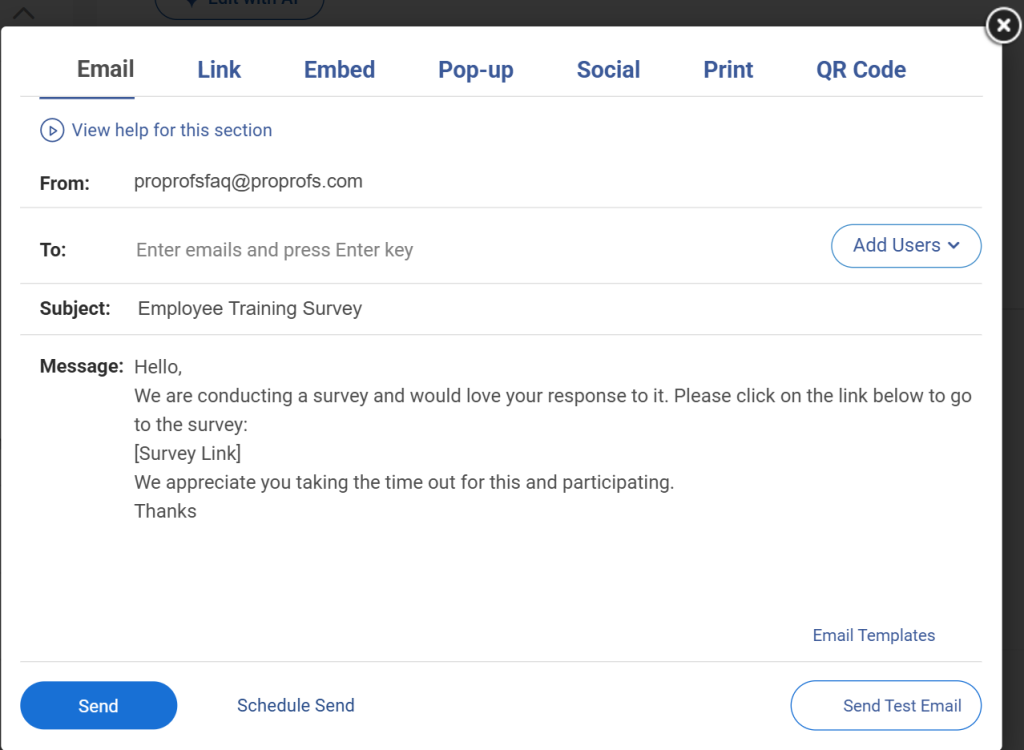
If you plan to distribute beyond email, the same survey also supports QR codes and website embed options, so you are not rebuilding it for a second channel.
Step 5: Send and Track Responses
Send the invite and track opens or responses from the same dashboard where the survey itself lives, instead of juggling a separate email tool and a separate reporting tool.
Seeing both in one place also makes it easier to spot early on whether you need to send the ask participation or reminder template from the next section.
This entire flow matters most for teams without a dedicated designer or copywriter.
The California Department of Public Health, for one, has noted that ProProfs saves a lot of time in issuing certificates and tracking, which is the same efficiency gain you get when survey creation and invite creation live in a single workflow instead of two disconnected tools.
What Should a Ready-to-Use Survey Invite Email Template Include?
A survey invite email template only earns its “ready-to-use” label if you can drop it into your email tool, swap the bracketed details, and send it without rewriting a single sentence.
Below are four versions built for the most common scenarios, each following the same five-part structure but adjusted for context.
A quick note before you copy any of these: the bracketed placeholders like [First Name] or [X] minutes are meant to be filled in by your email tool or CRM at send time, not typed manually for each person.
If you are building this inside ProProfs Survey Maker, these fields map directly to the merge fields pulled from your contact list.
General Survey Invitation Email Template: Standard Customer Feedback
Use this for standard customer feedback, product feedback, or post-purchase surveys.
It works whenever the relationship is friendly but not especially deep, and you just need a fast, low-friction yes.
| Subject: Got 2 minutes, [First Name]?
Hi [First Name], We would love your take on your recent experience with [product or service]. It takes about 2 minutes, and your answers go directly to the team deciding what we build or fix next. [Take the Survey button] Thanks for the help. [Sender Name] |
Ask Participation Survey Invitation Email Template: Script and Structure
This is a distinct email from the first invite, not a copy of it.
Use it when you need to actively push someone toward participation, either as a first-touch nudge for a hard-to-reach group or a mid-campaign push when overall numbers are lagging.
It leans on urgency and specificity rather than repeating the original ask.
| Subject: We need your voice on this one
Hi [First Name], A handful of quick questions stand between us and a much clearer picture of [topic]. This survey closes on [date], and we would rather hear from you than guess. It takes about [X] minutes, and every response genuinely shapes the next decision we make here. [Participate Now button] Appreciate you taking the time. [Sender Name] |
Employee Survey Invitation Email Template: What to Include
Employee invites carry more weight than customer invites because trust, not curiosity, drives participation.
| Subject: Your feedback shapes what we do next
Hi [First Name], [Company Name] is running its [quarterly/annual] employee survey starting today. It takes about [X] minutes, your responses are fully anonymous, and results are shared with [department/leadership] within [timeframe]. Last round, feedback led to [one concrete example of change made]. This round shapes what comes next.[Start Survey button]Thank you for making time for this. [HR or Leadership Name] |
Anonymity and follow-through need to be addressed directly in the email itself, not implied or left to a separate policy document. Here’s how you can make your email surveys anonymous:
Participation Survey Invitation Email Template: Reminder Version
Reminders should never be a copy-paste of the original invite. Keep it short, name the deadline, and remove any friction that might have stopped someone from responding the first time around.
| Subject: Last call: survey closes [date]
Hi [First Name], Quick reminder that our survey on [topic] closes [date]. If you have not had a chance yet, it only takes [X] minutes. [Complete It Now button] If you already responded, thank you, and please ignore this note. [Sender Name] |
Here is a quick reference for which template to reach for and when:
| Scenario | Template to Use | Ideal Timing |
| First-Time Customer Feedback Ask | General survey invitation | Within 24 hours of the interaction |
| Low-Response Group Mid-Campaign | Ask participation template | 3 to 5 days after initial launch |
| Company-Wide Engagement Survey | Employee survey template | Day one of the survey window |
| Anyone Who Has Not Responded Yet | Reminder template | 3 to 7 days after the first invite |
What Makes a Survey Invitation Email Subject Line Get Opened?
The subject line decides whether the rest of your template even gets seen.
Roughly a third of recipients decide whether to open an email based on the subject line alone, which makes this line worth as much attention as the body copy.
No matter how good your invitation email is, none of it matters if the subject line does not earn an open.
A few rules hold up consistently across customer and employee surveys:
| Subject Line Style | Example | Best for |
| Direct question | “Got 2 minutes, [First Name]?” | General customer or product feedback |
| Urgency with the deadline | “Survey closes Friday, we need your input” | Reminders or low-response follow-ups |
| Value-forward | “Your feedback shapes what we build next” | Employee or long-term relationship surveys |
| Personalized product ask | “What did you think of [Product Name]?” | Post-purchase or transactional surveys |
FREE. All Features. FOREVER!
Try our Forever FREE account with all premium features!
Ready to Turn Invitations Into Actual Responses?
A good survey invitation email template will not fix a broken survey, but it removes the most common reason a good survey never gets answered in the first place: an email that gives the reader no reason to click.
Start with the template that matches your scenario, keep the five-part structure intact, and test one variable at a time, whether that is subject line, time estimate, or send day.
If you are building and sending surveys regularly, doing this inside ProProfs Survey Maker means your invite, your survey, and your response tracking all live in one place instead of three.
You can build and test all four templates on ProProfs Survey Maker’s forever-free plan before deciding whether to upgrade.
Frequently Asked Questions
What is a good response rate for a survey invitation email?
Customer email surveys typically land between 10 and 30 percent. Employee engagement surveys are considered healthy at 70 to 80 percent, while employee pulse surveys usually run lower, around 50 to 60 percent. Compare your results against the survey type, not a single universal number.
How long should a survey invitation email be?
Keep it short: three to five sentences covering a greeting, purpose, time estimate, call to action, and thank you. Most well-performing invites stay under 150 words. Longer emails delay the click and reduce the odds that someone finishes reading before they decide to skip it.
When is the best time to send a survey invitation email?
For customer surveys, send within 24 hours of the interaction being measured while the experience is fresh. For employee surveys, weekday mornings tend to perform best. Avoid Mondays before 10 am and Friday afternoons, when open rates typically drop.
Should I send a reminder after the first survey invite?
Yes. Send one reminder 3 to 7 days after the original invite. Reminder emails commonly lift response rates by 5 to 15 percent, and they matter even more for longer survey windows where the first invite is easy to forget.
Do incentives improve response rates on survey invitations?
Incentives such as discounts, gift cards, or prize draws can meaningfully improve response rates, especially for customer surveys. They are not required for every survey, but they help most when the ask is longer, or the audience is less naturally invested in the topic.
How do I reassure employees that a survey invitation is anonymous?
State it directly in the invite, not just in a policy document. Mention who collects and reviews responses, whether that is HR, leadership, or a third party, and confirm that individual answers will not be tied back to a name.
What words should I avoid in a survey invitation email subject line?
Avoid free, urgent, act now, last chance, and excessive exclamation marks, since these commonly trigger spam filters and feel pushy. Also, avoid vague phrases like "just a moment" for time estimates and generic openers like "Dear Valued Customer."
Can I embed the survey directly inside the invitation email instead of linking out?
Most survey tools, including ProProfs Survey Maker, send respondents to a hosted survey page rather than embedding full questions inside the email body. This keeps formatting consistent across devices and email clients, though a short single-question poll can sometimes be embedded directly.
FREE. All Features. FOREVER!
Try our Forever FREE account with all premium features!

 We'd love your feedback!
What did you like & how can we make it even better?

 Thanks for your feedback!
 Ask Your Question
Have a question? Get expert help to make your decision easier.