
Typeform built its reputation on one thing: surveys that don’t feel like surveys. The one-question-at-a-time format is genuinely engaging, and it shows up in completion rates for short, well-crafted forms. That part is real.
What’s also real is that the cost of staying on Typeform grows fast. Remove branding? That’s the Plus plan. Advanced logic? Higher tier.
More than a few hundred responses per month? The pricing table is starting to look unfriendly for teams running real programs.
I’ve used a handful of these tools firsthand across NPS programs, HR assessments, and lead qualification workflows.
For the rest, I’ve pulled verified insights from Capterra, Reddit, and conversations with product managers and CX leads who are actively running survey programs.
Here’s what I found.
Why Are Teams Looking for Typeform Alternatives?
Typeform is a conversational form and survey builder widely used across marketing, HR, customer success, and education for lead capture, NPS surveys, event registrations, and customer feedback programs.
The format works. Conversational surveys yield higher completion rates with short, well-structured forms, and Typeform’s template library is solid for teams getting started quickly.
But here’s what consistently comes up when teams look for something similar or better:
Pricing Escalates Without Warning: The free plan caps at 10 responses per month, which is barely enough to test a survey. The basic paid plan starts at $28/month, but removing Typeform’s branding and accessing custom domains requires the Plus plan at $59/month. For teams running volume campaigns, the cost-per-response math quickly breaks down.
Response and Feature Caps Cut Mid-Program: Verified Capterra reviewers note that data access itself can be affected by plan tier, not just feature access. One reviewer described the pricing as “built for a specific curated use case,” not for businesses collecting responses at scale.
Analytics Depth is Limited: Typeform’s reporting dashboard is clean but shallow. Teams that need cross-tab filtering, real-time segmented reports, or NPS trend tracking typically export CSVs and process the data elsewhere, which adds manual work to every reporting cycle.
No Native Scored Surveys: If you’re running lead qualification assessments, HR maturity reviews, or coaching program worksheets, you need scored surveys with custom result pages. Typeform doesn’t offer this natively, and building a workaround costs time every single time.
Branding Limitations Persist Even on Paid Plans: White-labeling survey forms for agency or enterprise use requires plan upgrades that most small-to-mid teams find hard to justify.
These aren’t edge cases or niche complaints.
They’re the patterns that show up repeatedly once a team outgrows the basic use case Typeform was built for.
The tools below are worth evaluating if any of these sound familiar.
The 10 Best Typeform Alternatives I’ve Tested and Vetted
I’ve personally run ProProfs Survey Maker and Qualaroo across real programs, including NPS campaigns, employee assessments, and lead scoring workflows.
JotForm and Google Forms I’ve put through their paces on operational projects.
The remaining tools come from detailed conversations with marketers, HR managers, and CX professionals who rely on them day to day.
Here are the top 10 Typeform alternatives:
| Tool | Best For | Capterra Rating | Starting Price |
| ProProfs Survey Maker | AI survey creation, NPS, scored assessments | 4.8/5 | Free; paid from $19.99/month |
| Qualaroo | In-product and website contextual feedback | 4.7/5 | From $19.99/month |
| Google Forms | Simple, free data collection | 4.7/5 | Free for Google Workspace users |
| Jotform | Payment forms and multi-purpose data collection | 4.7/5 | From $34/month |
| WPForms | WordPress-native form building | 4.3/5 | From $49.50/year |
| Microsoft Forms | Microsoft 365 ecosystem integration | 4.6/5 | From $99.99/year |
| Zoho Forms | Custom forms with offline and CRM sync | 4.5/5 | From $10/month |
| Woorise | Lead gen campaigns, contests, and landing pages | 4.7/5 | From $23/month |
| Paperform | Conditional logic and landing-page-style forms | 4.8/5 | From $24/month |
| Cognito Forms | Data collection with payments and signatures | 4.6/5 | From $19/month |
Here’s the deep dive into each tool:
1. ProProfs Survey Maker – Best for Easy AI Survey Creation, NPS, and Scored Assessments
I’ve built NPS programs and scored assessments in ProProfs Survey Maker, and the speed from a blank screen to a live survey is something I didn’t fully appreciate until I compared it side by side with other tools.
The AI builder is the feature that surprises people most.
You describe a survey goal in plain language, and it generates a complete survey with branching logic in seconds.
Responses carry point values, respondents are bucketed by score range, and custom result pages are shown based on their outcome. Typeform doesn’t offer this natively.
How ProProfs Survey Maker Compares to Typeform: Typeform charges more as your needs grow, locking branding, scoring, and analytics behind higher tiers. ProProfs Survey Maker puts all of those on the free plan and scales by responses, not by features. For teams that want the full capability set without negotiating plan upgrades, that’s a meaningful structural difference.
Pros:
- AI-powered survey creation from a plain-language prompt
- 100+ professionally designed templates covering NPS, CSAT, employee engagement, market research, and event surveys
- Scored surveys with custom result pages for assessments and lead qualification
- 20+ question types, including NPS scale, Likert, slider, ranking, and open-ended
- Omnichannel distribution of surveys
- Multilingual surveys in 70+ languages
- Skip logic and branching for adaptive survey flows
- Integrations with Salesforce, HubSpot, MailChimp, Zendesk, and Zapier
- GDPR and ADA compliant, with SSO on enterprise plans
- White-label add-on for agencies managing client-facing surveys
- Popup, sidebar, and in-app survey delivery for real-time website feedback
Cons:
- Free plan caps at 50 responses per month, suited for pilots but not high-volume programs
- A dedicated onboarding manager is available only on paid plans
Pricing: Free plan with all premium features. Paid plans from $19.99/month.
User Rating: 4.8/5 (Capterra)
Intel’s Product Manager described it as easy to use with stellar customer service. Those outcomes reflect what a well-structured survey program actually produces when the tool is set up correctly.

2. Qualaroo – Best for In-Product and Website Contextual Feedback
I’ve had Qualaroo running in product feedback workflows, and the difference in response quality compared to post-session surveys is immediate.
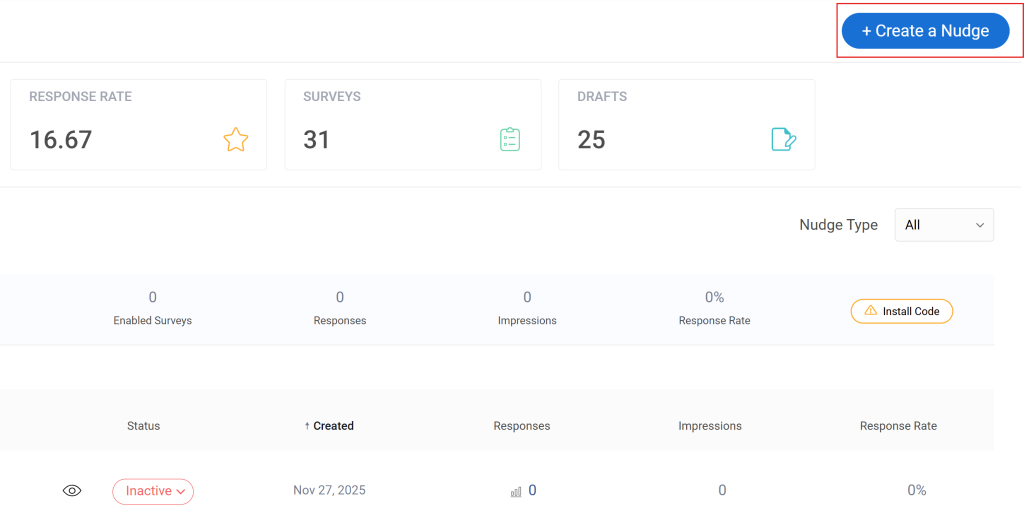
Qualaroo captures the response while the user is still inside it. The mechanism is a Nudge: a lightweight survey prompt triggered by behavior, time on page, scroll depth, specific URLs, exit intent, or device type.
The AI sentiment analysis layer is what makes it operationally useful at scale. Open-ended responses are automatically categorized and scored.
How Qualaroo Compares to Typeform: Typeform collects responses from people who have already left the moment that triggered their opinion. Qualaroo catches them while that moment is still happening. The data quality difference is significant for product and CX teams trying to understand behavior rather than just record sentiment.
Pros:
- Behavior-based and URL-specific targeting for precise, contextual survey placement
- AI sentiment analysis on open-ended responses
- 12+ question types including NPS, CSAT, CES, and UES
- No-code deployment with no developer dependency
- 100+ templates for exit intent, product feedback, and UX research
- A/B testing for survey variants
- Integrations with HubSpot, Salesforce, Mailchimp, and major analytics platforms
- Mobile in-app survey support for native app feedback
Cons:
- There is no dark user interface for long hours or late nights
- Dedicated onboarding/account manager services are available only in paid plans
Pricing: From $19.99/month.
User Rating: 4.7/5 (Capterra)
3. Google Forms – Best for Simple, Free Data Collection
I’ve used Google Forms for quick internal polls and one-off feedback collection, and for those use cases, it’s genuinely hard to argue against.
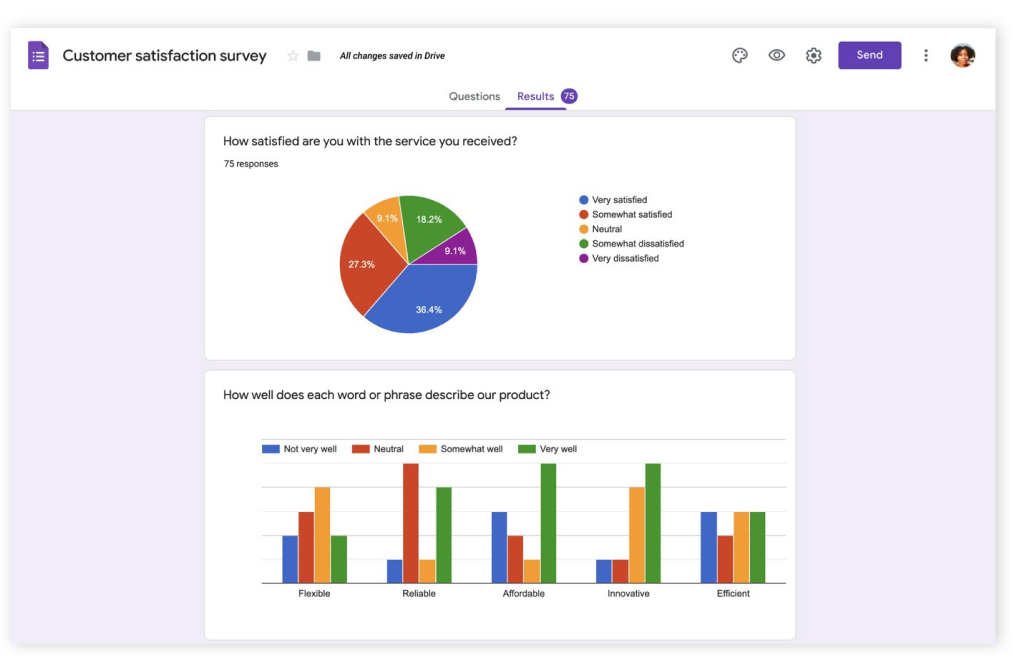
It’s free, works on any device, and if the team already runs on Google Workspace, the export to Sheets for further analysis is seamless.
Where it falls apart is anything beyond basic. Conditional branching is limited, reporting is minimal, and there’s no native NPS or CSAT framework.
How Google Forms Compares to Typeform: Typeform invests heavily in respondent experience and design. Google Forms invests in nothing except function, and charges accordingly. The gap matters when your survey represents your brand. It doesn’t matter at all when you’re collecting internal data from people who already work for you.
Pros:
- Completely free with a Google account, no response limits
- Native Google Workspace integration with real-time export to Sheets
- Drag-and-drop editor accessible from any device
- Basic skip logic, multiple question types, and collaborative editing
- Responsive design out of the box
Cons:
- No native NPS, scored surveys, or advanced branching logic
- Reporting is basic charts with no filters or cross-tab analysis
- No CRM integrations or white labeling
Pricing: Free for Google Workspace users.
User Rating: 4.7/5 (Capterra)
4. Jotform – Best for Payment Forms and Multi-Purpose Data Collection
Jotform comes up whenever a team needs one tool that covers surveys, payment collection, event registrations, and file uploads without separate subscriptions. I’ve heard from operations managers who switched to it specifically because it replaced three separate tools in their stack.
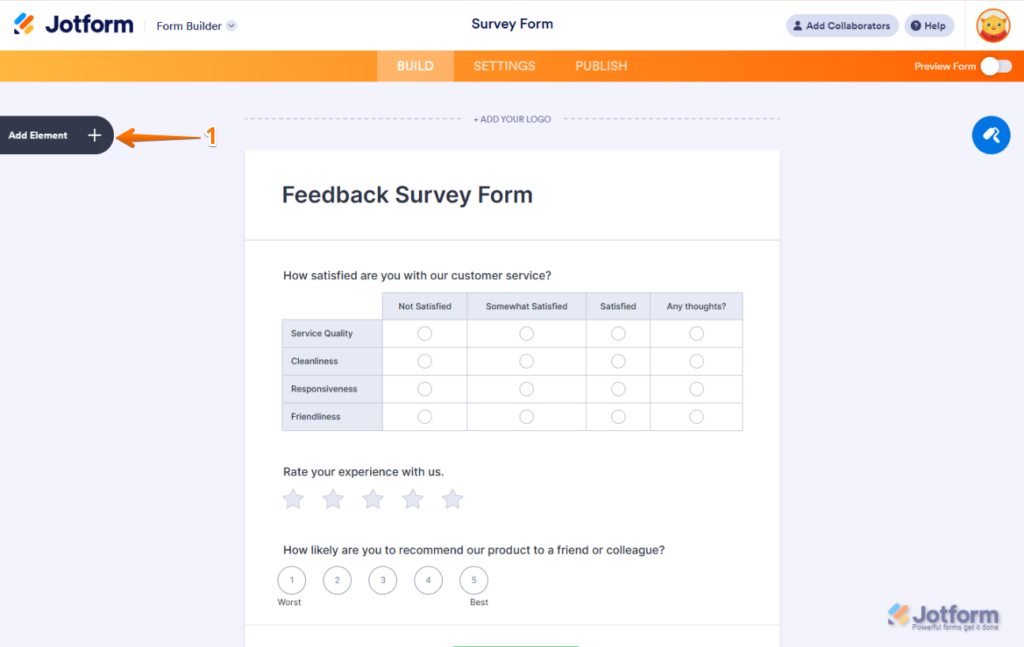
The Forms Analytics feature tells you where respondents drop off and which question formats affect completion.
That’s more behavioral insight than most form builders offer out of the box, and it’s genuinely useful for improving response rates over time.
How Jotform Compares to Typeform: Typeform is built around the survey as a standalone object. JotForm treats the form as one component in a larger operational workflow. If you need the form to also accept a payment, collect a file, or route a registration, JotForm handles the whole sequence, whereas Typeform handles only one part of it.
Pros:
- 10,000+ templates across surveys, registrations, payments, and lead capture
- Native payment collection via PayPal, Stripe, and Square
- Forms Analytics for behavioral data on how respondents interact with questions
- Conditional logic and multi-page forms
- SSL security with built-in spam prevention
- Integration with Adobe, Zoom, HubSpot, and Google Workspace
Cons:
- Navigation feels dense compared to survey-focused tools
- Bug reports appear frequently in reviews around form rendering
- More expensive than some alternatives for basic use cases
Pricing: From $34/month.
User Rating: 4.7/5 (Capterra)
5. WPForms – Best for WordPress-Native Form Building
WPForms is the most practical choice for business owners, bloggers, and developers who live in the WordPress ecosystem and need forms that install, configure, and style within their existing site.
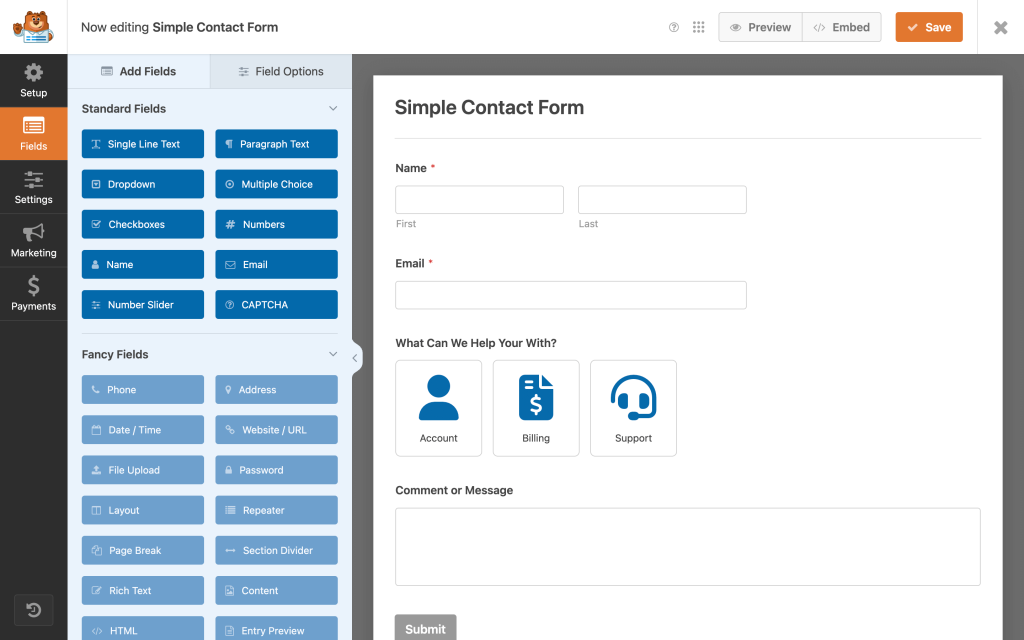
The drag-and-drop interface requires no coding. Multi-page forms, file uploads, payment collection, and conditional logic are all available.
Partial form saves let users complete forms later, which is useful for longer registration or application forms.
How WPForms Compares to Typeform: Typeform lives outside your website and connects to it via embed. WPForms lives inside WordPress and behaves like a native part of the site. For teams whose entire digital presence runs on WordPress, that distinction removes a layer of tool management entirely.
Pros:
- WordPress-native drag-and-drop form builder, no coding required
- Multi-page forms with progress indicators
- Conditional logic for showing and hiding fields
- File upload support and payment collection are built in
- Instant email notifications on form submission
- Save-and-resume for longer forms
Cons:
- Only relevant if you’re running WordPress
- No standalone web version or use outside WordPress
- Limited survey analytics compared to dedicated survey tools
Pricing: From $49.50/year.
User Rating: 4.3/5 (Capterra)
6. Microsoft Forms – Best for Microsoft 365 Ecosystem Integration
If an organization already runs on Microsoft 365, Microsoft Forms is already in the stack.
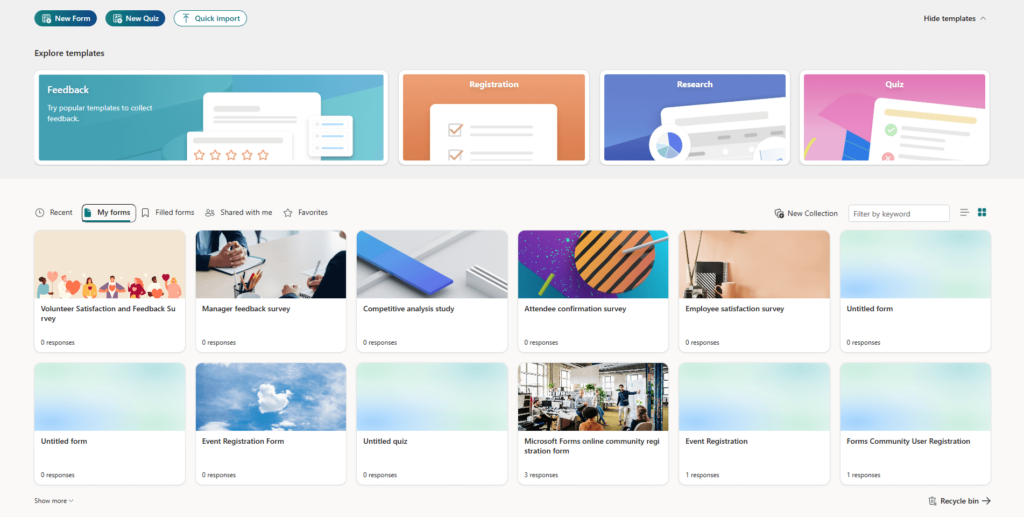
For simple quizzes, feedback surveys, and event registrations that need to feed into Teams, SharePoint, or Excel without adding a new vendor, it covers the basics cleanly.
The Power BI integration is what teams with leadership-level reporting needs will find most useful. It’s not something most standalone tools in this category can match natively.
How Microsoft Forms Compares to Typeform: Typeform is a standalone product you pay for separately. Microsoft Forms is already included in what most enterprise teams are paying for. If your organization runs on M365, the question isn’t whether Microsoft Forms is better than Typeform. It’s whether adding Typeform is worth the extra cost.
Pros:
- Included with Microsoft 365 subscriptions
- Native integration with Teams, OneNote, Excel, and Power BI
- Branching questions, question scoring, and randomization
- QR code sharing and website embed
- Role-based access controls for internal survey security
Cons:
- Limited outside the Microsoft ecosystem
- No white labeling or custom branding removal
- Reporting is basic with no cross-tab or advanced segmentation
Pricing: From $99.99/year.
User Rating: 4.6/5 (Capterra)
7. Zoho Forms – Best for Offline Data Collection and CRM Sync
Zoho Forms earns its place as the natural survey tool for teams already running the Zoho suite. The integration with Zoho CRM and Salesforce via Zapier means form data flows into CRM records automatically without manual exports.
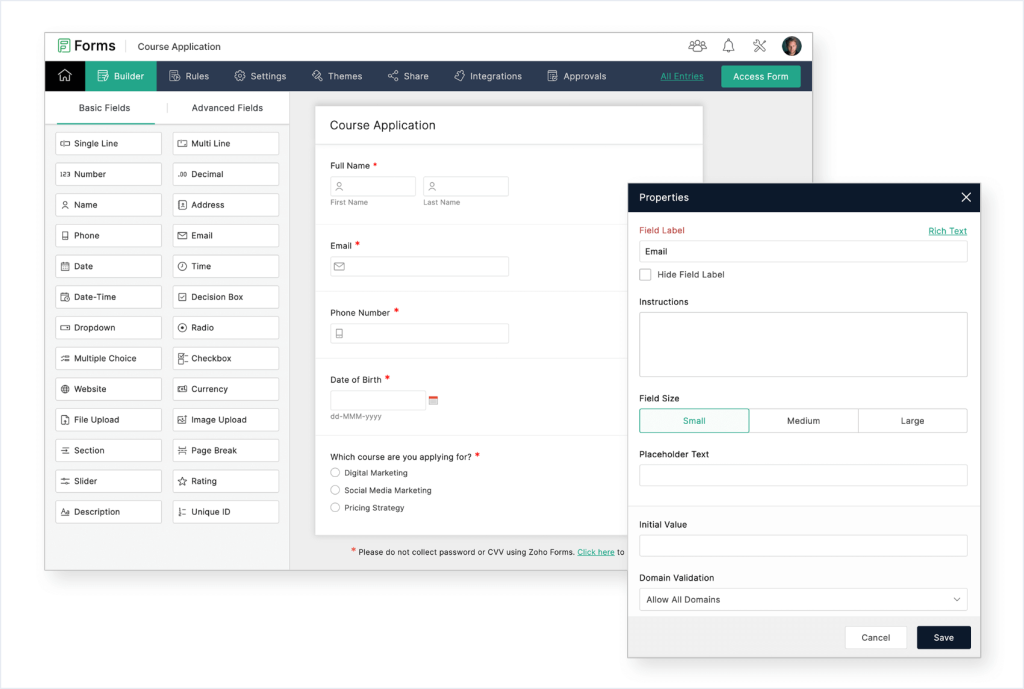
Offline data collection is a genuine differentiator here. You can capture responses without an internet connection and sync automatically when connectivity returns.
For field teams and event-based data collection, which fills a gap most alternatives leave open.
How Zoho Forms Compares to Typeform: Typeform treats CRM integration as a connection to configure. Zoho Forms treats it as the default state for teams already in the Zoho ecosystem. Add offline collection on top of that, and Zoho Forms covers field use cases that Typeform simply isn’t designed for.
Pros:
- Drag-and-drop builder with real-time email and SMS notifications
- Offline data capture with automatic sync
- Pre-built templates and field types for fast setup
- Merge response data with documents and automate workflows
- Integration with Salesforce, Zapier, and Google Drive
Cons:
- Interface is less intuitive than newer survey tools for first-time users
- Limited survey analytics compared to dedicated survey platforms
- Custom logic can require meaningful configuration time
Pricing: From $10/month.
User Rating: 4.5/5 (Capterra)
8. Woorise – Best for Lead Gen Campaigns, Contests, and Landing Pages
Woorise sits at the intersection of form builder and lead generation platform.
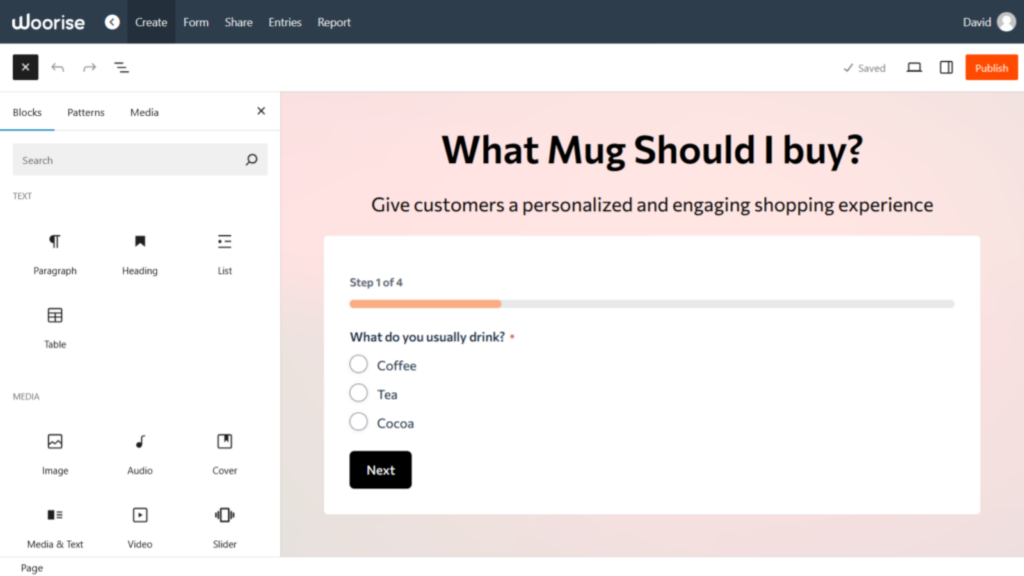
If your primary goal isn’t survey feedback but growing your contact list through giveaways, contests, landing pages, or interactive campaigns, Woorise covers it all from one place.
Marketing teams at digital agencies and direct-to-consumer brands find this useful because it replaces the need for separate tools for landing pages, lead-capture forms, and contest management. The 100+ templates are optimized for conversion, not just data collection.
How Woorise Compares to Typeform: Typeform is designed to collect information from people who already intend to respond. Woorise is designed to create the conditions that make people want to engage in the first place. For marketers whose primary goal is list growth rather than data collection, that’s a fundamentally different starting point.
Pros:
- Complete lead generation platform with forms, surveys, quizzes, and contests
- 100+ customizable templates for campaigns and landing pages
- Drag-and-drop builder with conditional logic
- Payment acceptance and real-time email notifications are built in
- Multi-channel distribution
Cons:
- Not designed for deep survey analytics or NPS programs
- Less suitable for HR or research-grade feedback collection
- Response tracking is limited compared to dedicated survey tools
Pricing: From $23/month.
User Rating: 4.7/5 (Capterra)
9. Paperform – Best for Conditional Logic and Landing-Page-Style Form
Paperform creates what it calls Landing Forms: forms that feel and look like dedicated landing pages rather than embedded survey widgets. The presentation quality is noticeably higher than most form builders in this price range.
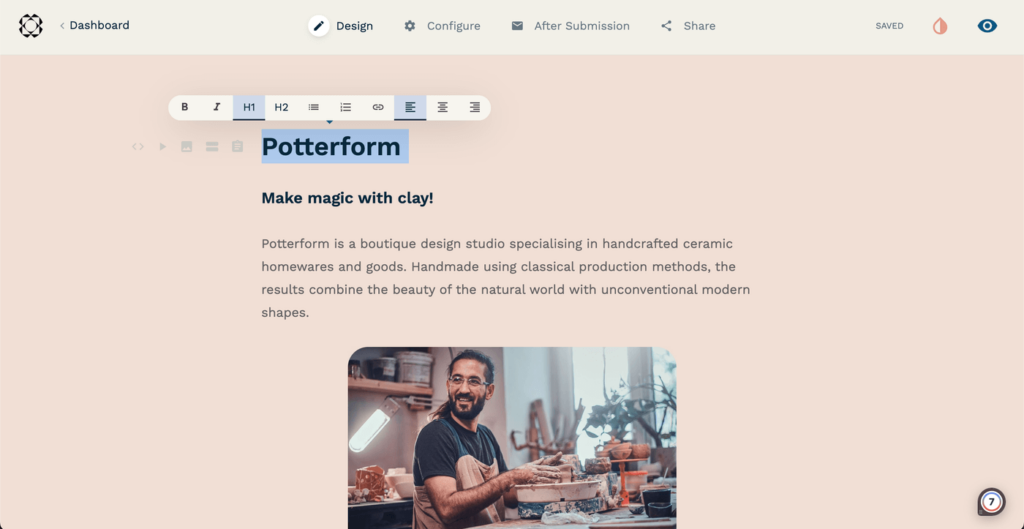
A colleague building discovery and feedback flows for a boutique consultancy described it as the form tool that doesn’t feel like a form tool.
Booking forms, evaluation forms, onboarding questionnaires, and appointment scheduling all work without developer involvement.
How Paperform Compares to Typeform: Typeform guides respondents through questions one at a time in a chat-style flow. Paperform presents the full context of a form in a document-style layout, which works better for bookings, evaluations, and onboarding flows where respondents benefit from seeing the full picture before they start answering.
Pros:
- Landing-page-style forms with high design quality
- Wide range of template types, including bookings, assessments, and onboarding
- HTML and CSS customization options
- Conditional logic for personalized form paths
- Automated response notifications
- Integration with Google Sheets, Asana, Slack, and other tools
Cons:
- More expensive than simpler alternatives for basic survey needs
- Less suited for high-volume NPS or CX programs
- No dedicated scored survey module
Pricing: From $24/month.
User Rating: 4.8/5 (Capterra)
10. Cognito Forms – Best for Data Collection With Payments and Signatures
Cognito Forms handles data collection scenarios that go beyond surveys: signatures, payments, calculated fields, and partial entry saves in one place.
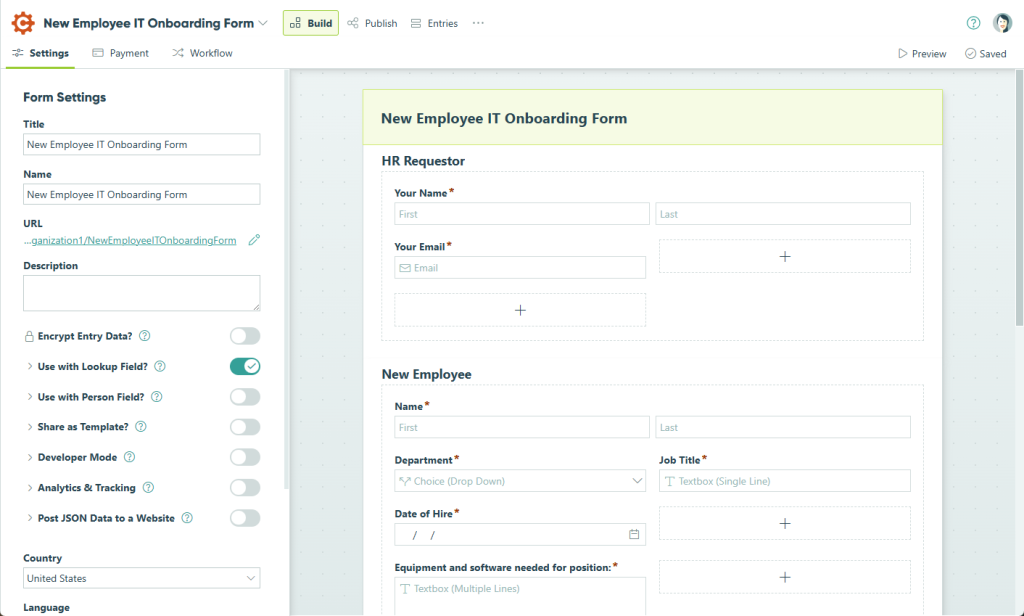
For operations teams, HR departments, and services businesses that need a signed consent, a payment, and structured answers from the same form, it removes the need for multiple tools.
The calculated field functionality is particularly useful. You can perform real-time calculations on collected data within the form itself, which is rare at this price point.
How Cognito Forms Compares to Typeform: Typeform collects survey responses. Cognito Forms collects responses, signatures, payments, and calculated outputs from the same submission. For teams running any workflow that requires more than opinion data, Cognito Forms handles the operational complexity that Typeform leaves to other tools.
Pros:
- Calculated fields for real-time in-form data processing
- Signature collection and file uploads
- Payment collection via Stripe, PayPal, and Square
- Multi-step automated workflows
- Allow users to save partial entries and complete them later
- Range of pre-designed templates
Cons:
- Not designed for NPS or CX survey programs
- Analytics and reporting are basic compared to dedicated survey tools
- Interface can feel complex for simple survey use cases
Pricing: Paid plans from $19/month.
User Rating: 4.6/5 (Capterra)
My Top 3 Picks Among These Typeform Alternatives
After working with several of these tools directly and speaking with teams using the rest in production, here’s where I actually land.
1. ProProfs Survey Maker
This is the tool I recommend first to almost any team evaluating Typeform competitors. The AI survey builder removes the blank-page problem entirely.
The scored survey workflow covers lead qualification, HR assessments, and educational tools that Typeform simply can’t match natively. And the per-response pricing model means small teams aren’t overpaying for enterprise infrastructure. Start here.
2. Jotform
For teams whose survey needs are part of a wider operational workflow that includes payments, file collection, and registrations, Jotform covers all of it from one platform.
The Forms Analytics feature adds a layer of behavioral insight most form builders at this price point don’t offer, telling you exactly where respondents drop off and which question formats drive completion.
3. Paperform
For teams where the form itself needs to make an impression, Paperform delivers a document-style experience that feels more like a branded landing page than a survey widget.
The conditional logic handles complex workflows without developer involvement, and at a 4.8 Capterra rating, it’s one of the most consistently well-reviewed tools on this list.
How I Evaluated These Typeform Alternatives
I didn’t want this to be a list that looks credible in a comparison table but falls apart the moment you try one. Here’s exactly what shaped my assessments.
Feature Testing and Usability Analysis: I evaluated each tool on conditional-logic depth, question-type range, distribution options, reporting clarity, and mobile responsiveness. For tools I used directly, I built and launched actual surveys rather than just exploring the interface.
Verified User Reviews: I pulled Capterra ratings and read through both positive patterns and recurring complaints to surface what users actually experience after months of use, not just during onboarding demos.
Pricing Transparency: I assessed the real cost at realistic usage volumes, including response caps, per-user fees, and paywalled features. A tool that looks affordable at signup but charges per seat, per feature, or per response band at scale is not affordable once you’re running at capacity.
Integration Depth: Whether a tool connects natively to the CRMs, marketing automation platforms, and analytics tools a team already uses determines how well it fits into a real workflow rather than sitting as an isolated island.
Feedback Metric Coverage: I specifically checked whether each tool supports Net Promoter Score (NPS), Customer Satisfaction Score (CSAT), and Customer Effort Score (CES) natively. Most professional survey programs are built around at least one of these frameworks, and a tool that requires workarounds to run them creates ongoing friction in every reporting cycle.
FREE. All Features. FOREVER!
Try our Forever FREE account with all premium features!
When Should You Switch From Typeform?
Typeform earns its place if you run low-volume, design-forward surveys and your response volume stays within your current plan.
Outside of that, here’s a framework I use to help teams decide when it’s time to move.
| Your Situation | What to Look For |
| You’re paying more per month than the tool is delivering in usable insights | Transparent per-response or flat-rate pricing with no hidden tier jumps |
| Your surveys still show competitor branding, and you can’t afford the removal tier | White label included or available as a low-cost add-on |
| Every report cycle starts with downloading a CSV and reformatting it manually | Live dashboards that produce share-ready outputs without extra steps |
| NPS, CSAT, or scored surveys require workarounds that your team rebuilds every time | Native scoring frameworks and pre-built feedback templates out of the box |
| A growing share of your respondents are on mobile or in areas with poor connectivity | Mobile-first design with offline response capture and automatic sync |
| Your survey program spans multiple countries and languages | Language support is built into the core platform, not bolted on as an add-on |
| Responses sit in a tool your CRM and marketing stack can’t read automatically | Native workflow triggers and direct integration with the tools your team acts on |
| You operate in a regulated industry where data handling is a legal requirement | GDPR compliance, role-based access controls, and documented data governance |
How to Choose the Right Typeform Alternative for Your Team
Start with your primary constraint, not your wish list. The tool that fixes your actual bottleneck is better than the tool with the longest feature page.
| If My Primary Problem Is… | I’d Start Here |
| Setup is slow, and I need surveys to live quickly | ProProfs Survey Maker |
| I’m guessing why users drop off or churn | Qualaroo |
| My surveys need to look impressive to respondents | Paperform |
| I need NPS and CSAT frameworks built natively | ProProfs Survey Maker |
| I need WordPress-native forms on my existing site | WPForms |
| I need payments, registrations, and surveys from one tool | Jotform |
| My team is already inside the Microsoft 365 ecosystem | Microsoft Forms |
| I need lead gen campaigns and interactive contests | Woorise |
| Survey responses need to trigger automated workflows | Cognito Forms |
| I need offline data collection for field or event use | Zoho Forms |
The Right Tool Is the One Your Team Can Actually Benefit From
There’s no universally correct answer here. Each tool on this list solves a real problem well.
The ones that cause frustration are the ones chosen for the wrong reason, usually price or familiarity, rather than fit with the actual workflow.
Start with the problem your current tool isn’t solving, find the tool built specifically for that gap, and run the free plan before committing.
If you’re not sure where to start, try ProProfs Survey Maker first. The forever-free plan includes all premium features, including AI survey creation, skip logic, scoring, NPS templates, and multilingual support, with no credit card required.
It’s the fastest way to see whether a Typeform replacement fits your workflow before committing to a paid plan.
Frequently Asked Questions
What is the best free Typeform alternative?
ProProfs Survey Maker offers a forever-free plan with all premium features included, covering unlimited surveys and up to 50 responses per month. Google Forms is entirely free with no response caps, but lacks NPS, scored surveys, and advanced analytics. For in-product feedback, Qualaroo also has a free entry point for teams that need contextual website or product feedback.
Which Typeform competitors are best for NPS surveys?
ProProfs Survey Maker has a dedicated NPS module with automatic scoring, follow-up scheduling, and pre-built NPS templates included on every plan, including the free tier. The Salesforce and HubSpot integrations close the loop between survey responses and CRM records. It's the most complete NPS setup available without requiring an enterprise-tier plan.
Why do businesses look for Typeform alternatives?
The most common reasons are pricing escalation at scale, limited analytics that require manual CSV work before reports are usable, feature paywalls for branding removal and advanced logic, and no native scored survey capability. Teams running employee engagement surveys, NPS programs, or lead qualification assessments consistently outgrow what Typeform offers at affordable price points.
What is the best Typeform alternative for small businesses?
ProProfs Survey Maker's forever-free plan gives small businesses access to all premium features, including AI survey creation, skip logic, NPS, and scored surveys at zero cost. It's the most complete free offering available for small teams. Google Forms works for basic data collection but lacks NPS, scoring, and CRM integration.
Which online form builders have better analytics than Typeform?
ProProfs Survey Maker delivers real-time dashboards with segmented reporting without requiring CSV exports or manual reformatting. Typeform's reporting dashboard is clean but shallow, and most users with serious analytics needs end up exporting data to process it elsewhere. For research-grade analytics, including cross-tab analysis and trend detection, higher-tier platforms go deeper but come at enterprise pricing.
What Typeform alternative works best for HR teams?
ProProfs Survey Maker is the strongest fit for HR teams running employee engagement surveys, onboarding questionnaires, and HR maturity assessments. Scored surveys with custom result pages replace standalone assessment tools. Helena Romero at College Hospital Cerritos achieved 100% compliance in a shorter time period using ProProfs Survey Maker for an HR feedback program.
Which survey tools support multiple languages, like Typeform?
ProProfs Survey Maker leads the tools on this list with 70+ language support. Most other alternatives, including Google Forms and Jotform, support multiple languages as well, though the depth of native language options varies by platform. If global reach is a core requirement, language support should be confirmed against your specific target markets before committing to any tool.
How long does it take to switch from Typeform to a new tool?
Most teams complete the transition in one to two weeks. That covers recreating existing survey structures, verifying distribution setups, and confirming that reporting matches previous benchmarks. Tools like ProProfs Survey Maker and Qualaroo require no server migration or hosting configuration, which removes the most time-consuming step from any transition.
FREE. All Features. FOREVER!
Try our Forever FREE account with all premium features!

 We'd love your feedback!
What did you like & how can we make it even better?

 Thanks for your feedback!
 Ask Your Question
Have a question? Get expert help to make your decision easier.